ClamXAV Overview
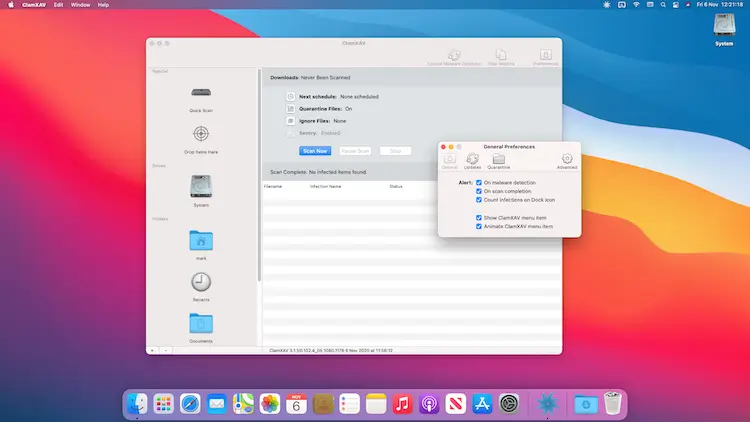
ClamXAV for Mac scans your files, downloads, and connected drives for viruses, adware, and malware, then quarantines or removes anything it finds. Its Sentry feature runs continuously in the background, checking new and modified files in real time without noticeably slowing down your Mac. It's earned a perfect AV-Test score across protection, performance, and usability, and it now includes dedicated protection against ClickFix, a clipboard-based malware technique that's tricked plenty of otherwise careful users. Home users protecting a family of Macs, IT admins managing a fleet through the command line, and anyone who just wants a quiet, effective scanner running in the background all rely on it to keep threats out.
Why Choose ClamXAV Mac App
Sentry is the feature that does most of the heavy lifting here. Once enabled, it watches files as they're created, downloaded, or modified and flags anything suspicious immediately, so you're not relying on remembering to run a manual scan. That real-time protection comes without the usual antivirus tax on your Mac's performance. ClamXAV picked up a perfect score from AV-Test across protection, performance, and usability, which matters because plenty of "lightweight" antivirus tools quietly still peg your CPU during a background scan. This one genuinely doesn't.
The ClickFix protection built into version 3.10 covers a gap most Mac antivirus tools still ignore entirely: it monitors your clipboard and blocks malicious AppleScript links, including content dragged and dropped rather than typed or pasted. Beyond that, per-source scan settings let you set different exclude rules for each drive or folder, a command-line tool lets you trigger scans and prune logs straight from Terminal, and power management options let you prevent scans from draining battery or running while your Mac sleeps. For home users, up to three Macs are covered on one subscription, with a Family Pack extending that to nine, plus a 30% student discount and volume pricing for schools and businesses.
Key Features
- Real-time Sentry monitoring: scans files as they're created, downloaded, or modified, running quietly in the background.
- ClickFix protection: monitors clipboard content, dragged text, and AppleScript links to block ClickFix-style malware attacks.
- Scheduled and QuickScans: run automatic scans on a schedule, or trigger instant checks on suspicious files.
- Adware Defence: blocks unwanted pop-ups and adware injections before they reach your browser.
- Native Apple Silicon support: runs natively on M-series Macs without any Rosetta translation overhead.
- Power management controls: prevent sleep during scans, wake your Mac for scheduled scans, or block scans on battery power.
- Command-line interface: trigger scans, prune logs, and check for updates directly from Terminal.
- Per-source scan settings: set different exclude rules and quarantine behaviour for each drive or folder individually.
- One-click exclusions: right-click any flagged item in your results to exclude it from future scans.
- Smart volume handling: automatically recognizes and skips Time Machine backup disks so scans stay fast and relevant.
What's New in ClamXAV 3.10 Version
Version 3.10 is latest released, build with ClickFix protection introduced the previous month.
- ClickFix protection now also covers drag-and-dropped text, not just typed or pasted content.
- ClickFix protection extended to cover malicious AppleScript links.
- Improved handling of your Mac's sleep state after a scheduled scan finishes.
- Fixed an issue causing repeated malware database update failures under certain conditions.
- Added another layer of network redundancy to the database update process.
- Fixed a daylight-saving-time bug in the scan scheduler.
- Renamed the menu bar helper from "ClamXAV UI Helper" to the clearer "ClamXAV Mini."
Supported macOS Versions
ClamXAV 3 requires macOS 10.13 High Sierra as a floor; Macs still running 10.6.8 through 10.12 need the older, no-longer-updated ClamXAV 2 instead. Apple Silicon support has been genuinely native since version 3.2, so M-series Macs run Sentry's background scanning without any translation overhead, while Intel Macs on a supported macOS version stay fully protected too. The developer has already confirmed compatibility work is underway for the next major macOS release previewed at WWDC 2026, so anyone updating early shouldn't expect a lapse in protection.
How to Download and Install ClamXAV on Mac?
Installing ClamXAV on Mac only takes a few steps after downloading, including one quick permission it needs to run properly.
- First click on the Download button given on this page and complete the downloading procedure.
- Open the downloaded .pkg installer and follow the on-screen prompts.
- Enter your admin name and password when asked. These are the same ones you use to log into your Mac.
- Launch ClamXAV from Applications. If macOS shows an "unidentified developer" warning, go to System Settings → Privacy & Security and click Open Anyway.
- Grant Full Disk Access when prompted, so ClamXAV can scan your entire system properly.
Once the initial setup is done, ClamXAV won't ask for these permissions again, future launches go straight to your dashboard.
How to Use ClamXAV Mac App?
- Launch ClamXAV and start your 30-day free trial, or enter your registration key if you've already purchased.
- Choose a source to scan from the sidebar, a specific folder, an external drive, or your entire Mac.
- Run a QuickScan for suspicious files, or click Scan Now for a full check.
- Turn on Sentry under Settings for continuous background protection.
- Set a schedule under Settings > Schedule so scans run automatically at a convenient time.
- Review flagged items in the Reports window and choose to quarantine, delete, or exclude them.