
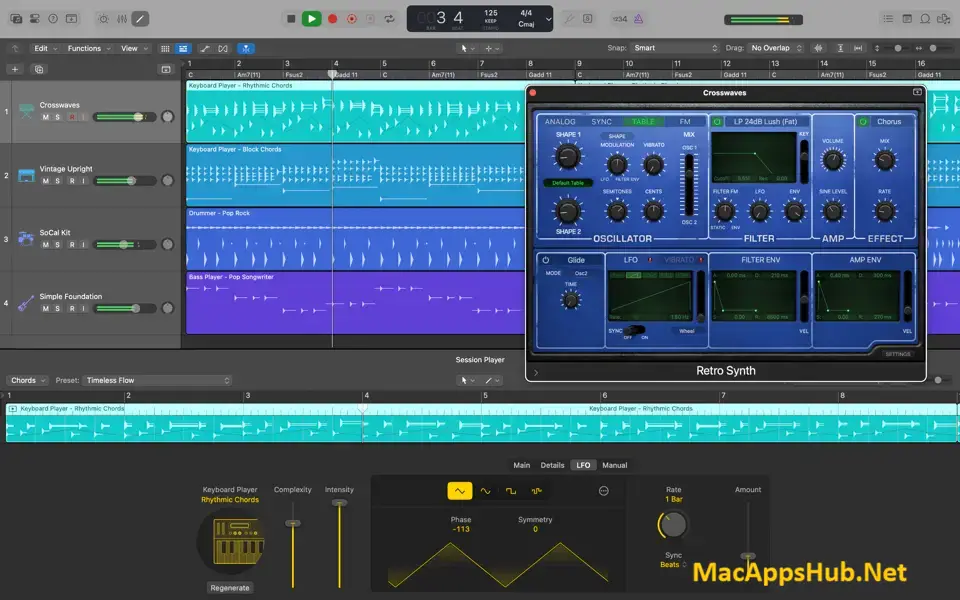
Logic Pro Overview
Logic Pro for Mac is Apple's professional digital audio workstation, built for songwriting, beat-making, recording, and mixing at a studio-grade level. It ships with a massive built-in library of over 4,300 instrument and effect patches, 1,800 sampled instruments, and 10,000-plus Apple Loops, so there's rarely a need to buy separate sound packs just to get started. Six AI Session Players can lay down synth, bass, keyboard, or drum performances that follow your chord progressions in real time, and Stem Splitter can pull vocals, drums, bass, guitar, and piano out of a single mixed recording. Bedroom producers building out a first track, composers scoring to picture, and working engineers mixing in Dolby Atmos all use it as their main studio.
Why Choose Logic Pro Mac App
The AI Session Players are the feature that separates this from most other DAWs at any price. Synth Player, Bass Player, Keyboard Player, Acoustic Drummer, Electronic Drummer, and Percussionist all follow the Chord Track and respond to your direction, so you can sketch a full arrangement without hiring session musicians or programming every note by hand. Stem Splitter takes that further by separating an existing mixed recording into six distinct parts, useful for remixing, sampling, or fixing a single element without re-recording the whole take. Chord ID listens to any part of your song and drops the detected chords straight into the Chord Track, and Mastering Assistant analyzes your final mix and applies release-ready mastering you can adjust before exporting.
The included Sound Library removes a cost most competing DAWs push onto separate purchases: over 4,300 patches, 1,800 sampled instruments, and 10,000+ Apple Loops all come with the app. Mixing goes deep too, with a full-featured mixer, professional plug-in suite, and integrated Dolby Atmos tools for authoring spatial audio mixes that export as industry-standard ADM files ready for Apple Music. Round-trip compatibility means a project started on Logic Pro for Mac opens directly in Logic Pro for iPad, and Voice Memos integration lets a vocalist layer a take over an existing instrumental without needing headphones at all.
Key Features
- AI Session Players:six virtual musicians that follow your Chord Track and respond to direction in real time.
- Stem Splitter: separates any mixed recording into six parts: drums, bass, vocals, guitar, piano, and other instruments.
- Mastering Assistant: analyzes your mix and applies professional-grade mastering you can adjust before release.
- Chord ID:automatically detects chords from any part of a song and drops them into the Chord Track.
- Massive Sound Library: over 4,300 instrument and effect patches, 1,800 sampled instruments, and 10,000+ Apple Loops.
- Flex Time and Flex Pitch: reshape timing and correct pitch on any recording without re-tracking a single take.
- Dolby Atmos spatial audio mixing: author immersive mixes and export industry-standard ADM files for streaming.
- Live Loops: trigger and mix loops, samples, and recordings in a grid to build arrangements on the fly.
- Step Sequencer: program drums, bass, and melodic parts using a workflow inspired by vintage drum machines.
- Round-trip iPad compatibility: move projects between Logic Pro for Mac and Logic Pro for iPad without losing your work.
What's New in Logic Pro 12.3.1 Version
Version 12.3.1 shipped August 14, 2026 as a stability and bug-fix update. It follows June's version 12.3, which brought:
- Flex Time and Smart Tempo enhancements, letting you drag and drop short looping audio files that automatically match your project's tempo.
- Improved Chord ID detection, with better accuracy across styles, more reliable chord inversion recognition like C/E instead of just C, and detection of richer chord flavors including 7ths and 6ths.
- New filter and pan randomization modes for Beat Breaker, and a granular sync mode for Alchemy.
- A new Granular Alchemy sound pack built around the new Grain Sync mode.
Supported macOS Versions
Logic Pro 12 requires macOS 15.6 Sequoia as a floor, and critically, it now needs a Mac with Apple Silicon; Intel Macs can no longer run the current version at all, regardless of which macOS release they're on. This is a real shift for anyone still on an Intel machine, and it's worth double-checking your Mac's chip before purchasing. On Apple Silicon, Logic Pro runs demanding plug-ins and large projects at full fidelity without any translation overhead, and features like AI Session Players and Stem Splitter lean directly on Apple Silicon's processing power to run in real time.
How to Download and Install Logic Pro on Mac?
Installing Logic Pro on Mac takes just a few minutes through the App Store, no separate download, unzip, or drag-and-drop needed.
- Click the Download button above — it opens Logic Pro's official listing on the Mac App Store.
- Tap the $199.99 price button to purchase, or start a free trial through Apple Creator Studio if you'd rather try it first.
- Sign in with your Apple ID if prompted.
- macOS downloads and installs Logic Pro automatically in the background.
- Once installed, launch it from Launchpad or your Applications folder and let the initial Sound Library download finish before your first session.
Because the App Store handles future updates automatically, you won't need to manually reinstall Logic Pro each time a new version ships.
How to Use Logic Pro Mac App?
- Launch Logic Pro and choose a template, or start with an empty project.
- Add software instrument or audio tracks from the New Tracks dialog.
- Record MIDI or audio, or drag Apple Loops in from the Loop Browser to start building an arrangement.
- Use Smart Tempo and Flex Time to match imported audio to your project's tempo.
- Mix your tracks in the Logic Pro Mixer using stock plug-ins or third-party Audio Units effects.
- Run Mastering Assistant for a release-ready master, then export or share your song directly to SoundCloud.