
XQuartz for Mac Review: Is It Worth It in 2026?
XQuartz is free, still getting real updates, and remains the only practical way to run X11 apps on a modern Mac. Install it if something you rely on actually needs it. Skip it if you're not sure what X11 is, you probably don't need this one.
Testing Notes: What the Data Actually Shows
We didn't spend two weeks living inside an X11 session to write this one, and we're not going to pretend we did. What we did instead: read the XQuartz 2.8.6 changelog line by line, checked it against the project's GitHub release history, and cross-referenced how real users on Apple Silicon Macs describe the experience in the issue tracker and on forums like MacRumors.
That matters here more than usual. XQuartz isn't a polished consumer app. It's a piece of infrastructure, a display server, and most of what makes a review useful is whether the maintainers are still fixing real bugs. They are. Version 2.8.6, released July 14, 2026, patched a bug where X11 surfaces could render solid black on Apple Silicon hardware. It also fixed a rendering regression that had crept in with the previous release, 2.8.5. That's not marketing copy. That's the kind of detail you only get from reading a changelog, not a press release.
Inside XQuartz: What It Actually Does
XQuartz isn't an "app" in the way Preview or Notes are apps. It's the X.Org X Window System, packaged to run on top of macOS's Quartz graphics layer. Apple shipped its own version of this from OS X 10.5 through 10.7, then handed the job to the open-source community starting with Mountain Lion in 2012. XQuartz has carried it ever since.
In practice, here's what that means for you:
- It's the thing that lets Unix and Linux GUI software open a window on your Mac. Apps like Inkscape and FontForge, both built on X11 toolkits, need XQuartz installed before they'll launch at all.
- It handles X11 forwarding. If you SSH into a remote Linux box and need its GUI apps to display locally, XQuartz is what draws those windows on your desktop.
- It's rootless. X11 windows show up as regular, individually movable macOS windows rather than being trapped inside one giant virtual desktop. That sounds minor until you've used an X server that doesn't do this.
Installation is a standard .pkg download from xquartz.org, and it currently requires macOS 10.13 (High Sierra) or later. One quirk worth knowing before you install: if this is your first time running XQuartz, log out and back in afterward. That's what refreshes the DISPLAY environment variable system-wide, and skipping it is a common reason people think the install didn't work.
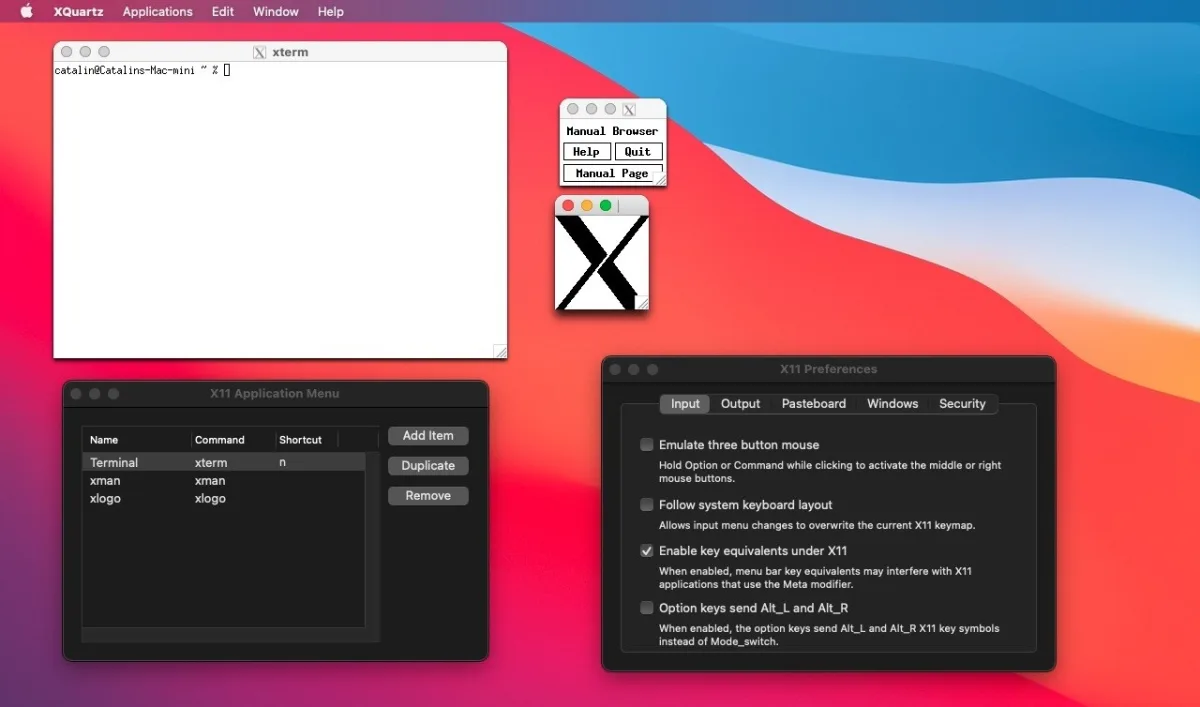
An xterm session and the X11 Preferences panel, each running as their own movable window on macOS, this is what rootless actually looks like in practice.
One limitation that hasn't changed: XQuartz still doesn't render natively on Retina displays. X11 apps run pixel-doubled instead, so text and UI elements look noticeably softer than native macOS software on a high-resolution screen. It's not a bug so much as a ceiling this project has never fully solved.
Worth flagging for anyone comparing this against older reviews: GIMP used to be on every "apps that need XQuartz" list. It isn't anymore. Current GIMP builds run natively on macOS, no X11 required. If a review or download page still lists GIMP as a reason to install XQuartz, that's outdated information.
Performance and Reliability on Apple Silicon
XQuartz became fully compatible with Apple Silicon starting with version 2.8.1, and 2.8.6 tightened that further, arm64 slices were added to companion tools like glxinfo and glxgears, and the black-screen bug mentioned above only affected Apple Silicon Macs specifically.
That said, the project's own issue tracker tells a more mixed story on older releases. Reports from M1 machines described windows that flipped color and contrast, and separate reports pointed to slowdowns on 8GB M1 configurations during long sessions, particularly after resizing X11 windows repeatedly. Logging out and back in reportedly cleared it up, which lines up with how XQuartz handles its display connection. Whether that's still happening on 2.8.6 specifically isn't something we can confirm without dedicated hands-on time on that exact build, so treat it as historical context rather than a current guarantee.
On the security side, 2.8.6 updated its underlying component projects to address multiple CVEs accumulated over the past few years. For a tool that's essentially running as a system-level display server, that's not a small thing, it's the difference between "abandoned open-source project" and "actively maintained one."
Is XQuartz Worth It? Pricing Verdict
There's no pricing tier to weigh here. XQuartz is free and open source, distributed under the Apple Public Source License with MIT-licensed components, and there's no paid version, no in-app upsell, nothing gated behind a subscription. The real question isn't "is it worth the money" — it's "do you actually need an X11 server on your Mac." If the answer is yes, there's no competing product to weigh it against on price, because nothing else fills this specific role on macOS.
Who Should Install XQuartz (and Who Shouldn't)
Install it if:
- You use Inkscape, FontForge, or another X11-dependent design or typography tool
- You work with scientific or academic software built on X11, molecular visualization tools like PyMOL show up often in this category
- You SSH into Linux servers and need their GUI tools to display on your Mac
- A specific app you already use told you it needs XQuartz to launch
Skip it if:
- You don't already have a specific app that requires it
- You want something that feels like a native, polished Mac app, XQuartz is functional infrastructure, not a consumer product
- You're not comfortable occasionally dropping into Terminal, since some XQuartz quirks are easiest to fix from the command line
Alternatives to XQuartz
There isn't really a competing product here, since XQuartz is effectively the standard way to get X11 on macOS. The closest thing to an alternative is installing the same underlying xorg-server through a package manager like MacPorts or Homebrew instead of the packaged XQuartz.app. That's a different installation method for largely the same software, not a genuinely different option.
Final Score
4 / 5 — XQuartz does one narrow job, does it for free, and is still being patched in 2026 instead of quietly abandoned. The Retina scaling limit and its rough edges on some Apple Silicon setups keep it from a higher score, but for the audience that actually needs it, there's nothing else to install instead.