XQuartz for mac logo

XQuartz for Mac

4.5 Based on 4 user rates

Run X11 apps on macOS with XQuartz for Mac.

Verified Safe No Malware Editor Tested
M
Reviewed by
Matthew
Content Editor

XQuartz Overview

XQuartz for Mac is an open-source implementation of the X Window System (X11) for macOS. It allows users to run X11-based Linux and Unix applications on a Mac while maintaining seamless integration with the macOS desktop. The current version is 2.8.6. Whether you're a developer, researcher, or system administrator, XQuartz provides a reliable environment for graphical applications that depend on X11.

Key Features

  • Run X11 applications on macOS.
  • Supports Apple Silicon and Intel Macs.
  • Seamless integration with the macOS desktop.
  • Launch remote X11 applications via SSH.
  • Native copy and paste support.
  • Compatible with many Linux and Unix applications.
  • Open-source and actively maintained.
  • Supports multiple X11 windows simultaneously.
  • Customizable display preferences.
  • Lightweight and efficient performance.
  • Keyboard and mouse integration with macOS.
  • Reliable support for development workflows.
  • Secure remote graphical application access.
  • Regular updates and compatibility improvements.
  • Easy installation and configuration.

What's New in the Latest Version

XQuartz 2.8.6 focuses on Apple Silicon fixes and security updates. Recent improvements include:

  • Fixed an issue causing some X11 surfaces to appear black on Apple Silicon Macs
  • Fixed a rendering regression from the previous release
  • Fixed a crash in xrandr
  • Added arm64 support to glxinfo and glxgears
  • Updated component projects to address multiple security vulnerabilities (CVEs)
  • Better support for Apple Silicon Macs overall
  • Improved compatibility with the latest macOS versions

These updates help ensure a smoother experience when running local or remote X11 applications on macOS. XQuartz 2.8.6 requires macOS 10.13 or later to install.

How to Install XQuartz on Mac?

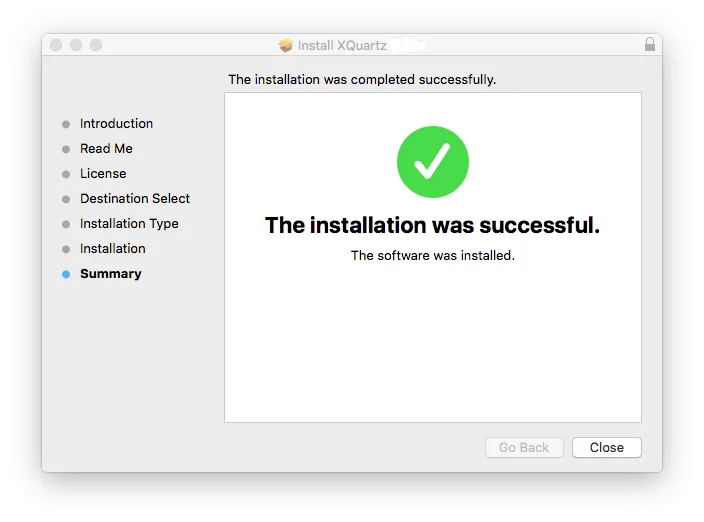
Installing XQuartz is quick and straightforward.

  1. Download the latest version of XQuartz for Mac.
  2. Open the downloaded .pkg installer.
  3. Double-click the installation package.
  4. Follow the installation wizard to complete the setup.
  5. Restart your Mac if prompted.
  6. Launch XQuartz from the Applications folder.
  7. Configure your display or SSH settings if required.

If you use Homebrew, you can install XQuartz from the terminal instead, using `brew install --cask xquartz`. This installs the same official release without needing to open a .pkg file manually.

After installation, you can run local X11 applications or connect to remote Linux and Unix systems using X11 forwarding.

How to Uninstall XQuartz on Mac?

Since XQuartz installs system-level components outside your Applications folder, simply dragging it to Trash leaves files behind. To fully delete XQuartz from your Mac:

  1. Quit XQuartz if it's currently running.
  2. Open Terminal from Applications > Utilities.
  3. Run `launchctl unload /Library/LaunchAgents/org.xquartz.startx.plist`
  4. Run `sudo launchctl unload /Library/LaunchDaemons/org.xquartz.privileged_startx.plist`
  5. Run `sudo rm -rf /opt/X11* /Library/Launch*/org.xquartz.* /Applications/Utilities/XQuartz.app /etc/*paths.d/*XQuartz`
  6. Run `sudo pkgutil --forget org.xquartz.X11` to clear the installer record.

If you installed XQuartz through Homebrew instead, run `brew uninstall --cask xquartz` to remove it cleanly.

Pros
  • Free and open-source software.
  • Enables X11 applications on macOS.
  • Compatible with Apple Silicon and Intel Macs.
  • Excellent integration with the macOS desktop.
  • Supports secure remote X11 forwarding over SSH.
  • Lightweight and easy to install.
  • Regular updates and active community support.
  • Works with many Linux and Unix graphical applications.
Cons
  • Primarily designed for technical and professional users.
  • Some legacy X11 applications may require additional configuration.
  • Not useful for users who don't run X11-based software.
  • Interface is functional rather than modern.
Previous Versions
Version 2.8.5
Jan 26, 2023
Download v2.8.5
Frequently Asked Questions
Is XQuartz safe for Mac?
Yes. XQuartz for macOS is an open-source project that has been widely used by developers, researchers, and system administrators for many years.
Does XQuartz support Apple Silicon Macs?
Yes. Recent releases are compatible with Apple Silicon processors while continuing to support Intel-based Macs.
What is XQuartz used for?
XQuartz provides an X11 server for macOS, allowing users to run Linux and Unix graphical applications that depend on the X Window System.
Can I use XQuartz with SSH?
Yes. XQuartz supports X11 forwarding over SSH, making it possible to display graphical applications running on remote Linux or Unix servers directly on your Mac.
Is XQuartz free?
Yes. XQuartz is completely free and distributed as open-source software.
Do I need XQuartz on every Mac?
No. Only users who work with X11-based applications, remote Linux systems, or Unix development tools typically require XQuartz.
Does XQuartz work with Wine?
Some older Wine and WineBottler setups on Mac relied on XQuartz for X11-based rendering. Many current Wine builds render natively without it, but certain configurations may still need it installed.
Is there a XQuartz version for Windows?
No. XQuartz is built specifically for macOS. Windows uses its own separate X server tools, so XQuartz itself doesn't run there.
Does XQuartz still support older macOS versions like Yosemite?
No, not in current releases. XQuartz 2.8.5 was the last version supporting Mavericks, Yosemite, El Capitan, and Sierra. Current versions require macOS 10.13 or later.
Is there a good alternative to XQuartz?
Not really, XQuartz is the de facto standard X11 server for Mac, maintained by the X.Org Foundation. MacPorts offers an alternative installation route for X11 components, but it isn't a separate app.

Final Verdict

XQuartz for Mac remains the standard X11 implementation for macOS and continues to be an essential utility for developers, researchers, engineers, and IT professionals. Its ability to run Linux and Unix graphical applications directly on macOS makes it a valuable tool for technical workflows.

Download XQuartz for Mac Latest Version

Ready to run X11 applications on your Mac?

Download the latest version of XQuartz for Mac to launch Linux and Unix graphical applications, use secure X11 forwarding over SSH, and enjoy seamless integration with modern macOS versions. Whether you're developing software, managing remote servers, or using scientific tools, XQuartz provides a stable and efficient X11 environment.

Ready to Download?

Free, safe, and always the latest version — XQuartz

Download XQuartz

Comments (0)

No comments yet. Be the first!

Leave a Comment

Specs preview enlarged