ApolloOne Overview
ApolloOne for Mac decodes and displays camera RAW files at speeds most viewers can't touch, showing 100MP Fujifilm GFX RAW files almost instantly and 26MP HEIF images at 32 frames per second on a 5K display. There's no database to import into first; point it at a folder and every photo and video inside opens ready to view and edit immediately. It also renders true HDR from RAW files on XDR and EDR-capable Mac screens, something few Mac viewers attempt at all. Photographers culling a shoot straight off a memory card, anyone managing a photo library without committing to Lightroom's catalog system, and shooters who want to see their RAW files in actual HDR all reach for it.
Why Choose ApolloOne Mac App
Speed is the whole pitch here, and it holds up. Every image is ready to edit the moment it's displayed, so there's no separate mode to switch into and no waiting on a database import before you can start working, unlike catalog-based tools. On a Mac Studio with an M1 Ultra chip, it's been measured decoding 26-megapixel HEIF images at 32 frames per second and 100-megapixel Fujifilm GFX RAW files almost instantly, using multi-threading and Core Image to keep the interface responsive even on massive files. It's also the first Mac viewer to properly decode full sensor dynamic range from RAW files and show it as true HDR on an XDR or EDR-capable display, rather than just a brighter-looking JPEG preview.
The features that matter specifically for a Mac workflow go deeper than raw speed. RawBridge™ technology connects newer, proprietary camera RAW formats to Apple's own RAW decoder, which means support for a just-released camera often lands before Apple's system-level decoder catches up, and it works on older macOS versions too. GPS data on any photo can be edited by dragging a pin on an interactive Apple or Google Map, Spotlight indexing makes your entire photo library searchable straight from Finder by address or camera data, and HDR exports to JPEG XL, AVIF, and HEIC with gain maps stay compatible with iPhone, Mac, and Photoshop. OpenEXR support for archival and VFX work is included free for every user, Standard or Pro.
Key Features
- Ultra-fast RAW preview engine — decodes 100MP Fujifilm GFX RAW files almost instantly, with images ready to edit as soon as they're displayed.
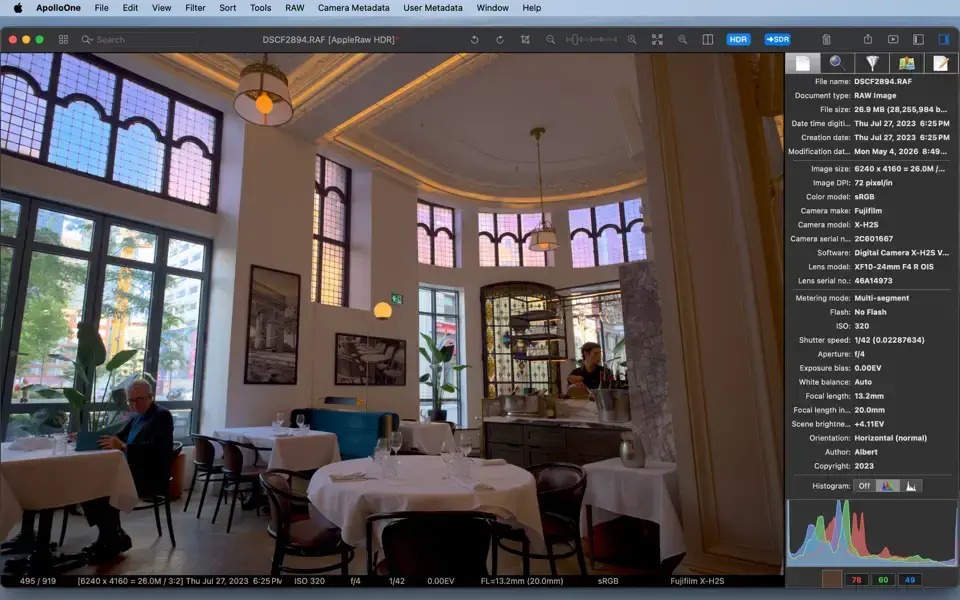
- True HDR RAW viewing — decodes full sensor dynamic range and displays it on XDR/EDR-capable Mac screens.
- RawBridge™ camera support — connects new camera RAW formats to Apple's decoder, often supporting cameras before Apple's own update does.
- Fast culling tools — rate, tag, and pick keepers using keyboard shortcuts or a dedicated toolbar Pick button.
- Powerful EXIF/IPTC inspector — search, edit, and tag comprehensive metadata, including every Maker Note field.
- Interactive GPS mapping — locate shots on Apple or Google Maps, and edit GPS coordinates by dragging the pin.
- HDR export — output JPEG XL, AVIF, and HEIC files with gain maps compatible with iPhone, Mac, and Photoshop.
- Spotlight indexing — search your entire photo library from Finder using address, camera, or shooting data.
- GPU-accelerated slideshow — 12 transition effects with full customization, running fullscreen or in a window.
- Batch processing — rename, resize, convert, and export images in bulk, with HEIC support built in.
What's New in ApolloOne 4.8.0 Version
Version 4.8.0 is latest released, focused on HDR workflow refinements and culling speed.
- See the SDR version of any HDR photo with one click, toggling the embedded gain-map preview to check exactly what non-HDR viewers will see.
- SDR Proof Mode now runs through the same rendering pipeline as the actual export, so what you proof matches what viewers actually get.
- New Pick button for the toolbar, letting you cull an entire shoot with the mouse alongside Rating and Previous/Next controls.
- Export the JPEG embedded inside your RAW file, saving the camera's own preview exactly as shot, with original quality and metadata intact.
- The floating Browser and Inspector panels now open from the window edge, so Contact Sheet thumbnails near the edges are easier to click.
- Fixed the Crop tool forgetting your chosen aspect ratio between images, plus several other smaller fixes.
Supported macOS Versions
ApolloOne 4.8.0 requires macOS 12 Monterey as a floor, a requirement raised from Catalina back in July 2026, so anyone still on an older release will need an earlier build. Some newer features, including AVIF export and full HDR display, specifically need macOS 13 Ventura or later, and the app runs best on macOS 15 Sequoia or macOS 26 Tahoe, where a recent update specifically fixed HDR JPEG exports that had been failing to open on Tahoe. As a genuine universal binary tested on hardware like the Mac Studio M1 Ultra, Apple Silicon Macs handle large RAW files and real-time HDR rendering without any translation overhead, while Intel Macs on a supported macOS version stay fully functional for everything short of the heaviest 100MP RAW workflows.
How to Download and Install ApolloOne on Mac?
Installing ApolloOne on Mac takes under a minute through the App Store, no separate download, unzip, or drag-and-drop needed.
- Click the Download button given on this page it opens ApolloOne's official listing on the Mac App Store.
- Tap Get to install the free app.
- Sign in with your Apple ID if prompted.
- macOS downloads and installs ApolloOne automatically in the background.
- Once installed, launch it from Launchpad or your Applications folder.
Because the App Store handles future updates automatically, you won't need to manually reinstall ApolloOne each time a new version ships.
How to Use ApolloOne Mac App?
- Open ApolloOne from Launchpad and grant folder or drive access when prompted, so it can browse your photo library.
- Double-click any photo or video anywhere on your Mac to open the full viewer instantly.
- Use the Rating group, pick button, or keyboard shortcuts to cull a shoot without slowing down.
- Open the EXIF Inspector to check or edit metadata, GPS location, and camera settings.
- Switch to Split View to compare two images side by side with synced zoom and scroll.
- Export finished selections as JPEG, HEIC, AVIF, or other formats, with HDR gain maps where needed.