
Little Snitch Overview
Little Snitch for Mac is an advanced network monitoring and application firewall designed to give you complete control over your Mac's internet connections. It alerts you whenever an app attempts to connect to the internet, allowing you to allow or block connections based on your preferences. Whether you're protecting your privacy, monitoring network activity, or preventing unauthorized data transfers, Little Snitch provides powerful security tools, real-time traffic monitoring, and detailed connection insights for both Apple Silicon and Intel-based Macs.
Track background activity
As soon as your computer connects to the Internet, applications often have permission to send any information wherever they need to. Little Snitch takes note of this activity and allows you to decide for yourself what happens with this data.
Control your network
Choose to allow or deny connections, or define a rule how to handle similar, future connection attempts. Little Snitch runs inconspicuously in the background and it can even detect network-related activity of viruses, trojans, and other malware.
Key Features
- Monitor outgoing network connections.
- Advanced application firewall.
- Real-time Network Monitor.
- Create custom connection rules.
- Block unwanted internet access.
- Monitor bandwidth usage.
- View connection history.
- Domain and server tracking.
- Silent Mode support.
- Interactive connection alerts.
- Apple Silicon optimized.
- Intel Mac compatible.
- Lightweight performance.
- Privacy-focused security.
- Regular feature updates.
Screenshots
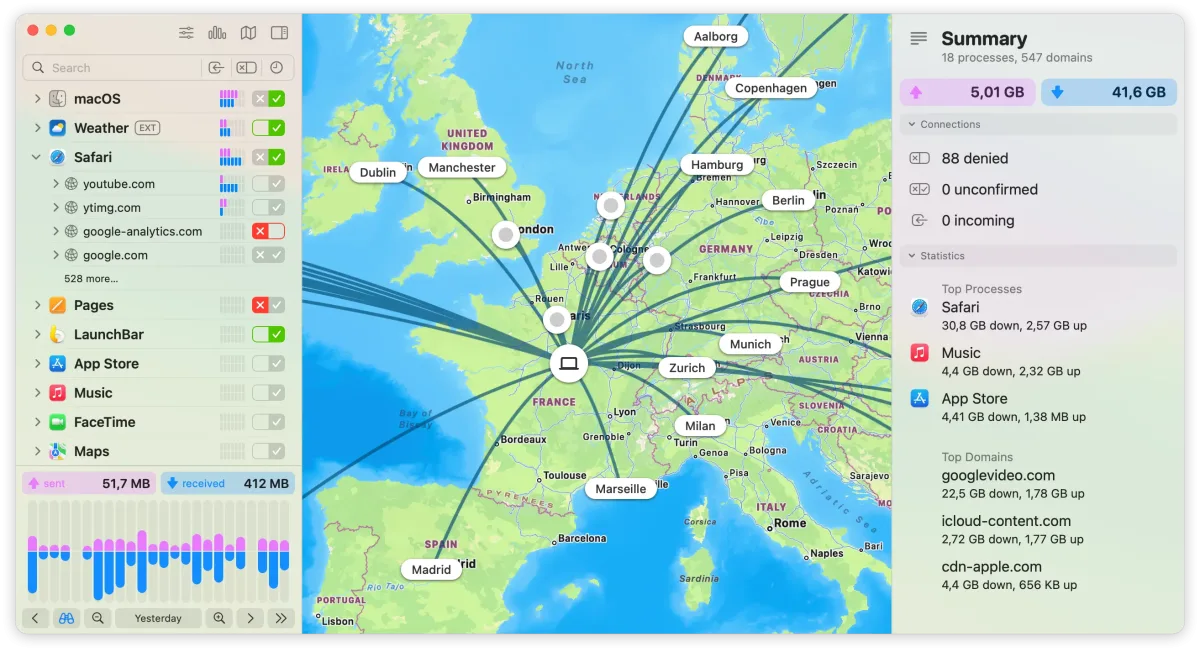
What's New in 6.5 Version
Important: Upgrade to this version before you upgrade to macOS 27 Golden Gate! Previous versions of Little Snitch are not compatible with macOS 27 Golden Gate and would break your internet connection after the macOS upgrade.
Improvements:
- Compatibility with macOS 27 Golden Gate.
- App bundle integrity monitoring. Little Snitch now monitors the integrity of its app bundle not only at app start (like before) but also while the app is running, presenting a warning dialog if an unexpected modification of its app components was detected.
- Clicking an already selected location in the map (which filters the connection list to show only connections to that country/region/city) now clears that selection to reset the location filter.
- Using the term “traffic volume” instead of “traffic amount”.
- Improved appearance of search fields in inactive windows.
- Added an experimental implementation of NAT64 (RFC 6052).
Bug Fixes:
- Fixed an issue that prevented expired temporary rules from appearing under Suggestions > Expired.
- Fixed a rare crash that could occur when searching for a process by exact match with an empty search string in the rules list.
- Little Snitch no longer uses hostnames for inbound connections.
- Improved and fixed various aspects of encrypted DNS.
- When a socket is closed for outbound traffic only, incoming bytes are now still accepted.
- Various other bug fixes and improvements under the hood.
How to Install Little Snitch on Mac?
Installing Little Snitch is simple and only takes a few minutes.
- Download the latest version of Little Snitch for Mac.
- Open the downloaded installer.
- Follow the on-screen setup instructions.
- Grant the required system permissions when prompted.
- Restart your Mac if necessary.
- Launch Little Snitch and begin configuring your connection rules.
How to Use Little Snitch Mac App?
Getting started with Little Snitch is easy.
- Open Little Snitch on your Mac.
- Allow or deny new internet connection requests as they appear.
- Create permanent or temporary rules for your applications.
- Monitor live network activity using Network Monitor.
- Review connection history and adjust rules whenever needed.
These simple steps help you control which apps can access the internet while improving your Mac's privacy and network security.