
PCSX2 Overview
PCSX2 is a free, open source PlayStation 2 emulator for Mac that replicates PS2 hardware using CPU interpreters, recompilers, and a virtual machine. It runs most of the PS2 library at full speed, with custom resolutions, upscaling, and texture filtering that make older games look sharper than the original console ever could. Unlimited virtual memory cards remove the cartridge limits of real PS2 hardware, and save states let you save or load progress at nearly any point in a game. A built-in HD video recorder captures gameplay footage in lossless quality, and a pnach-based patching system applies cheats or game-specific fixes. Version 2.8 added EyeToy camera support on macOS, bringing feature parity with the Windows and Linux builds. A legitimate PS2 BIOS file, dumped from a console you own, is required before any game will run.
Why Choose PCSX2 Mac App
Original PS2 hardware is aging, and finding a working console plus a compatible display gets harder every year. PCSX2 emulates the PS2's CPU, graphics hardware, and memory on a Mac instead, running most of the library at full speed with sharper resolutions and upscaling the original console never offered.
Version 2.8 specifically added EyeToy camera support on macOS, meaning games built around Sony's PS2 camera accessory now work through a standard USB webcam on a Mac, matching a feature Windows and Linux users already had. Save states, unlimited virtual memory cards, and a built-in HD video recorder round out a feature set well beyond what the original PS2 hardware ever supported.
Key Features
- Full PS2 hardware emulation: replicates the PS2's CPU, graphics synthesizer, and memory using interpreters, recompilers, and a virtual machine.
- Custom resolutions and upscaling: renders games at resolutions far beyond what the original PS2 ever output.
- Unlimited virtual memory cards: creates and swaps as many memory cards as needed, with no cartridge limit.
- Save states: saves or loads progress at nearly any point in a game, not just at in-game save points.
- Cheat and fix patching: applies pnach-format patches for cheats or game-specific corrections.
- Broad controller support: works with PS3, Xbox 360, and other controllers, alongside keyboard and mouse.
- Adjustable game speed: speeds up grinding or slows down difficult sections using a built-in frame limiter.
- Built-in HD video recorder: captures gameplay footage in lossless quality at full speed.
- EyeToy camera support on macOS: lets supported games use a standard USB camera in place of Sony's original accessory.
- RetroAchievements support: tracks achievement progress through a dedicated, visually organized menu.
- Customizable On-Screen Display: adjusts font, position, scale, and margin for in-game overlays.
- Automatic cover art downloading: fetches game cover art for a cleaner, more organized game library view.
Screenshots
What's New in PCSX2 2.8.2 Version
Version 2.8.2, released September 4, 2026, includes a fix specific to Mac graphics compatibility:
- Fixed a swizzle value in the Vulkan renderer to work correctly with MoltenVK on older GPUs, the translation layer PCSX2 uses to run Vulkan through Metal on Mac
- Added a related MoltenVK patch specifically for older GPUs during the macOS build process
- Fixed a deadlock that could occur when enabling Achievements in the Big Picture Mode interface
- Fixed depth-stencil-as-render-target and unordered-access-view binding issues on the Direct3D 11 renderer
- Updated the built-in controller database to the latest available list
- The major release just before it, 2.8.0, brought a substantial update:
- EyeToy camera support added for macOS, bringing full parity with Windows and Linux
- A redesigned installer with dark mode support
- Customizable On-Screen Display, adjusting font, position, scale, and margin
- Visual improvements to the Achievements menu, including a sidebar for games with multiple subsets
- Cover art downloading added to Big Picture Mode, matching the existing desktop interface feature
- Extensive graphics accuracy and performance improvements affecting dozens of specific games
- The full, highly technical changelog covering every graphics and emulation fix is available on PCSX2's GitHub milestone page for anyone who wants the complete list.
Supported macOS Versions
PCSX2 requires macOS 11 or later and runs natively on both Apple Silicon and Intel Macs, with Metal API acceleration on M-series chips. On older GPUs specifically, PCSX2's Vulkan renderer runs through MoltenVK, a translation layer that lets Vulkan code work on top of Metal, and recent patches have specifically targeted compatibility issues with that translation layer. Emulating PS2 hardware accurately, especially its custom graphics synthesizer, is genuinely demanding work for any computer. A Mac with a faster processor and a capable GPU runs games at higher upscaled resolutions and with more accuracy settings enabled than an older or entry-level Mac can manage. Compatibility and performance both vary significantly by game, so checking PCSX2's own compatibility list before assuming a specific title will run well is worth doing.
How to Download and Install PCSX2 on Mac?
Installing PCSX2 on Mac only takes a few steps after downloading.
- Click the Download button above to safely download the setup file.
- Open the downloaded file, then drag PCSX2 into your Applications folder.
- Launch PCSX2 from Applications. If macOS shows an "unidentified developer" warning, go to System Settings → Privacy & Security and click Open Anyway.
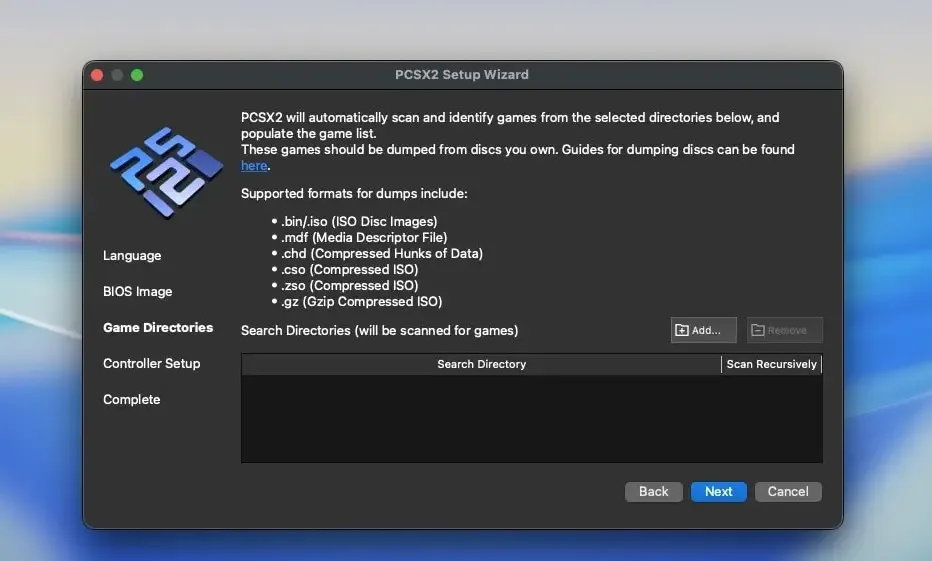
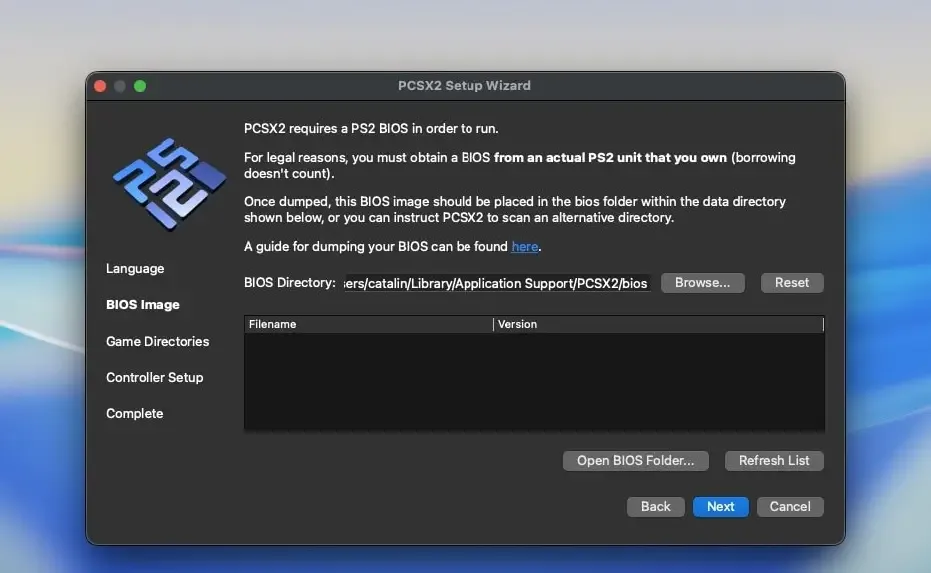
- Complete the setup wizard, which walks through selecting folders and basic settings.
PCSX2 requires a legitimate PS2 BIOS file to run games, which must be dumped from a PS2 console you own. The setup wizard explains how to do this using PCSX2's own BIOS dumping tools.
How to Use PCSX2 Mac App?
- Add a folder containing your legally owned PS2 game files to build your game list.
- Double-click a game in the list to start it.
- Adjust graphics settings, such as resolution and upscaling, from the Graphics menu if a game needs tuning.
- Create a save state at any point during gameplay instead of relying only on in-game saves.
- Apply a cheat or fix patch through the pnach patching system if a game needs one.
- Check PCSX2's compatibility list before assuming a specific game will run at full speed.
Alternatives to PCSX2
Play!: Free, actively developed, cross-platform PS2 emulator for Mac, though generally less mature and more prone to glitches than PCSX2.
RetroArch (LRPS2 core): Free, open source emulation frontend with a dedicated PS2 core built specifically for the Libretro API, available on Mac.