Chargd Overview
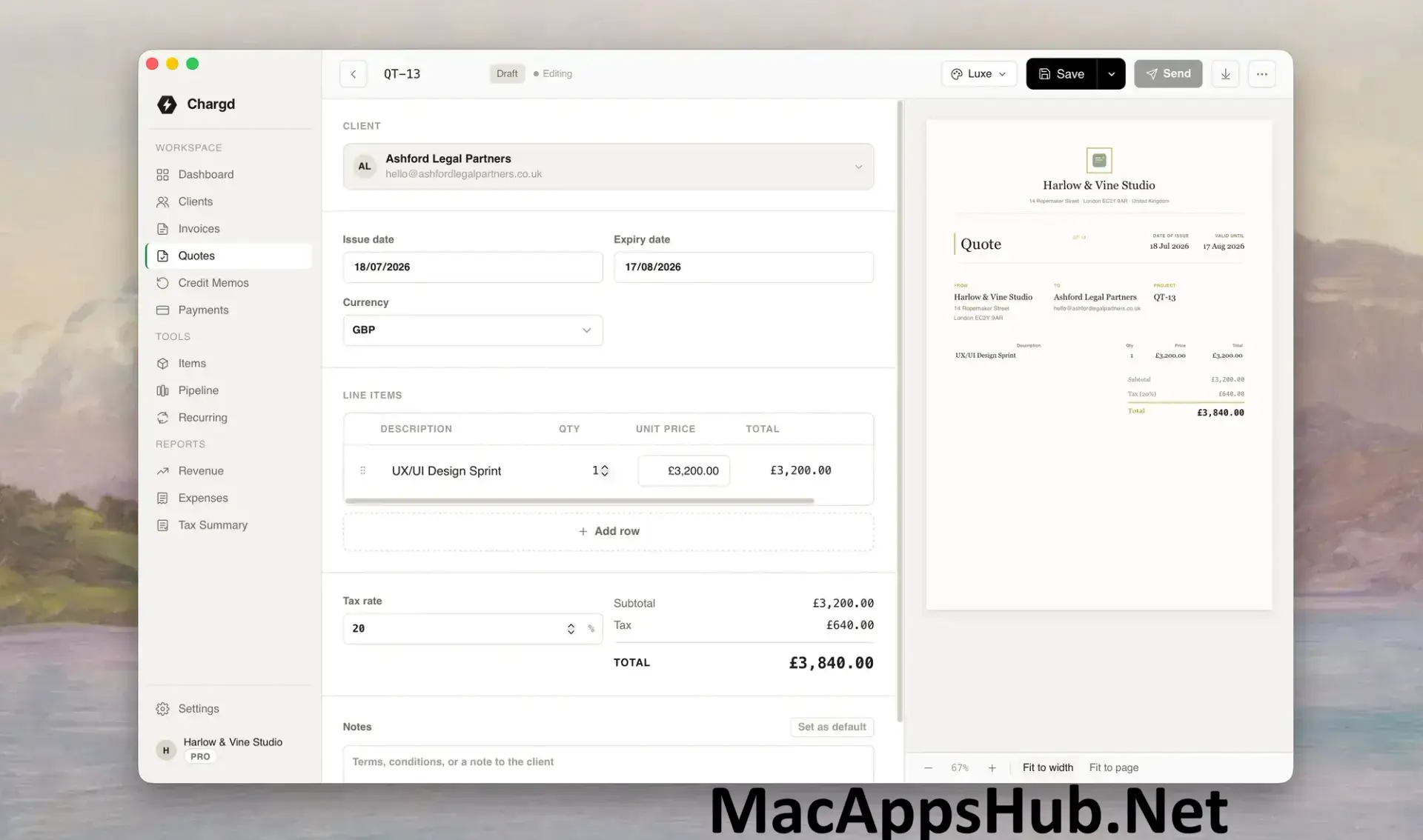
Chargd for Mac is a native invoicing app for freelancers, contractors, and tradespeople who bill their own clients. Every invoice, client, and payment lives in a local database on your Mac, so there's no account to create and no internet connection required to build a quote or send an invoice. Accepted quotes convert into invoices in one tap, without retyping a single line item, and recurring invoices go out automatically for retainer clients on a set schedule. Electricians and plumbers building invoices between job sites, freelance photographers and consultants tired of a monthly software bill, and anyone who just wants their client data to stay on their own machine all use it to handle billing without the usual overhead.
Why Choose Chargd Mac App
The pricing model is the headline feature. A $49 one-time purchase for Pro replaces what competitors like FreshBooks or QuickBooks charge monthly, and since there's no subscription to cancel, the app you buy today keeps working exactly the same way years from now. Everything runs fully offline: no server to go down mid-quote, no sync delay, and no account required just to open the app. Quotes convert into invoices with one tap the moment a client signs off, so line items never need retyping, and recurring invoices handle retainer clients automatically once you've set the schedule.
For anyone working without reliable internet on site, the offline-first design isn't just a nice-to-have. A quote built in a van between jobs is ready as a finished PDF before you've even parked, with nothing waiting on a connection to sync. Business data stays local to your Mac rather than living in someone else's cloud, which means backup and restore are entirely under your control instead of depending on a service staying online. Multiple PDF invoice templates, multi-currency support, and a visual sales pipeline for tracking jobs round out a toolkit built specifically around how freelancers and tradespeople actually bill their clients.
Key Features
- One-tap quote-to-invoice conversion: accepted quotes become invoices instantly, with no re-typing line items.
- Fully offline operation: every invoice, client, and payment lives in a local database on your Mac.
- Recurring invoices: set a schedule once and Chargd sends retainer invoices automatically from then on.
- Sales pipeline Kanban board: track jobs and quotes through stages visually, from lead to paid.
- Multiple PDF invoice templates: choose from Classic, Modern, Minimal, and Pro-exclusive Bold and Executive styles.
- Client management: organize every client with outstanding balances tracked automatically.
- Multi-currency support: bill clients in different currencies from the same app.
- Expense tracking and reports: log business expenses and view revenue reports without a separate tool.
- Credit memos: issue corrections or refunds tied directly to existing invoices.
- Backup and restore: export and restore your business data under your own control, independent of any cloud service.
What's New in Chargd 1.0.4 Version
Chargd is a newer app, and recent updates have focused on rounding out the core billing workflow:
- Recurring invoices launched, letting retainer clients get billed automatically on a set schedule.
- Multi-currency support added for billing clients outside your home currency.
- Bulk PDF export added for Pro users, for exporting multiple invoices at once.
- Credit memos added, for issuing corrections or refunds tied to an existing invoice.
Supported macOS Versions
Chargd requires macOS 11 Big Sur as a floor, giving it a wide compatibility range that covers most Macs still in active use. As a universal binary, it runs natively on both Apple Silicon and Intel Macs, and since invoicing is lightweight, text-and-database work rather than anything graphics-intensive, performance stays smooth on either chip through the current macOS 26 Tahoe release.
How to Download and Install Chargd on Mac?
Installing Chargd on Mac only takes a few steps after downloading, including one quick permission it needs to run properly.
- First click on the Download button given on this page that is fully secure and complete the downloading procedure.
- Open the downloaded .dmg file, then drag Chargd into your Applications folder.
- Launch Chargd from Applications. If macOS shows an "unidentified developer" warning, go to System Settings → Privacy & Security and click Open Anyway.
- Grant any folder access macOS requests, so Chargd can save your local business database and exported PDFs.
- Open the app and start creating your first client, quote, or invoice, no account required.
Once the initial setup is done, Chargd won't ask for these permissions again, future launches go straight to your dashboard.
How to Use Chargd Mac App?
- Launch Chargd, no account or sign-in required; it opens straight to your dashboard.
- Add your business details, logo, and preferred invoice template in Settings.
- Create a client, then build a quote or invoice with line items and tax.
- Send the quote, and convert it to an invoice in one tap once the client accepts.
- Set up recurring invoices for any retainer clients under the Recurring section.
- Check the Reports view for outstanding balances and revenue over time.