
LinearMouse Overview
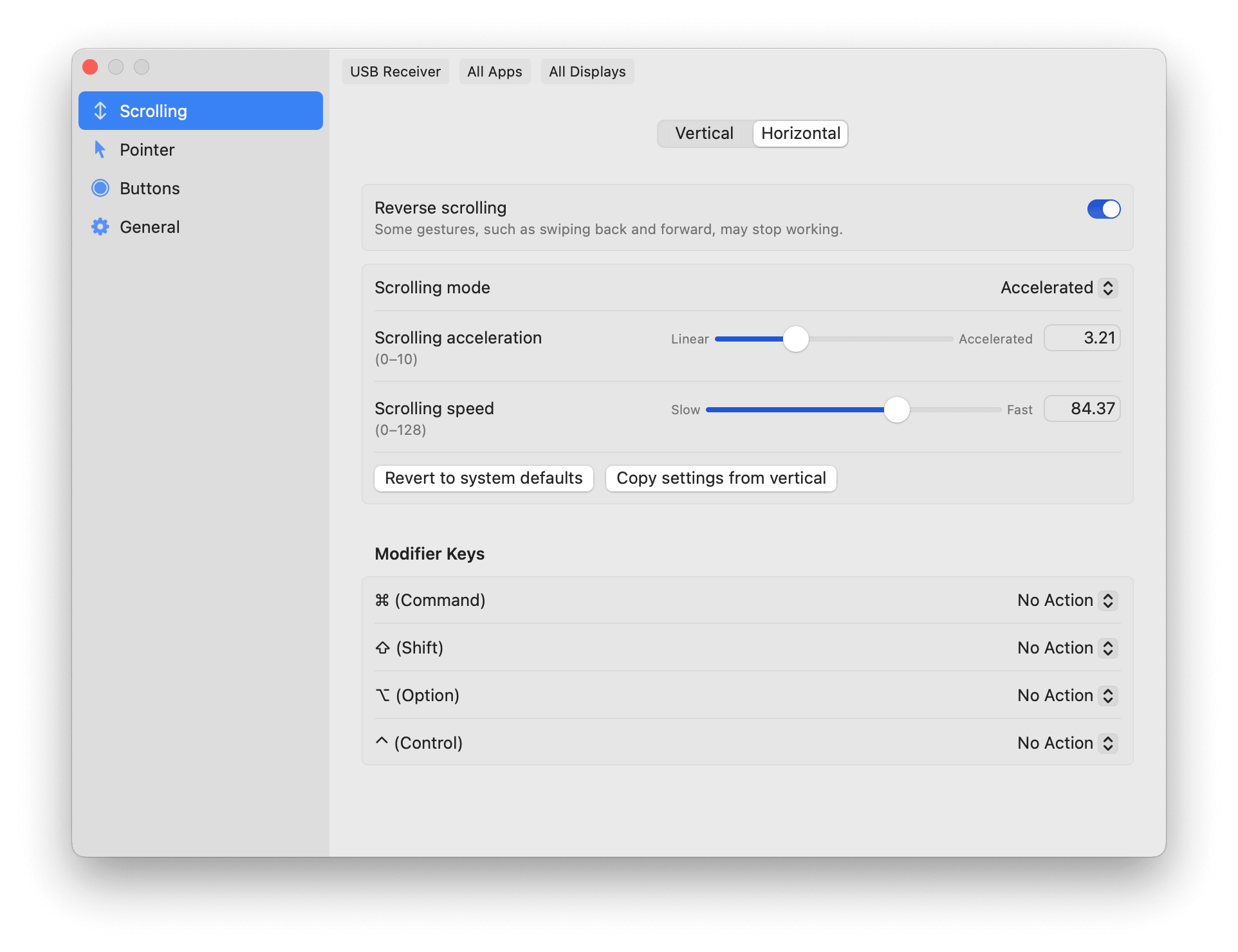
LinearMouse for Mac is a free, open-source utility that gives you control over mouse and trackpad behavior macOS doesn't expose on its own. It lets you reverse scrolling direction for a mouse while keeping natural scrolling on your trackpad, since both can be set independently. Pointer acceleration and sensitivity can be fine-tuned separately, or turned off entirely for steady, predictable movement. App Profiles let different apps or displays use their own settings automatically. LinearMouse also fixes a common annoyance: side mouse buttons that don't register properly for back and forward navigation in apps like Safari and Xcode. It stays lightweight and runs quietly in the background once configured.
Why Choose LinearMouse for Mac
macOS gives you very little control over how a mouse actually feels. Tracking Speed in System Settings is the only real option, and it doesn't behave consistently across every device. LinearMouse replaces that with direct control over acceleration and sensitivity, including the option to turn acceleration off completely for a flat, predictable pointer curve.
Its Logitech support has grown especially deep. Recent updates added hardware DPI control, high-resolution scroll wheel support, gesture button handling, and even battery monitoring for Logitech Bolt receivers, all without needing Logitech's own software installed. If your mouse lacks a smooth scroll wheel, LinearMouse's linear scrolling mode also removes acceleration from scrolling itself, giving you discrete, predictable steps instead.
Key Features
- Reverse scrolling direction per device, keeping trackpads natural while flipping mice
- Linear scrolling mode for predictable, non-accelerated scroll steps
- Universal back and forward button support, fixing issues in apps like Safari and Xcode
- Independent cursor acceleration and sensitivity controls
- App Profiles for automatic per-app or per-display settings
- Modifier key support for changing scroll speed or direction on the fly
- Deep Logitech support, including hardware DPI and Bolt receiver battery monitoring
- Menu bar visibility mode for quick access to settings
- Pointer location reveal shortcut for locating your cursor instantly
- Config hot-reload, so changes apply without restarting the app
What's New in 0.12.0 Version
LinearMouse 0.12.0 continues its heavy focus on Logitech compatibility. Recent changes include:
New features
- Add long presses, button combinations, and swipe gestures to button mappings by @lujjjh in #1326
- Add maximize and minimize button mapping actions by @DrMatrix85 in #1341
- Add long-press activation to Auto Scroll toggle mode by @lujjjh in #1348
- Support matching bundle-less processes by executable name in the app picker by @Outfire in #1369
Bug fixes
- Fix crash when Logitech receiver channel fails to open by @ksc98 in #1333
- Restore LaunchAtLogin migration by @YuriNachos in #1336
- fix: accept integer-pixel scroll distances containing 0 in the JSON schema by @YuriNachos in #1343
- Fix Auto Scroll drag activation over clickable elements by @lujjjh in #1346
- Fix hold-only autoscroll swallowing clicks by @lujjjh in #1347
- Fix right-click fallback for button gesture mappings by @lujjjh in #1352
- Accept a zero gesture dead-zone instead of disabling all gestures by @YuriNachos in #1354
- Post simulated key events with HID system state to keep input state intact by @Outfire in #1370
- Fix potential crashes when mice connect or disconnect by @lujjjh in #1388
- Keep mouse battery levels up to date with device notifications by @lujjjh in #1389
- Preserve held button modifiers across triggers and fix mapping conflicts by @lujjjh in #1390
- Do not post a stray key when a symbolic hot key has no key assigned by @Yash121l in #1393
- Fix zoom shortcuts on non-US keyboard layouts by @lujjjh in #1406
Other changes
- Honor acceleration=0 and inertia=0 in SmoothedScrollingEngine by @YuriNachos in #1337
- fix: parse hex vendor/product IDs case-insensitively (accept 0X prefix) by @YuriNachos in #1342
- Update translations (Korean) by profs35 in #1345
- Fix AutoScroll accessibility hit-test latency and reliability by @lujjjh in #1350
- Restore the pointer-speed schema minimum a JSDoc typo dropped by @YuriNachos in #1353
- Bypass Homerow-generated events by @romankhadka in #1358
- Improve Logitech device lifecycle and restore hardware state by @lujjjh in #1376
- Fix Swift warnings and avoid null HID property writes by @lujjjh in #1397
- Filter configuration watcher events without resolving symlinks per event by @anandghegde in #1395
- Adopt Swift 6 in HIDPP, GestureKit, and DockKit by @lujjjh in #1398
Supported macOS Versions
LinearMouse requires macOS 10.15 or later and runs natively on both Intel and Apple Silicon Macs. It stays extremely lightweight, so it runs comfortably in the background without a noticeable impact on system performance.
How to Install LinearMouse on macOS?
Setting up LinearMouse on your Mac takes just a few steps.
- Download the latest version of LinearMouse for Mac.
- Open the downloaded disk image (.dmg) file.
- Drag the LinearMouse icon into your Applications folder.
- Launch LinearMouse from your Applications folder.
- Grant any accessibility permissions macOS requests on first launch.
- Once installed, you can start customizing your mouse and trackpad settings right away.
How to Use LinearMouse Mac?
- Open LinearMouse and select your connected mouse or trackpad from the device list.
- Adjust scrolling direction and acceleration for that specific device.
- Fine-tune cursor speed and sensitivity, or turn acceleration off entirely.
- Set up App Profiles if you want different settings for specific apps.
- Remap buttons or modifier keys under Button Actions if needed.
- Changes apply immediately, so you can test settings as you adjust them.