Satellite Eyes Overview
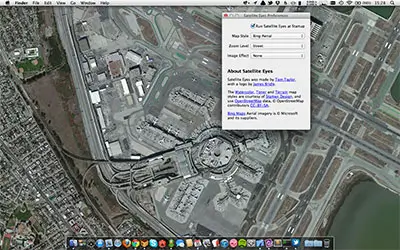
Satellite Eyes for Mac is a free, open-source utility created by Tom Taylor that automatically updates your desktop wallpaper to a high-resolution map based on your physical location. Utilizing native macOS CoreLocation services, it detects your geographic position and fetches corresponding aerial, satellite, or vector imagery from providers like Mapbox, Stamen Design, and OpenStreetMap. The software runs quietly in the menu bar, updating background art seamlessly as you travel with your laptop. Featuring multi-monitor layout support, customizable zoom levels, and diverse map rendering styles, Satellite Eyes turns standard macOS desktop backgrounds into interactive cartographic displays.
Why Choose Satellite Eyes Mac
Satellite Eyes provides a unique personalizing tool for Mac users who travel frequently or appreciate geospatial design. Unlike static wallpaper apps, it hooks into system location APIs to render accurate context-aware maps wherever you connect to the internet. Users can choose between detailed satellite imagery, artistic watercolor canvases, toner street grids, or classic topographical maps for their background.
The application operates with a tiny memory footprint from the macOS menu bar. Designed natively as a Universal Binary, it executes background location queries and tile caching without draining battery life on Apple Silicon MacBook models. Full support for multi-display setups allows each connected screen to display tailored zoom levels or localized map tiles simultaneously.
Key Features
- Dynamic Location Wallpapers: Automatically changes desktop wallpaper based on real-time geographical coordinates.
- Multiple Map Styles: Includes Mapbox Satellite, Terrain, Streets, Stamen Watercolor, Toner, and OpenStreetMap views.
- Custom Zoom Levels: Offers adjustable map scale controls ranging from neighborhood views to full city overview grids.
- Multi-Monitor Support: Configures unique zoom factors or synchronized location maps across multiple displays.
- Low Battery Impact: Uses native macOS CoreLocation triggers to minimize CPU usage and preserve battery health.
- Image Effects & Filters: Applies subtle vignette, desaturation, and contrast filters to keep desktop icons visible.
- Menu Bar Controls: Quick access to manual location refreshes, map style switching, and preference configurations.
- Open Source Transparency: Built under the open-source MIT License with zero background tracking or advertising.
What's New in 2.1.1 Version
The v2.1.1 update brings maintenance improvements, API compatibility fixes, and modern macOS screen display updates.
- Refined High-DPI Retina tile fetching for sharp map displays on modern MacBook Pro screens.
- Updated CoreLocation service handling for reliable positioning on macOS Sonoma and macOS Sequoia.
- Fixed Mapbox API key authentication handling and tile loading stability.
- Optimized Universal Binary execution for Apple Silicon M1 through M4 processors.
- Corrected wallpaper refresh behavior when waking your Mac from sleep mode.
- These updates ensure stable tile rendering and smooth background refreshes across current macOS environments.
Supported macOS Versions
Satellite Eyes 2.1.1 requires macOS 13 (Big Sur) or later, running smoothly on macOS Sonoma and macOS Sequoia. It runs natively on Apple Silicon processors (M1 through M4 series) and 64-bit Intel chips. The utility requires minimal system resources, taking up less than 30 MB of disk space and under 50 MB of system RAM.
How to Install Satellite Eyes on macOS?
Setting up Satellite Eyes on your Mac takes just a few steps.
- Download the latest version of Satellite Eyes for Mac.
- Open the downloaded file in your Downloads folder.
- Drag the Satellite Eyes icon into your Applications folder.
- Launch Satellite Eyes directly from your Applications folder or via Spotlight search.
- Grant Location Services permissions when prompted by macOS to allow auto-positioning.
- Access the app icon in your menu bar to select your preferred map style and zoom scale.
How to Use Satellite Eyes Mac?
- Click the Satellite Eyes icon in the top menu bar to open quick settings.
- Choose your preferred map provider and visual style from the style dropdown menu.
- Adjust the map zoom slider to set how close or wide your location view renders.
- Enable image effects like Vignette or Desaturate to ensure your desktop icons remain readable.
- Toggle multi-monitor preferences if you operate a multi-screen workstation setup.
- Select Force Refresh whenever you wish to manually re-center your desktop map location.