
AltTab Overview
AltTab is a free, open source window switcher for Mac that brings Windows-style Alt+Tab behavior to macOS. It lists every open window individually, not just running apps, so switching to one specific document or browser window takes a single keystroke instead of hunting through Mission Control. Thumbnail previews show a live view of each window, and hovering displays the selected one at full size on top of everything else. Custom shortcuts support modifier keys, function keys, and trackpad gestures, with filtering by app, Space, or screen. Status badges show which windows are minimized, hidden, or on another Space, and traffic-light icons let you close, minimize, or fullscreen a window directly from the switcher. The app follows macOS's Light or Dark appearance automatically and works fully with VoiceOver and other accessibility settings. An optional Pro upgrade adds search, additional display styles, and up to nine independent keyboard shortcuts.
Why Choose AltTab Mac App
Cmd+Tab switches between apps, not windows. Two documents open in the same app, or a dozen browser tabs spread across separate windows, all get lumped into one icon, forcing extra clicks just to find the right one. AltTab brings the Windows-style Alt+Tab behavior to Mac instead, listing every open window individually so switching between them takes one keystroke.
The project has been refined for eight years and has racked up more than 9 million downloads and 16,000 GitHub stars, with MacRumors and Pocket-lint both naming it among their top macOS utility picks. It follows macOS's Light or Dark appearance automatically, works with trackpad gestures instead of just the keyboard, and stays fully accessible with VoiceOver and reduced-transparency support built in from the start.
Key Features
- Individual window listing: shows every open window separately instead of grouping them under one app icon like Cmd+Tab.
- Live thumbnail previews: displays a real-time preview of each window, with the selected one shown full-size on hover.
- Custom shortcuts: configures a switcher hotkey using virtually any modifier or function key combination.
- Trackpad gestures: triggers the switcher with a swipe instead of the keyboard, for a hands-free workflow.
- Status badges and traffic icons: marks minimized, hidden, or off-Space windows, with one-click close, minimize, and fullscreen controls.
- Instant-release or keep-open modes: switches the moment a shortcut is released, or keeps the panel open to browse at your own pace.
- Window exceptions: hides specific apps or window types, useful for virtual machines or remote desktop sessions.
- Full accessibility support: works with VoiceOver, sticky keys, and reduced transparency out of the box.
- Wide macOS compatibility: supports every release from macOS 12 (Monterey) through the newest version, on Apple Silicon and Intel.
- No telemetry or tracking: collects no usage data, with network access limited to update checks and optional crash reports.
- Command-line interface: lists, focuses, or shows windows programmatically from the terminal.
- 21-language localization: displays its interface in more than 20 languages.
Screenshots
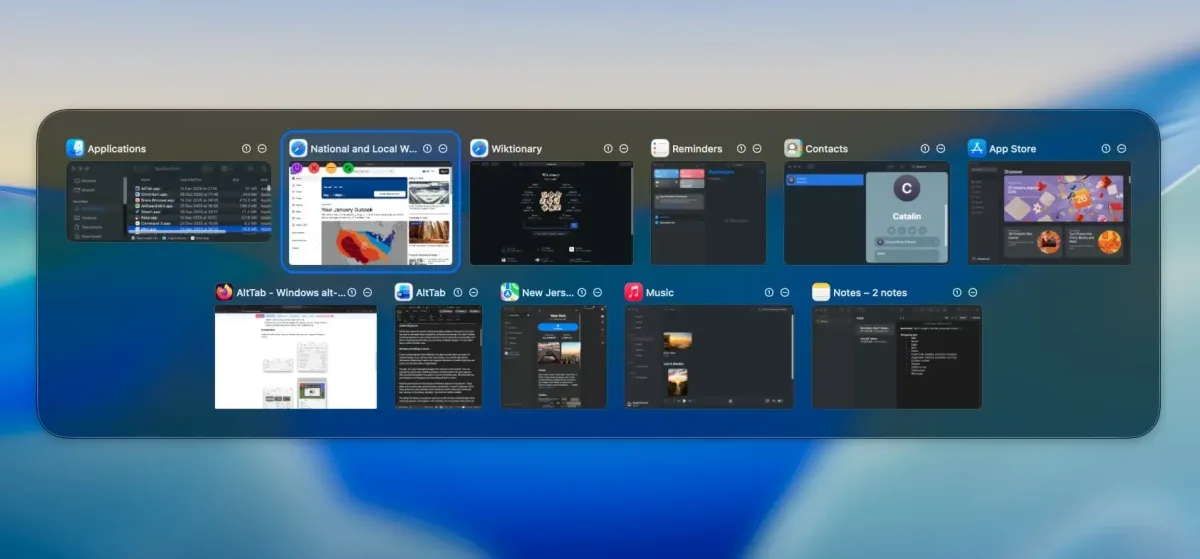
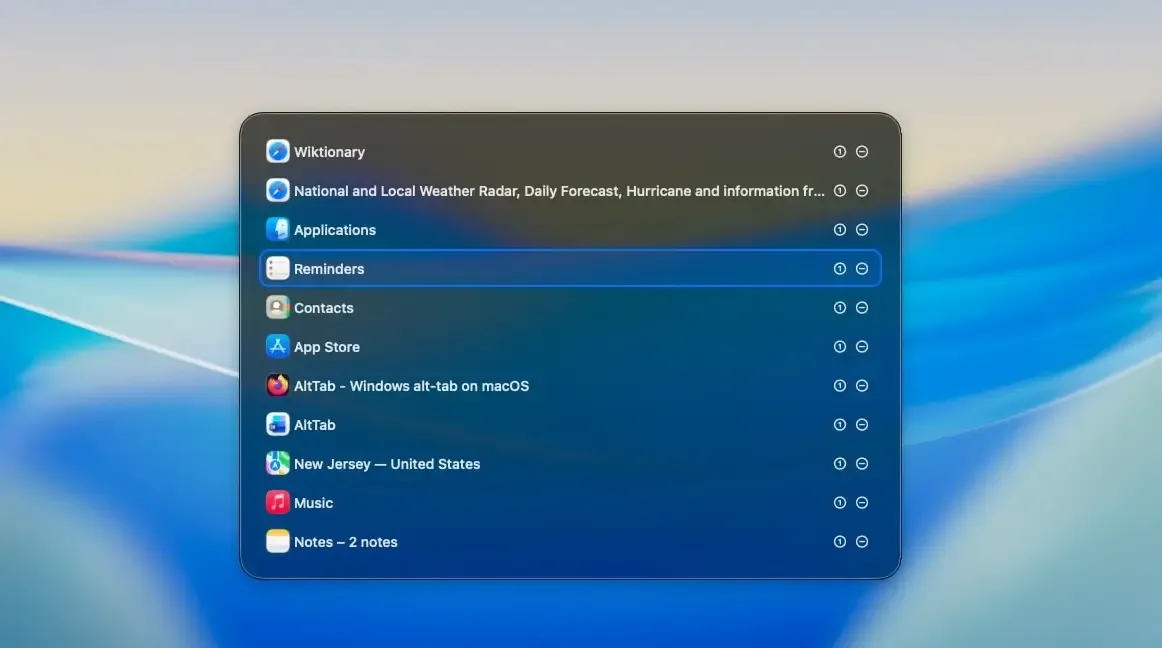
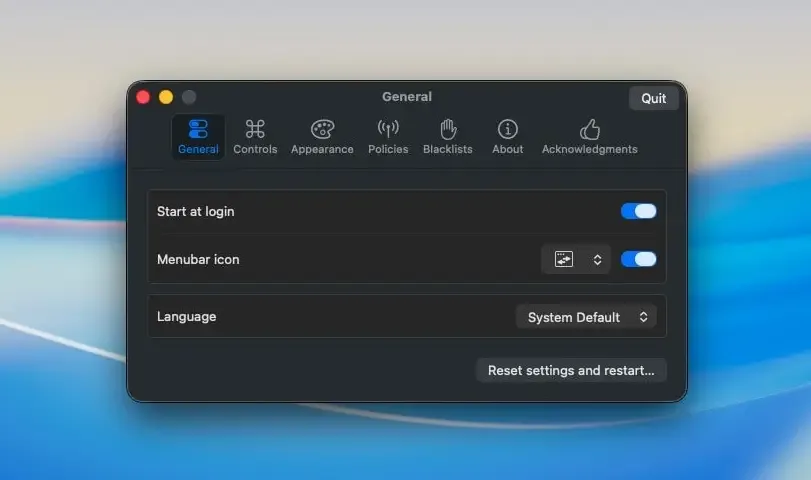
What's New in AltTab 11.7.1 Version
Version 11.7.1, released September 20, 2026, is a small bug-fix update:
- Fixed a Dock badge that could briefly linger after being cleared
- Fixed the trial menu label being cut off in some cases
- AltTab has been in continuous development for eight years, with new releases shipping regularly rather than sitting untouched between updates.
Supported macOS Versions
AltTab supports every macOS version from 12 (Monterey) through the newest release, running natively on both Apple Silicon and Intel Macs. Switching between windows is a lightweight task, so hardware speed makes essentially no difference to how the app performs, even on a Mac a decade old. The app also respects accessibility settings like reduced transparency and sticky keys automatically, without needing separate configuration.
How to Download and Install AltTab Mac?
Installing AltTab on Mac only takes a few steps after downloading.
- Click the Download button above to safely download the setup file.
- Open the downloaded .zip file, then drag AltTab into your Applications folder.
- Launch AltTab from Applications. If macOS shows an "unidentified developer" warning, go to System Settings → Privacy & Security and click Open Anyway.
- Grant Accessibility permission when prompted, so AltTab can detect and switch between open windows.
AltTab runs completely free once installed. An optional Pro upgrade unlocks search, extra display styles, and additional shortcut slots for anyone who wants them.
How to Use AltTab Mac App?
- Hold the Option key and press Tab to open the window switcher.
- Keep holding Option and press Tab repeatedly, or use the arrow keys, to move between windows.
- Release the keys to switch to the highlighted window.
- Click the traffic-light icons on a thumbnail to close, minimize, or fullscreen a window directly from the switcher.
- Open AltTab's Preferences to customize the shortcut keys, appearance, and behavior.
- Add an exception for any app whose windows shouldn't appear in the switcher, such as a virtual machine.
Alternatives to AltTab
Rectangle: Free, open source window management tool for Mac focused on snapping and tiling windows rather than switching between them, useful alongside AltTab.