
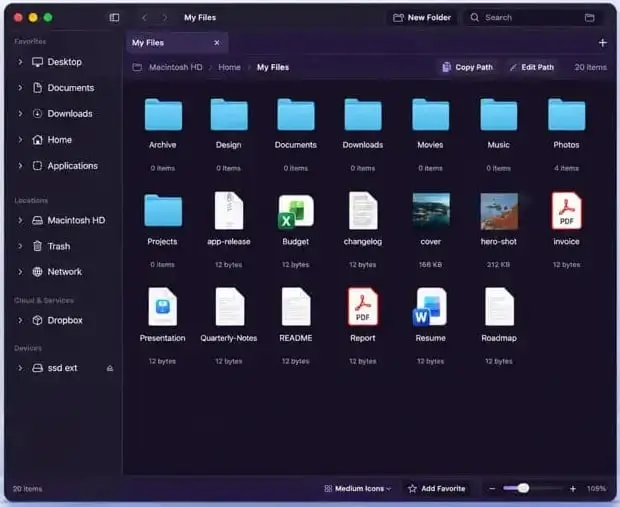
SADFinder Overview
SADFinder for Mac is a native file management application developed by Alteru Inc. that brings a familiar Windows File Explorer workflow to macOS. Designed as a keyboard-first alternative to default Finder navigation, it combines tabbed directory browsing, editable path address bars, and instant quick-filter searching. Users can seamlessly manage local files alongside major cloud storage providers like Dropbox, Google Drive, and Microsoft OneDrive within a single workspace. Featuring integrated window snapping, custom theme support, and direct archive extraction, SADFinder offers a dual-platform file browsing experience optimized for macOS desktop performance.
Why Choose SADFinder Mac
SADFinder fills a distinct gap for Mac users and recent Windows converts who prefer structured folder paths over standard macOS spatial browsing. By adopting classic navigation conventions like pressing Return to open folders and Backspace to ascend directories, it eliminates the learning curve associated with switching operating systems. An editable address bar allows users to paste or type direct file paths to jump instantly to deep system locations.
Unlike heavy virtual wrappers, SADFinder executes natively as a sandboxed macOS utility using Apple's recommended security protocols. It manages cloud storage status indicators, Finder color tags, and external drive mount points without locking background CPU threads. For those evaluating a satfinder for mac free alternative to simplify daily folder navigation, SADFinder provides a lightweight layout that enhances daily file handling efficiency.
Key Features
- Windows-Style Navigation: Implements classic Return-to-open, Backspace-to-go-up, and editable path bar controls.
- Tabbed File Browsing: Organize multiple directory locations in a single unified window with tab sets.
- Cloud Storage Integration: Connect and manage files directly from Google Drive, Dropbox, and OneDrive.
- Fast Indexing & Quick Look: Instant filename and content searching paired with single-spacebar Quick Look previewing.
- Archive Extraction & Creation: Native support for compressing and extracting archive formats without extra plugins.
- Finder Tag Synchronization: Displays colored dots and syncs native macOS tag commands seamlessly.
- Built-in Window Snapping: Features snap controls to split file windows efficiently across display layouts.
- Theme Customization: Includes six visual styles to match personal workspace aesthetics.
What's New in 1.0.15 Version
The v1.0.15 update brings critical maintenance fixes, search reliability enhancements, and interface optimizations for current macOS builds.
- Updated system compatibility and UI performance optimizations for macOS 15 Sequoia.
- Optimized search indexing algorithms to query large directory structures containing thousands of subfolder items without latency.
- Accelerated Camera RAW preview rendering by reading embedded thumbnail data directly.
- Enhanced volume mount handling so unmounting external drives during thumbnail generation remains stable.
- Added SADFinder Pro account licensing synchronization across App Store profile purchases.
- Fixed Quick Look keyboard interaction so selection focus remains locked on the file list while scrolling previews.
- These release improvements ensure stable file handling and rapid storage indexing across local and cloud directories.
Supported macOS Versions
SADFinder 1.0.15 requires macOS 15.0 (Sequoia) or later. It runs natively on Apple Silicon processors (M1, M2, M3, M4 series) and 64-bit Intel Mac systems as a Universal Binary. The installation package takes up less than 10 MB of disk space, requiring a minimum of 4 GB RAM for smooth folder indexing and cloud thumbnail rendering.
How to Install SADFinder on macOS?
Setting up SADFinder on your Mac takes just a few steps.
- Download the latest version of SADFinder for Mac.
- Open the downloaded package installer from your Downloads folder.
- Move the SADFinder icon into your Applications folder.
- Launch SADFinder directly from your Applications folder or via Launchpad.
- Complete the one-click file permission prompt to allow directory access to your local disks.
- Choose a free trial or link your SADFinder Pro account to unlock advanced cloud and tab controls.
How to Use SADFinder Mac?
- Open SADFinder and use the editable path bar at the top to type or paste a folder location.
- Press Return to open selected items or Backspace to navigate up one folder level.
- Open multiple tabs by pressing Command-T to manage separate folder branches in one window.
- Use the search bar to execute quick-filter queries across local folders and cloud drives.
- Highlight any file and press the Spacebar to trigger Quick Look preview overlays.
- Right-click files to assign Finder tags, create compressed zip archives, or manage cloud offline status.