Folder Peek Overview
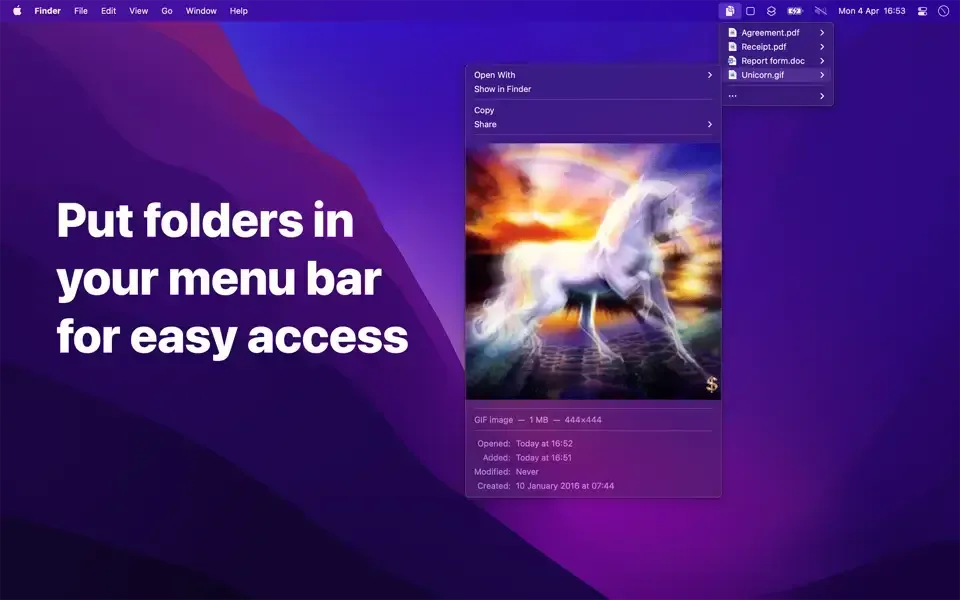
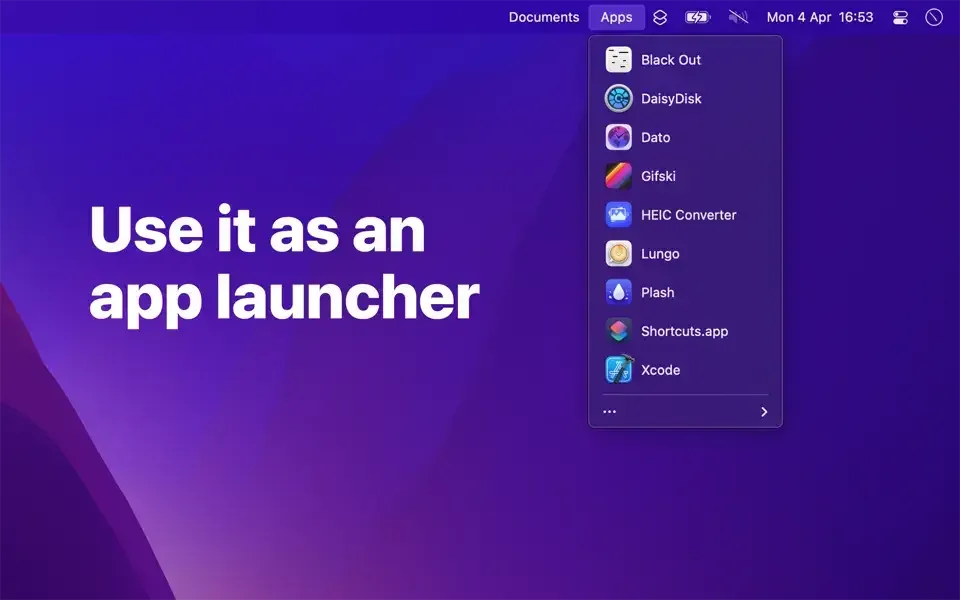
Folder Peek is a menu bar utility for Mac from Sindre Sorhus that puts one or more folders directly in the menu bar. Each folder gets its own customizable icon, letting you browse its contents, preview files, and open anything without switching to Finder. Image and video dimensions can be viewed and copied straight from the menu, and files can be dragged out directly to move or copy them elsewhere. A global keyboard shortcut can be assigned to each folder, optionally opening the menu at the cursor position. The app follows aliases and symlinks, so a folder of shortcuts can pull together files scattered across the Mac into one menu. Shortcuts app support lets specific folders show or hide automatically based on what you're working on. It's a one-time paid purchase on the Mac App Store, with free legacy versions available for older macOS releases.
Why Choose Folder Peek Mac App
Folders in the Dock work, but they're slower than they look, especially with the Dock set to auto-hide. Folder Peek puts folders directly in the menu bar instead, which stays visible at all times. Beyond speed, it adds things Dock folders never had: file previews, image and video dimensions on demand, and the option to open a file in a specific app instead of whatever's set as the system default.
Folder Peek was free for its first four years and picked up more than 50,000 downloads before developer Sindre Sorhus made it a paid app, a change he's described as being about managing support request volume rather than chasing revenue. The last free versions from that era, covering macOS 12 through 15, remain available directly from the developer's website for anyone on an older system.
Key Features
- Multiple menu bar folders: adds as many folders as needed, each with its own menu bar icon.
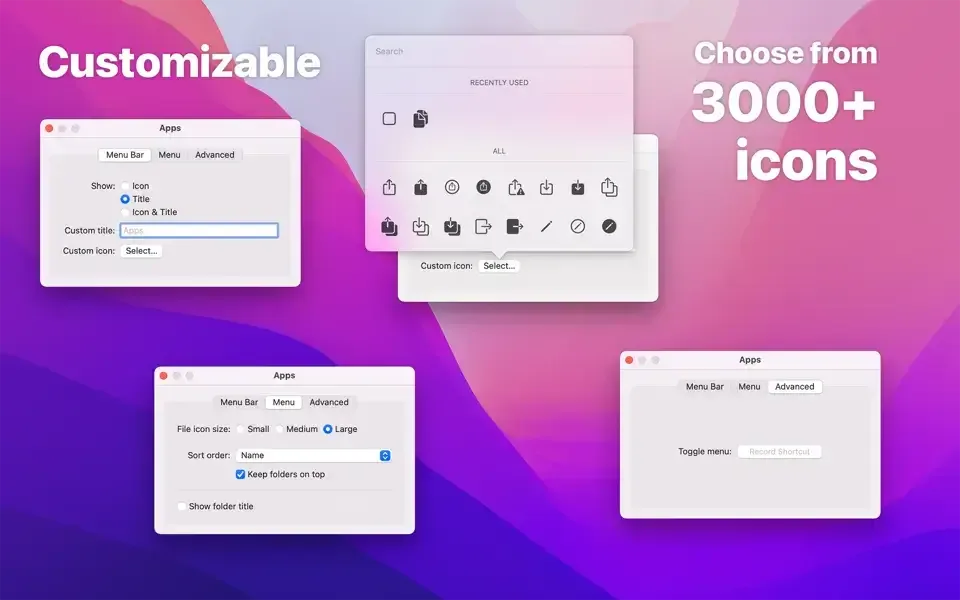
- Per-folder customization: sets individual settings, icons, and behavior for every folder added.
- File preview: views a file's contents directly from the menu without opening it.
- Image and video dimensions: displays and copies a file's dimensions right from the menu.
- Drag and drop from the menu: drags a file out to move it, or holds Option to copy it instead.
- Global keyboard shortcuts: opens or closes a specific folder's menu from the keyboard, optionally at the cursor position.
- Open in a specific app: chooses which app handles a file, rather than relying on the system default.
- Alias and symlink support: follows shortcuts through to the real file or folder they point to.
- Shortcuts app integration: automates which folders appear based on the current project or context.
- Flexible sort order: arranges files by date created, modified, accessed, added, or kind.
- Item limit control: caps how many files display in a folder's menu at once.
- Sandboxed for security: runs entirely within Apple's App Sandbox.
Screenshots
What's New in Folder Peek 1.13.6 Version
Version 1.13.6, released September 18, 2026, is a bug-fix update, following a string of similar minor releases. The more substantial recent release, 1.13.0 (March 30, 2026), included:
- Raised the minimum requirement to macOS 26, with the last macOS 15-compatible version still available from the developer's website
- Added a setting to make the menu open at the mouse pointer when using a keyboard shortcut
- Added the ability to drag and drop files and folders directly from the menu
- Every version since 1.13.0 has focused on bug fixes rather than new features.
Supported macOS Versions
The current version of Folder Peek requires macOS 26 or later, a minimum raised specifically in version 1.13.0. That jump doesn't leave older Macs stranded, since each prior OS requirement bump left its matching build downloadable rather than pulling it. Folder Peek's job, showing folder contents in a menu, is genuinely lightweight, so hardware speed makes essentially no difference to how it performs on any supported Mac.
How to Download and Install Folder Peek On Mac?
Installing Folder Peek on Mac takes under a minute through the App Store, simple follow given steps.
- Click the Download button above. It opens Folder Peek's official listing on the Mac App Store.
- Click the price button to purchase, since this is a paid app rather than a free download.
- Sign in with your Apple ID if prompted.
- macOS downloads and installs Folder Peek automatically in the background.
- Once installed, launch it from Launchpad or your Applications folder.
Because the App Store handles future updates automatically, there's no need to manually reinstall it each time a new version ships.
How to Use Folder Peek Mac App?
- Open Folder Peek and add a folder to give it its own menu bar icon.
- Click the menu bar icon to browse that folder's contents without opening Finder.
- Click a file to open it, or hold Option and click to reveal it in Finder instead.
- Drag a file directly out of the menu to move it, or hold Option while dragging to copy it.
- Assign a global keyboard shortcut to a folder from Settings for quicker access without the mouse.
- Add more folders as needed, customizing each one's icon, sort order, and item limit individually. Hold Command while dragging a menu bar icon to move it into a different position.
Alternatives to Folder Peek
XMenu: Free menu bar app with six predefined folders, including Applications and Documents, for launching files without customization.
Dock folders (built into macOS): Free and included on every Mac, offering basic folder stacks without previews, custom icons, or keyboard shortcuts.