Cinema 4D Overview
Cinema 4D is a professional 3D app from Maxon for modeling, animation, simulation, and rendering on Mac. It is built for motion designers, VFX artists, and visualization teams. The MoGraph toolset creates procedural motion with cloners, effectors, and fields. Redshift, the GPU renderer, is included for fast previews and final frames. Cineware links scenes to Adobe After Effects and Unreal Engine. The app also imports common formats such as FBX, Alembic, USD, glTF, and STEP. The app runs on both Apple Silicon and Intel Macs. Version 2026.4 adds a built-in MCP Server for connecting AI assistants. A 14-day free trial lets you test the full suite first. Access afterward runs on a Maxon subscription.
Why Choose Cinema 4D Mac App
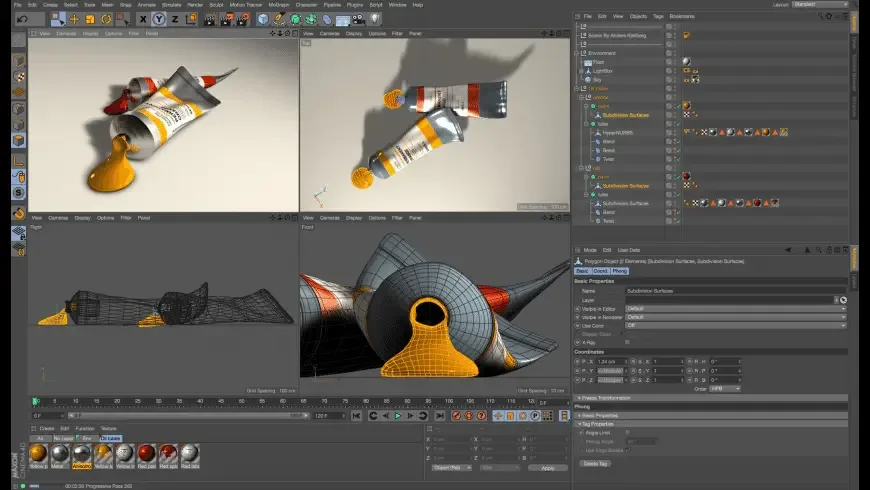
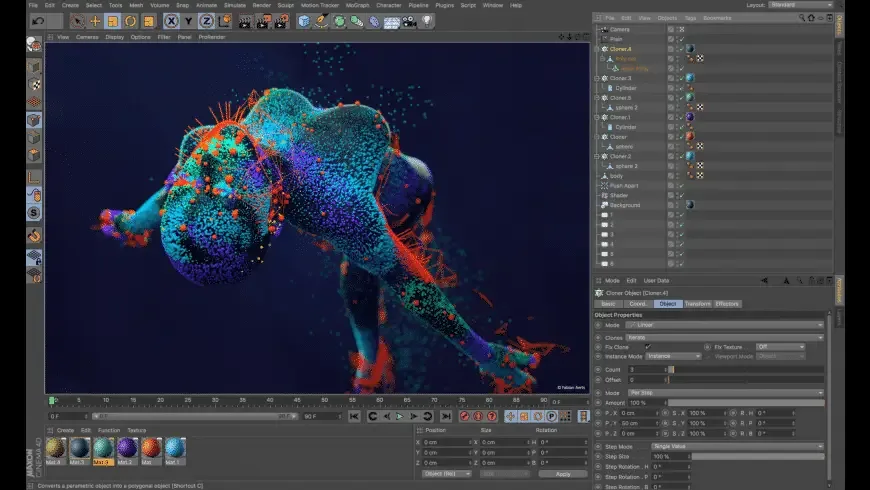
Many 3D apps ask you to build a pipeline from separate parts. One tool models, another simulates, and a third renders. Cinema 4D keeps those jobs in one scene. You can sculpt a shape and clone it across a surface with MoGraph. Then animate it with keyframes and render it with Redshift, all in one app. For motion design work, that tight loop is the main reason studios keep choosing it.
The Mac angle is practical. The app is a Universal Binary, so it is not limited to translated code on newer machines. Redshift uses the GPU for interactive previews, which helps when you adjust lights and materials in real time. Cineware also matters on a Mac desktop. A scene can sit inside an After Effects composition and stay editable, which saves repeated render and re-import cycles. The Maxon App handles installation, updates, and licensing in one place, so the trial and the full suite share the same setup.
Version 2026.4 also adds something new for automation. A built-in MCP Server lets compatible AI assistants run Cinema 4D tools for repetitive tasks. You still make the creative calls.
Key Features
- Parametric and polygonal modeling: builds shapes with generators, deformers, splines, and direct polygon editing.
- Sculpting tools: shapes organic forms in the viewport, including the new Fabric Brush for draping and folding soft objects.
- MoGraph: creates procedural motion with cloners, effectors, fields, and distributions.
- Keyframe animation and rigging: supports character rigging templates, motion tracking, and motion capture data.
- Simulation: covers cloth, rigid and soft bodies, particles, hair, smoke, fire, and liquids with GPU-accelerated dynamics.
- Redshift renderer: renders with the GPU and offers interactive preview while you adjust lighting and materials.
- Redesigned UV Editor: handles seam editing, smart unwrapping, texel density, and UDIM support.
- Cineware integration: connects scenes to Adobe After Effects and Unreal Engine.
- Wide format support: imports and exports OBJ, FBX, Alembic, USD, glTF, and CAD formats like STEP.
- Team Render nodes: spreads render jobs across several machines, with five nodes included in a subscription.
- Cinema 4D MCP Server: lets compatible AI assistants operate selected tools on your behalf.
Screenshots
What's New in Cinema 4D 2026.4 Version
Cinema 4D 2026.4 is a small release with one headline change:
- A built-in Cinema 4D MCP Server that you can switch on, so compatible AI assistants can run Cinema 4D tools for repetitive, procedural, and iterative tasks
- The previous release, 2026.3, carried most of the creative additions:
- A redesigned UV Editor with seam editing, smart unwrapping, zero-overlap packing, and UDIM support, and existing projects open without migration
- A Fabric Brush for draping, folding, and shaping soft objects in the viewport
- Three MoGraph Advanced Distributions that place clones on edges, polygon outlines, or UV-based surfaces
- A symmetry option for the Bend Deformer
- A Loop option for the Target Effector, which joins the first and last clones for circular motion
- A dockable Particle Property Manager
- New Redshift options: Scratches shader, High Altitude Clouds, Night Sky, and Hex Tiling
- If you skipped 2026.3, updating to 2026.4 brings both sets of changes together.
Supported macOS Versions
Cinema 4D 2026.4 supports macOS 14 (Sonoma) or later and is listed as a Universal Binary. That means it targets Apple Silicon and Intel Macs in a single download. Maxon's pages we checked do not list RAM, storage, or GPU minimums. Confirm them with Maxon before buying a machine for heavy work. As a general rule, simulations, high-resolution Redshift renders, and large scenes ask for more memory and a stronger GPU than simple modeling. A recent Apple Silicon Mac with generous unified memory is the safer choice for that kind of project. Light modeling and learning tutorials run fine on more modest hardware. Support for macOS releases newer than the ones listed has not been confirmed.
How to Download and Install Cinema 4D Mac?
Installing Cinema 4D on Mac takes a few steps, including one account sign-in it needs to run.
- Click the Download button above to download the setup file.
- Open the downloaded file and follow the installer prompts to place Cinema 4D in your Applications folder.
- Launch Cinema 4D from Applications. If macOS shows an "unidentified developer" warning, go to System Settings → Privacy & Security and click Open Anyway.
Sign in with a MyMaxon account and accept the license agreement when prompted. An account is required to use the app.
How to Use Cinema 4D Mac?
- Create a new scene and add a primitive object, such as a cube or sphere, from the Objects menu.
- Reshape it with a deformer or switch it to an editable polygon object for direct modeling.
- Add a Cloner from the MoGraph menu, then attach an Effector to control spacing, scale, or movement.
- Set keyframes on the timeline to animate position, rotation, or effector strength.
- Assign a Redshift material and add lights to shape the look of the scene.
- Open the Render Settings, choose Redshift, and render a still or an image sequence.
- Save the scene, or send it to After Effects through Cineware for final compositing.
Alternatives to Cinema 4D
Blender: Free, open-source 3D suite with modeling, sculpting, animation, simulation, and the Cycles renderer, with a large community and frequent releases.
Houdini Apprentice: SideFX offers a free version for non-commercial learning. It focuses on procedural effects and simulation, with a steeper learning curve than Cinema 4D.