
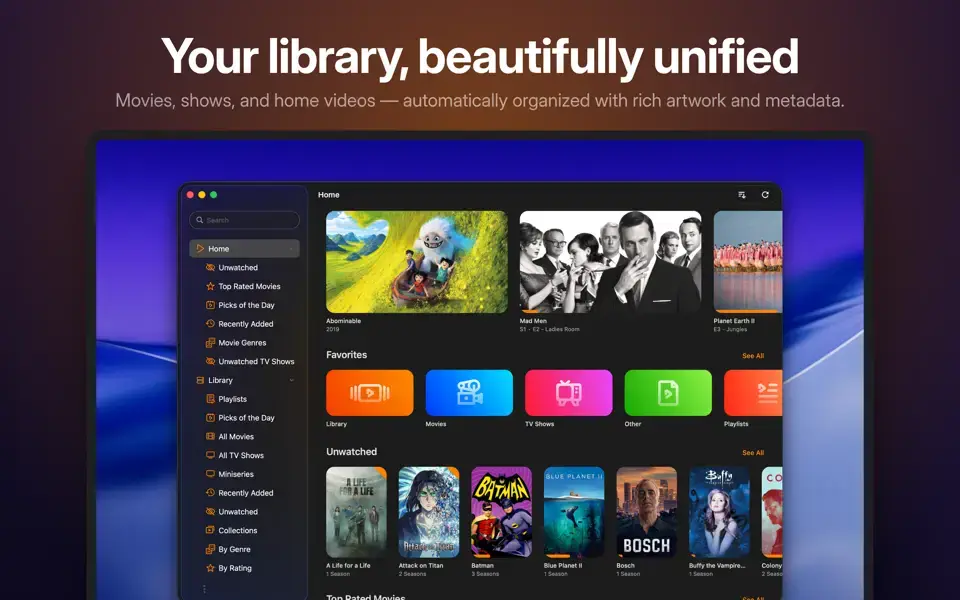
Infuse Overview
Infuse for Mac is a video player built by Firecore that plays nearly any video format without converting files first, including MKV, AVI, WMV, and a dozen other containers most native Mac apps can't touch. It automatically fetches metadata, artwork, cast details, and trailers using TMDB, turning a folder of video files into something that looks and feels like a streaming service. Infuse connects directly to Plex, Emby, Jellyfin, and Kodi servers, NAS devices, and cloud services including Dropbox, Google Drive, OneDrive, pCloud, Yandex.Disk, and Mega.nz. The free version covers basic local playback, while Infuse Pro unlocks extra formats, cloud sources, and cross-device syncing. It's part of the same Infuse 8 app family used on iPhone, iPad, Apple TV, and Vision Pro.
Why Choose Infuse for Mac App
Most Mac video players either handle playback well or handle library organization well, rarely both. Infuse does both at once. It plays formats that QuickTime and other native tools often can't touch, from MKV and DTS-HD audio to full 4K Dolby Vision, while also pulling in posters, cast info, and episode artwork automatically, so a personal media collection ends up looking closer to a streaming service than a folder of files.
The Mac version specifically benefits from Infuse's cross-device design. A single Infuse Pro subscription, shareable through Family Sharing, extends the same library, watch history, and server connections to every other Apple device you own. If you're already using Infuse on an Apple TV or iPhone, adding it to your Mac costs nothing extra and picks up right where the other devices left off.
Key Features
- Plays virtually any video format without conversion, including MKV, AVI, WMV, MTS, ISO, FLV, and a dozen more
- Automatic metadata, artwork, and cast info pulled from TMDB
- Direct integration with Plex, Emby, Jellyfin, and Kodi media servers
- Full format-native audio support, including Dolby TrueHD, DTS-HD Master Audio, and FLAC
- Support for Dolby Vision, HDR, and spatial audio on compatible hardware
- Connects to NAS devices, SMB shares, and WebDAV servers
- Cloud storage support for Dropbox, Google Drive, OneDrive, Box, pCloud, Yandex.Disk, and Mega.nz
- Automatic subtitle downloading from OpenSubtitles, with support for SRT, SSA/ASS, PGS, and VobSub formats
- Multiple user profiles with individual watch history and settings
- Community-powered intro and credits skipping, now with separate controls for each
What's New in 8.5.6 Version
New
- Added basic support for M3U/M3U8 files.
- Added support for Jellyfin 12.1
- Added option to hide individual favorites on Home.
Improved
- Improved in-app purchase flow.
Fixed
- Fixed syncing watched history with Feiniu servers.
- Fixed Plex transcoding profile on Unraid.
- Fixed local text-based subtitle rendering for Plex.
- Fixed transcoding for videos with a large number of tracks.
- Fixed other transcoding-related issues.
- Fixed display of sorting modes for Plex.
- Fixed favorites list updates after adding favorites.
- Other minor fixes and improvements.
Supported macOS Versions
Infuse for Mac supports recent macOS releases and runs on both Intel and Apple Silicon Macs. Since Infuse shares its core codebase across iPhone, iPad, Apple TV, Mac, and Vision Pro, Mac updates tend to arrive alongside the wider Infuse 8 release cycle rather than on a separate schedule, so staying on the current version keeps you aligned with the latest server and format support.
How to Install Infuse on MacOS?
Setting up Infuse on your Mac takes just a few steps.
- Download the latest version of Infuse for Mac to click above download button or get it from Official website.
- Open the downloaded installer file.
- Follow the on-screen instructions to complete installation.
- Launch Infuse from your Applications folder.
- Sign in with your Firecore account if you want to sync Pro across devices.
Once installed, you can add local folders, network shares, or cloud accounts to start building your library.
How to Use Infuse Mac App?
- Open Infuse and choose to add a local folder, NAS share, or cloud storage account.
- Let Infuse scan your files and automatically fetch matching metadata and artwork.
- Browse your library by movies, TV shows, or custom collections.
- Select a title to start playback, with subtitles applied automatically if available.
- Use profiles if multiple people share the same Mac, to keep watch history separate.
Alternatives
IINA: A free, open-source video player for Mac with broad format support and a modern native interface, without Infuse's subscription model.
VLC Media Player: A free, open-source media player that plays nearly any format, though without Infuse's automatic metadata and library organization.
Movist: A free video player with high-quality caption and subtitle support, more lightweight than Infuse but without media server integration.