
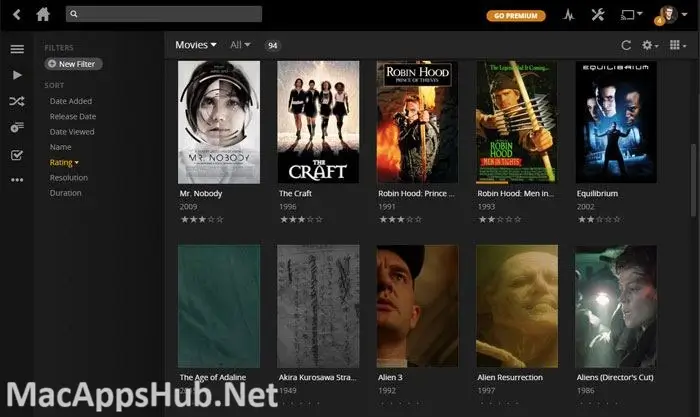
Plex Media Server Overview
Plex Media Server for Mac turns a folder of movies, TV shows, music, and photos into a proper library, automatically fetching posters, cast details, and metadata so everything looks like it came from a real streaming service. Once it's running, any device on your home network, a smart TV, game console, phone, or another Mac, can browse and play that library, with Plex transcoding video on the fly so format compatibility is rarely a problem. Households with a large collection of ripped discs or downloaded files, anyone who wants one central hub instead of scattered folders across devices, and people replacing a stack of physical media with something searchable all end up running it as their home media backbone.
Why Choose Plex Media Server Mac App
The automatic organization is what separates this from just pointing a media player at a folder. Add a folder of movies or shows as a library, and Plex matches each file against its own database, pulling in artwork, descriptions, and cast information without any manual entry. Playback adapts to whatever's watching too: a phone on a slow connection gets a smaller stream, a 4K TV gets the full file, and Plex handles the conversion in real time rather than making you keep multiple copies of the same video. Device support is genuinely broad, covering nearly every smart TV platform, streaming box, and game console still in common use, so the server side stays the same no matter what someone's watching on.
There's one change worth knowing before you commit to Plex as your setup. Streaming to your own devices while connected to your home network has always been free and remains free. Watching your library remotely, from outside your home network, now requires either a Plex Pass or the cheaper Remote Watch Pass, a shift that took effect in April 2025 after years of free remote access. On Apple Silicon specifically, Plex runs as a genuine universal binary rather than through Rosetta, which noticeably speeds up hardware-accelerated transcoding when multiple people are streaming different formats at once.
Key Features
- Automatic library organization — scans your movies, shows, music, and photos, then fetches matching posters, cast info, and metadata automatically.
- On-the-fly transcoding — converts video in real time to match whatever device is watching, so format compatibility is rarely an issue.
- Broad device support — stream to smart TVs, streaming boxes, game consoles, phones, tablets, and web browsers from one server.
- Hardware-accelerated transcoding — uses your Mac's own video hardware to transcode more efficiently, reducing CPU load during playback.
- Live TV and DVR — watch and record over-the-air broadcasts through the same interface as your personal library, with a compatible tuner.
- Multi-user libraries — share specific libraries with family and friends, each with their own watch history and profile.
- Smart Collections and Playlists — build a collection that updates itself based on rules like genre or watch status, instead of manually curating every title.
- Universal Apple Silicon support — runs natively on M-series Macs, with faster transcoding than under Rosetta translation.
- Free local streaming — anyone on your home network streams from your server at no cost, with no pass required.
- Plugin and metadata agent support — customize how content gets matched and organized beyond the default agents.
- Mobile sync and offline downloads (Plex Pass) — download library content to a phone or tablet for offline playback while traveling.
What's New in Plex Media Server 1.43.4.10903 Version
Version 1.43.4.10903 shipped August 18, 2026, and it includes two fixes specifically for macOS.
- Fixed OTA Live TV channels that would often fail to hardware transcode on macOS.
- Fixed a bug where the server could crash under certain network conditions on macOS.
- Added HDR, Dolby Vision, and Atmos filters for episodes in TV show libraries, matching the filters already available for movies.
- Added an audio codec filter for browsing tracks in music libraries.
- Added support for IPv6-only networks (currently a Plex Pass feature).
- Added subtitle support for DVB teletext.
- Renamed the transcoder's "HEVC Sources Only" setting to "HEVC/AV1 Sources Only," now covering AV1 sources as well.
- Patched a potential vulnerability in the CompanionProxy component, and locked transcoder preferences so they can no longer be changed remotely over the network.
- Several metadata matching and refresh reliability fixes, plus general library filter and download-display corrections.
- If you're running Plex Media Server through a NAS app store rather than downloading it directly, Plex notes those builds (QNAP and similar) may take longer to receive the update.
Supported macOS Versions
Plex Media Server 1.43.3.10896 requires macOS 10.13 High Sierra or later, on 64-bit hardware only. Since version 1.40.0, it's shipped as a genuine Universal build, so Apple Silicon Macs run it natively rather than through Rosetta, which matters most when transcoding video for multiple simultaneous streams. Intel Macs on a supported macOS version remain fully functional too, though heavier transcoding workloads, several 4K streams converting at once, for example, will feel the difference between an older Intel chip and a current Apple Silicon one more than lighter, everyday use would.
How to Download and Install Plex Media Server on Mac?
Installing Plex Media Server on Mac only takes a few steps after downloading, including one quick permission it needs to run properly.
- Click the Download button above to download the complete setup file safely or you may get it from official website.
- Open the downloaded .zip file, then drag Plex Media Server into your Applications folder.
- Launch Plex Media Server from Applications. If macOS shows an "unidentified developer" warning, go to System Settings → Privacy & Security and click Open Anyway.
- Grant network access and any folder permissions macOS requests, so Plex can serve your media over your local network.
- Sign in with a free Plex account (or create one) when the setup wizard opens in your browser.
Once the initial setup is done, Plex won't ask for these permissions again, future launches go straight to your server dashboard.
How to Use Plex Media Server Mac App?
- Add your media folders as libraries, Movies, TV Shows, Music, or Photos.
- Let Plex scan and fetch metadata automatically, correcting any mismatches manually if needed.
- Install a Plex app on your TV, phone, or another device and sign in with the same account to start streaming.
- Adjust transcoding and bandwidth settings under Settings if streams are stuttering.
- Decide whether you need a Plex Pass or Remote Watch Pass, based on whether you plan to watch your library away from home.
Alternatives
Jellyfin: A free, open-source media server with no paywall on remote streaming, the most commonly recommended direct alternative for anyone put off by Plex's pricing changes.
Emby Server: A mature, feature-rich media server with a usable free tier, though hardware transcoding, DVR, and mobile app playback sit behind its own Emby Premiere subscription, similar in spirit to Plex Pass.
Universal Media Server: A free, open-source DLNA/UPnP server that streams to a huge range of smart TVs, consoles, and Blu-ray players with minimal setup.