
Loopman Overview
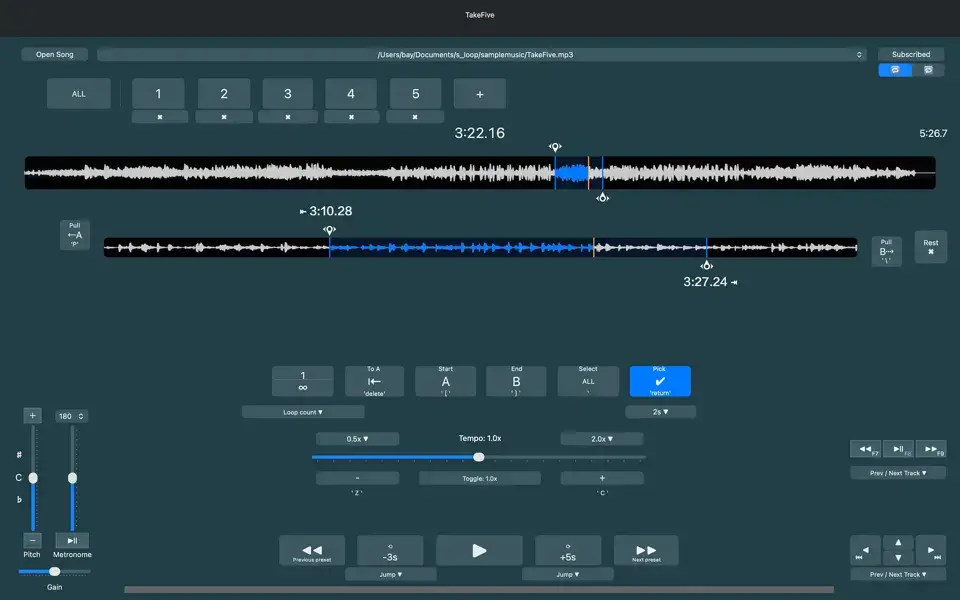
Loopman for Mac slows down music or speech without changing the pitch. It loops the exact section you want to hear, over and over, until it clicks. Musicians, language learners, and dancers use it to repeat a passage until they've truly learned it.
That's the whole idea behind it. You mark a start point and an end point, and Loopman replays just that piece on a loop. Slow it down for a fast guitar solo. Shift the pitch if a passage sits outside your range. The app saves your loop sections automatically, so you never lose your place between sessions.
Youngjoon Koh built it under Dolgorae Soft. It's a small app, under 4 MB, and it sticks to doing one job well instead of trying to be everything at once. The current release is version 2.8.7, and it runs on macOS 11.5 Big Sur and later.
Why Choose Loopman Mac?
Most media players warp the pitch the moment you slow audio down, which makes them useless for real practice. They also force you to export a file first, then hand it off to a separate tool just to loop one section. Loopman removes that entire workflow. Drag two sliders and your loop is marked, adjust the tempo without touching the pitch, and shift the pitch up or down by a full octave if a passage needs to sit in a different range. It's built specifically for repetition rather than casual listening, which is exactly why it's worth choosing over a general-purpose player for this kind of work.
That same focus is what makes it worth picking on Mac specifically. Loopman leans on your keyboard rather than your mouse, which matters when your hands are already on an instrument or you're mimicking a dance move in front of the screen. Recent updates made those shortcuts more reliable across non-English layouts too, covering AZERTY, QWERTZ, Korean input, and a range of Bluetooth keyboards. Combined with its tiny footprint and instant launch time, it ends up being the app you actually keep open during a practice session, rather than one you dig out only when something else fails.
Key Features
- Precision A-B looping with dual sliders to mark exact start and end points
- Tempo control that slows or speeds up audio without shifting pitch
- Pitch adjustment up or down by a full octave, in 12-step increments
- Auto-saved smart presets that bookmark loop sections for later
- Adjustable back and forward time jump for quick navigation
- Full keyboard and hotkey control, including arrow key navigation
- Merge and export tool for combining looped sections into one audio file
- Export Without Current Loop, for removing a specific section from a file
- Export Full Audio as M4A, useful for pulling audio out of video files
- Playlist export and import for sharing or moving loop presets between devices
What's New in 2.8.7 Version
Version 2.8.7 continues a recent run of updates centered on reliability, export flexibility, and international usability.
- More reliable keyboard shortcuts across AZERTY, QWERTZ, JIS, and Korean layouts, including many Bluetooth keyboards
- Shortcut labels now refresh automatically the moment you switch keyboard input sources
- A new Merge & Export tool for combining looped section audio into a single file
- An Export Without Current Loop option, for removing just the selected A-B section from a file
- Export Full Audio as M4A, handy for pulling audio out of video files
- Cleaner waveform rendering with separate main and zoom views
- Waveform analysis progress indicators, along with on-disk caching for faster reopening of large files
Supported macOS Versions
Loopman needs macOS 11.5 Big Sur or later, which covers most Apple Silicon and Intel Macs released over the past several years. The app is listed as Intel 64 on the App Store, and since Big Sur was also the first macOS version to support Apple's M-series chips, that's worth a quick note for anyone on newer hardware. Apps without a dedicated Apple Silicon binary still run smoothly through Rosetta 2, and because Loopman is such a light app rather than a demanding audio workstation, that translation layer isn't something you'll notice in daily use. At under 4 MB, it runs comfortably on any Mac that meets the minimum OS requirement, with no real difference in responsiveness between an older Intel machine and a newer Apple Silicon one.
How to Install Loopman on macOS?
Getting Loopman running on your Mac only takes a couple of minutes.
- Click the download button on this page to get the Mac build.
- Open the file once it finishes downloading, and follow the on-screen steps.
- Launch Loopman from your Applications folder or Launchpad.
- Grant any permission prompts macOS shows the first time you open it.
- Import an audio file to start exploring the free tier.
- Subscribe from within the app if you want unlimited full-length playback.
- You're ready to start looping and slowing down your first audio file.
How to Use Loopman Mac App?
Once Loopman is open, setting up your first practice loop takes only a few steps.
- Open an audio file in a supported format, such as MP3, WAV, or M4A.
- Drag the two sliders on the waveform to mark your loop's start and end points.
- Adjust the tempo slider to slow the section down while the pitch stays put.
- Use the pitch control if the passage needs to sit in a different key or range.
- Save the loop as a smart preset so you can return to it instantly later.
- Use arrow keys and hotkeys to jump back, replay, or fine-tune the loop hands-free.