MountMate Overview
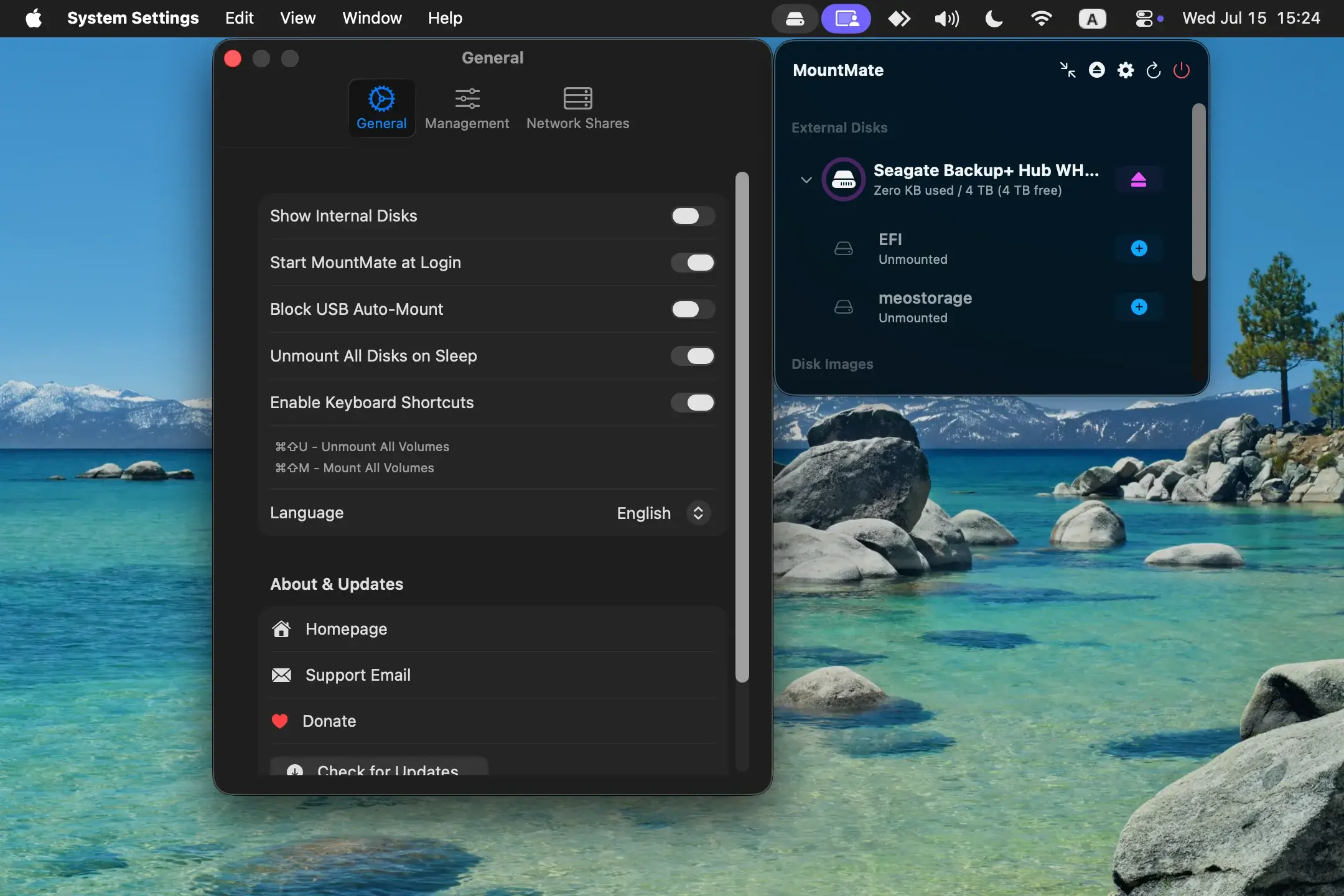
MountMate for Mac is a lightweight native macOS menu bar utility for managing external drives without repeatedly opening Finder, Disk Utility, or Terminal. It lets you mount and unmount connected drives from one menu bar interface while showing their current mount status and available storage.
The app is especially useful for Macs that regularly use external HDDs, SSDs, backup drives, or network shares. Instead of leaving a storage device mounted all the time, you can keep it disconnected from the active macOS filesystem until you actually need it. MountMate also supports disk images, keyboard shortcuts, force eject, SMB network shares, and Apple RAID management, depending on the current release and workflow. The project is free and open source, built with native macOS technologies, and designed to stay in the menu bar rather than adding a full desktop utility window.
Why Choose MountMate App
MountMate is designed around a very specific macOS storage problem: controlling when external volumes are mounted without physically disconnecting them or relying on command-line tools. macOS can automatically mount connected drives, but after a drive is unmounted, remounting it can require Finder, Disk Utility, or Terminal. MountMate puts that control directly in the menu bar, so a backup HDD or archive drive can stay unmounted until you need it.
Its main advantage over broader disk utilities is its focused workflow. MountMate does not try to become a complete disk repair or storage-analysis suite. Instead, it concentrates on mount, unmount, status, free-space visibility, and quick access to connected volumes. The native macOS implementation, offline operation, and menu bar design make it particularly suitable for users who keep external storage connected to a Mac mini, Mac Studio, or desktop Mac throughout the day.
Key Features
- Mount and Unmount Drives — Mount or unmount connected external volumes directly from the menu bar without opening Disk Utility or using Terminal.
- Drive Status — View connected external drives and see which volumes are currently mounted.
- Available Storage — Check the free space available on connected drives before starting a file transfer or backup.
- USB Auto-Mount Control — Disable automatic mounting for USB devices when you want to decide manually which drives become active.
- SMB Network Shares — Manage network shares through MountMate, with version 5.17 adding support for importing and drag-and-dropping manually mounted SMB shares into Settings.
- Keyboard Shortcuts — Use ⌘⇧M to mount and ⌘⇧U to unmount drives without navigating through the menu.
- Force Eject — Force ejects drives that are currently in use when the normal unmount process cannot complete.
- Disk Image Management — MountMate can also manage disk images, including mounting, unmounting, opening them in Finder, and removing them from the list.
- Apple RAID Support — Recent releases added support for Apple RAID sets with appropriate management and ejection handling.
- Native macOS Menu Bar App — MountMate uses native macOS APIs and remains in the menu bar instead of running as a large desktop utility.
What’s New in 6.0 Version
Changed
- Faster, Smoother Menu: The drive list only redraws when something actually changed, refreshes at high priority when you open the menu, and picks up newly plugged-in drives faster.
- No More Freezes When Mounting Shares: Mounting a network share no longer blocks the menu, even when the server is slow or unreachable. "Open in Finder" on a share is instant.
- Faster Mount All / Unmount All: Volumes are now mounted and unmounted in parallel, and the list updates as soon as they finish.
- Lighter Network Share Checks: Network share status is refreshed on mount events and when you open the menu, instead of after every disk refresh.
- Lower Background Usage: The Keep Alive timer no longer does any work when nothing is set to keep alive, and lets macOS group its wake-ups to save energy.
Fixed
- Saved Passwords for Encrypted Volumes: Locked APFS volumes now unlock automatically with the password saved in Keychain. The password you type is always the one used, and a wrong or outdated password asks again instead of showing an unknown error.
- Unlocking No Longer Freezes the Menu: Unlocking an encrypted volume now runs in the background.
- Mount All / Unmount All Failures Are Reported: If a volume can't be mounted or unmounted (for example because it's in use), an alert now names it instead of failing silently.
How to Download and Install MountMate on Mac?
MountMate is distributed as a direct .dmg download and can also be installed through Homebrew. The developer documents the DMG installation as the straightforward option.
- Click the Download button above and complete the MountMate .dmg download.
- Open the downloaded disk image.
- Drag MountMate.app into your Applications folder.
- Eject the mounted installer disk image after the copy finishes.
- Open MountMate from the Applications folder.
- If macOS displays an unidentified developer warning, go to System Settings → Privacy & Security and choose Open Anyway.
After the first launch, MountMate runs from the macOS menu bar and is ready to manage connected drives.
How to Use MountMate Mac App?
- Open MountMate: Launch the app once so its drive-management controls appear in the menu bar.
- Check connected volumes: Open the menu to see available external drives and their current mount status.
- Mount a drive when needed: Select an unmounted volume to make it available to macOS and your file-management applications.
- Unmount after use: Select the mounted drive when you no longer need it instead of physically disconnecting the device.
- Check available space: Review the drive’s free-space information before copying large files or starting a backup.
- Manage network storage: In version 5.17, manually mounted SMB shares can be imported or dragged into Settings for easier management.