Racket Overview
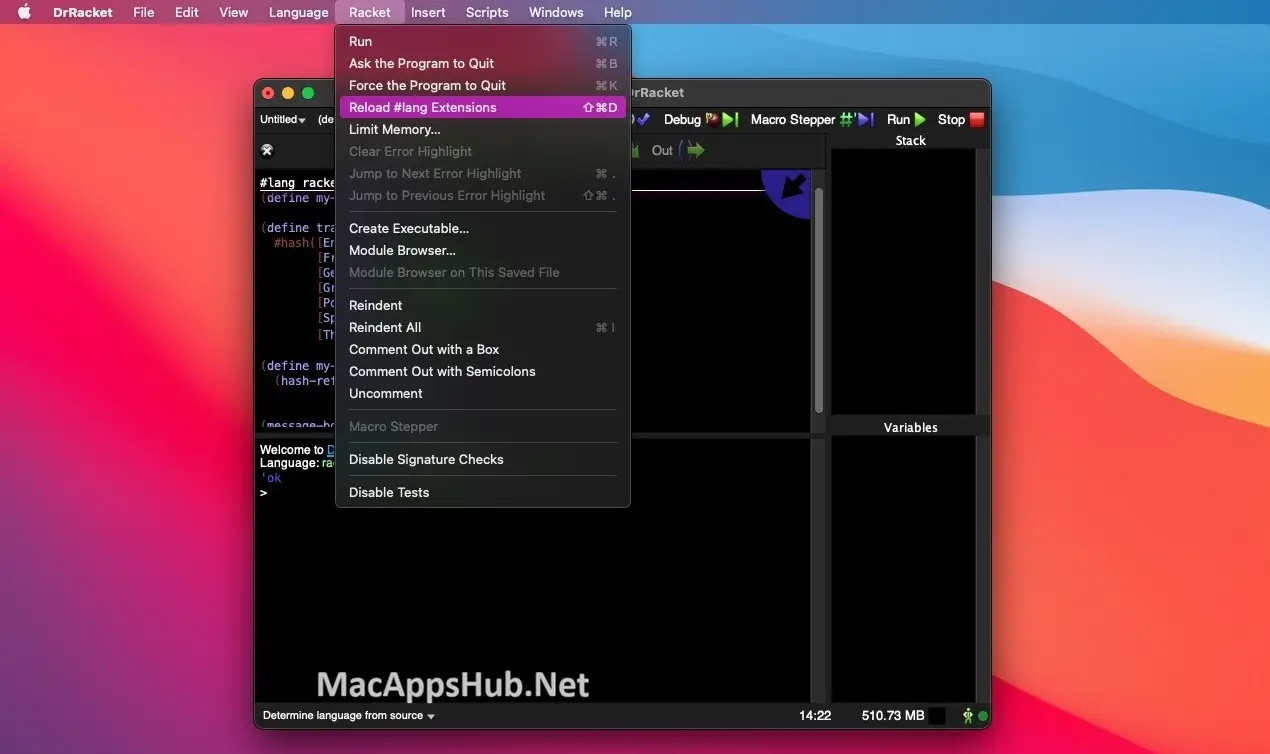
Racket for Mac is a free, open-source programming language that ships with its own IDE, DrRacket, and a package system that puts thousands of libraries one command away. It's built around a genuine macro system, powerful enough that programmers use it to construct entire new languages as ordinary libraries rather than needing separate tooling. A script can start with no type declarations at all, and Typed Racket only comes into play once a project is big enough to actually want that safety net. Students learning to program, researchers building domain-specific languages, and developers who want a language flexible enough to reshape around a specific problem all reach for it.
Why Choose Racket Mac App
The combination of language, IDE, and package ecosystem in one install is what sets this apart from picking a language and then assembling tooling around it separately. That pays off in ways beyond convenience: since Racket programs can be written in custom languages built through macros, a normal editor often has no idea what it's looking at, and jump-to-definition tools built for one language simply don't work in another. DrRacket doesn't have that problem, because it understands the source information Racket's macro system carries along, even into a language nobody but your team has ever used. Native-code JIT compilation means a quick five-line script and a large multi-file system both run with real performance, not just the toy scripts. The macro system itself has been used to build an algebraic pattern-matching library and a logic-constraint solver, both implemented entirely as ordinary Racket code rather than changes to the compiler.
A few practical details matter for anyone installing this on a Mac specifically. Apple Silicon and Intel Macs each get their own native installer rather than sharing one universal package, so M-series chips run without any Rosetta translation involved. Typed Racket adds a genuine safety net for larger projects: start a script untyped, and layer in static types only where the codebase has actually grown complex enough to benefit, rather than committing to a fully typed system upfront. Everything here, the compiler, the IDE, and the full package ecosystem, is free and open source with no licensing restriction on commercial or personal use.
Key Features
- DrRacket IDE — a built-in development environment where hovering over any identifier draws an arrow back to where it was defined.
- Real macro system — define new syntactic constructs the same way other languages let you define functions, powerful enough to build entire new languages as libraries.
- Typed Racket — add static, safe gradual typing to a project incrementally as it grows, without committing to types from the start.
- Native-code JIT compilation — both small scripts and large systems benefit from just-in-time compiled performance.
- Thousands of packages — install additional libraries with a single `raco pkg install` command, covering everything from web servers to 3D graphics.
- Cross-platform GUI toolkit — build native-feeling graphical applications that run on Windows, macOS, and Linux from the same code.
- Higher-order software contracts — formally specify and enforce how functions should be used, a feature Racket was first to support.
- Standalone executables — package a finished program into a distributable binary with `raco exe`, no separate runtime install required for end users.
- Multiple language dialects — write different parts of a project in different `#lang` variants, including typed, scripting, and Datalog styles, within the same ecosystem.
- Editor integrations — official support for VS Code, Emacs, and Vim, beyond the built-in DrRacket IDE.
What's New in Racket 9.3 Version
Version 9.3 shipped August 13, 2026 with tooling and performance refinements.
- `raco setup` can now generate markdown documentation using the `--doc-markdown` option.
- Teaching languages (BSL through ISL+, plus DeinProgram) reached parity with the Language dialog and are now the recommended choice for students.
- DrRacket's background expansion disables errortrace annotations, speeding up syntax checking.
- `raco pkg install` gained new options (`--adjacent-deps`, `--destdir`, `--attach`) and a refined `--skip-installed`.
- The foreign interface added a `define-runtime-lib` mechanism for locating libraries relative to a source file.
- The `file/zip` package added in-memory sources and per-file compression control for generating zip files.
- Network connections using `tcp-listen` now retry automatically when they fail with an "address in use" error.
- The `racket/base` module now requires fewer internal modules and instantiations, a small startup efficiency gain.
- Several refinements to contracts and continuation handling.
Supported macOS Versions
Racket 9.3 supports OS X 10.9 and later, a notably wide compatibility range for current developer tooling. The one detail to get right during download: Racket does not ship as a universal binary on Mac. Apple Silicon and Intel each get a separate, dedicated installer, so M-series Macs run entirely native code with no Rosetta translation, while Intel Macs on a supported OS version install the matching build built specifically for their architecture.
How to Download and Install Racket on Mac?
Installing Racket on Mac only takes a few steps after downloading, including one important choice based on your Mac's chip.
- Click the Download button above, making sure to select the installer matching your Mac's processor, Apple Silicon or Intel.
- Open the downloaded .dmg file, then drag Racket into your Applications folder.
- Launch Racket (DrRacket) from Applications. If macOS shows an "unidentified developer" warning, go to System Settings → Privacy & Security and click Open Anyway.
- Grant any folder access macOS requests, so Racket can read and write project files.
Once the initial setup is done, Racket won't ask for these permissions again, future launches go straight to DrRacket.
How to Use Racket Mac App?
- Launch DrRacket and choose a `#lang` line at the top of a new file, `racket`, `racket/gui`, `typed/racket`, or another dialect.
- Write and run a script directly in DrRacket's built-in editor and interactions window.
- Install additional packages with `raco pkg install` from the command line when you need a library beyond the default collection.
- Use `raco exe` to package a finished program into a standalone executable for distribution.
- Hover over any identifier in DrRacket to see an arrow pointing back to its definition.
- Switch to an external editor like VS Code or Emacs with the official Racket extension if you prefer working outside DrRacket.
Alternatives
Clojure: A free, open-source Lisp that runs on the JVM, popular for its immutable data structures and strong Java interoperability.
SBCL (Steel Bank Common Lisp): A free, open-source, high-performance implementation of Common Lisp with a native compiler.
GNU Guile: A free, open-source Scheme implementation designed for embedding as an extension language inside other applications.