GitHub Desktop Overview
GitHub Desktop for Mac wraps Git in a visual interface without hiding what's actually happening underneath. Side-by-side diffs make code review straightforward, a single Sync button pushes and pulls changes in one step, and commits can be dragged, cherry-picked, squashed, or reordered right in the timeline instead of memorizing rebase syntax. Git worktree support lets you check out a second branch into its own working directory without stashing anything, and Copilot can now write commit messages that follow your repository's own conventions. Developers who want Git without fighting the command line for routine tasks, teams standardizing on a shared workflow, and anyone managing multiple branches at once all keep it running alongside their editor.
Why Choose GitHub Desktop Mac App
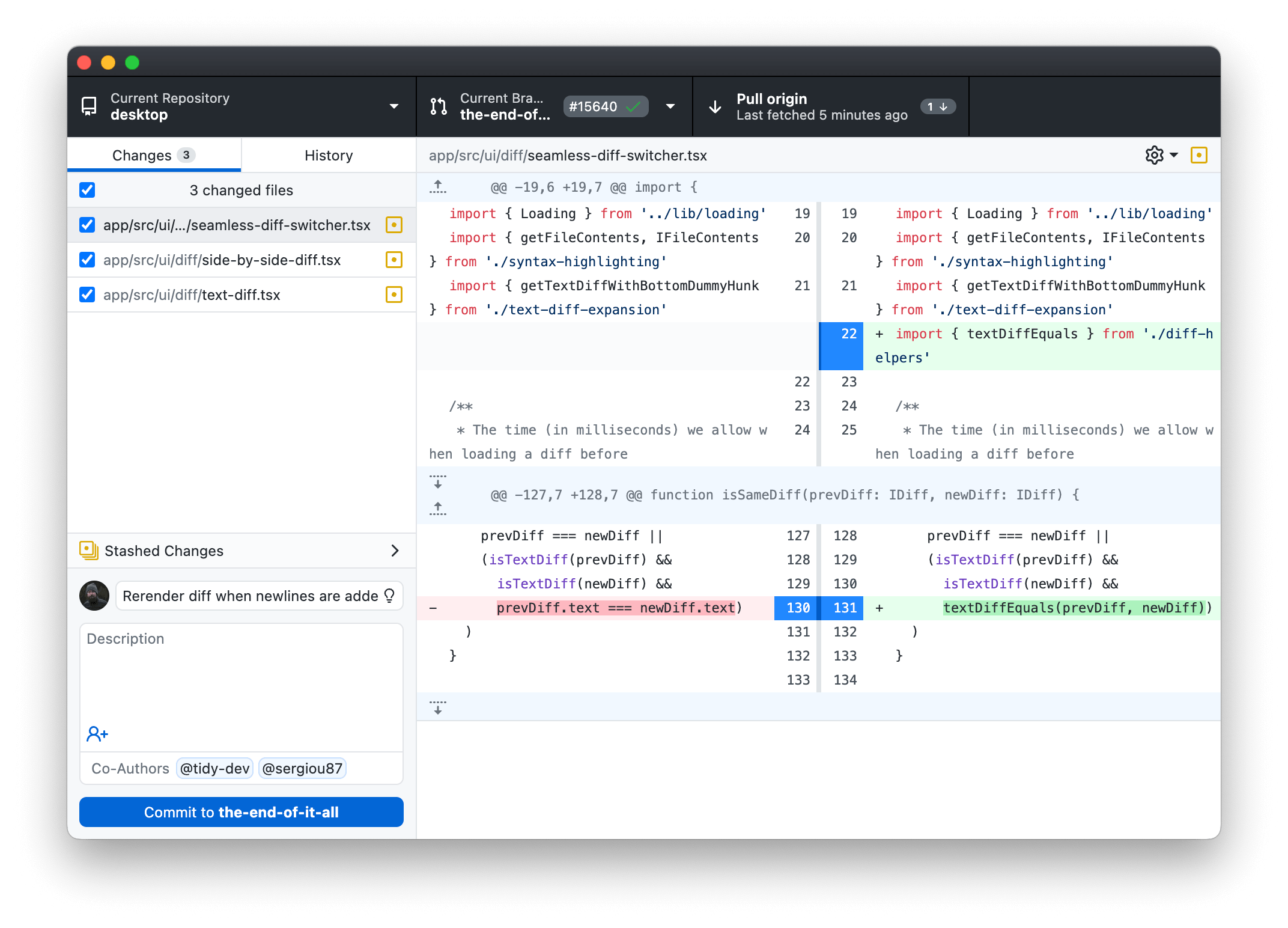
The core appeal hasn't changed much because it doesn't need to: visual diffs catch details a command-line `git diff` makes you squint at, and drag-and-drop commit management turns cherry-picking or squashing into something you can actually see happening instead of trusting a rebase command blindly. The Sync button pushes your changes and pulls anyone else's in one motion, with a clear notification any time you're ahead or behind. All of this stays completely free, with no feature locked behind a paywall for the core Git workflow.
The version 3.6 update added the features that matter most right now. Git worktree support means you can check out a second branch into its own folder and work on it in parallel, without stashing your current changes just to switch context. Commit message generation now runs on Copilot and reads your repository's own `.github/copilot-instructions.md` and `AGENTS.md` files, so generated messages actually follow your team's conventions instead of sounding generic. Merge conflicts get AI-assisted resolution help directly in the app, and a model picker plus bring-your-own-key support means you're not locked into whichever model GitHub picks by default. It's still a genuine universal binary, running natively on Apple Silicon.
Key Features
- Visual diff review: compare changes side by side to catch every detail before committing.
- Drag-and-drop commit management: cherry-pick, squash, or reorder commits by dragging them in the timeline.
- One-click branch sync: push and pull changes in a single action, with notifications when you're behind or ahead.
- Git worktree support: manage multiple working directories of the same repository at once, without stashing changes to switch branches.
- Copilot-powered commit messages: generate messages that follow your repo's own copilot-instructions.md and AGENTS.md conventions.
- AI-assisted merge conflict resolution: get Copilot's help navigating and resolving conflicts directly in the app.
- Model picker and BYOK: choose which AI model powers Copilot features, or bring your own key for a third-party or local model.
- Stash changes: save work-in-progress without committing it to a branch.
- Commit amending and reverting: adjust commit messages, add changes, or revert to earlier states without touching the command line.
- One-click repository cloning: automatically matches repositories to organizations you belong to.
What's New in GitHub Desktop 3.6.6 Version
Version 3.6.6 is a small maintenance release, updating the bundled Git and Git Credential Manager components. The substantial changes worth knowing about landed with version 3.6.0 in June 2026:
- Git worktree support for managing multiple working directories of the same repository.
- Copilot-powered commit message generation that respects your repository's custom instructions and metadata rules.
- AI-assisted merge conflict resolution, built on the same Copilot SDK.
- A model picker for every Copilot feature, plus bring-your-own-key support for third-party or local models.
Improved
- Ask for confirmation before revealing certain folders in Finder - #22872
- Improve how .gitignore files are handled - #22872
Supported macOS Versions
GitHub Desktop 3.6.6 requires macOS 12 Monterey as a floor and runs cleanly through macOS 26 Tahoe. As a genuine universal binary, it runs natively on both Apple Silicon and Intel Macs, and since Git operations and diff rendering aren't demanding tasks for either chip, performance stays smooth on either architecture for typical repository sizes.
How to Download and Install GitHub Desktop on Mac?
Installing GitHub Desktop on Mac only takes a few steps after downloading, including one quick permission it needs to run properly.
- First click on the Download button given on this page that is fully secure and complete the downloading procedure.
- Open the downloaded .zip file, then drag GitHub Desktop into your Applications folder.
- Launch GitHub Desktop from Applications. If macOS shows an "unidentified developer" warning, go to System Settings → Privacy & Security and click Open Anyway.
- Sign in with your GitHub account, or configure it for a different Git hosting provider if you're not using GitHub.com.
- Grant any folder access macOS requests, so GitHub Desktop can read and write your repository files.
Once the initial setup is done, GitHub Desktop won't ask for these permissions again, future launches go straight to your repository list.
How to Use GitHub Desktop Mac?
- Launch GitHub Desktop and sign in with your GitHub account.
- Clone an existing repository, or add a local repository you're already working in.
- Make changes to your files, then review the diff in the Changes tab before committing.
- Write a commit message yourself, or let Copilot generate one that follows your repo's conventions.
- Use the Sync button to push your commits and pull down anyone else's changes in one step.
- Create a worktree from History or Repository settings to work on a second branch without stashing your current changes.