
Anki Overview
Anki is a free, open source flashcard app for Mac that uses spaced repetition to schedule reviews right before you're statistically likely to forget something. FSRS, a modern scheduling algorithm, adapts to how an individual actually forgets, available alongside the classic algorithm long-time users may already know. Flashcards support audio, images, video, and scientific markup through LaTeX, and a single collection can hold more than 100,000 cards without performance problems. Deck layouts and review timing are fully customizable, and a large add-on ecosystem extends the app well beyond its core features. The free AnkiWeb service syncs decks, and shared decks let you study material other users have already built. Separate downloads are available for Apple Silicon and Intel Macs, with each installer built specifically for the chip it targets.
Why Choose Anki Mac App
Re-reading notes feels productive, but it's one of the least effective ways to actually retain information. Anki uses spaced repetition instead, showing a flashcard right before you're statistically likely to forget it, so review time goes toward what's genuinely at risk of being lost rather than material already mastered.
A well-known essay on long-term memory by Michael Nielsen describes Anki as turning remembering from something left to chance into something closer to a guarantee, achieved with genuinely minimal daily effort. Recent versions have leaned into that promise further, refining exactly when a card resurfaces so the timing tracks a real person's memory rather than a one-size-fits-all curve. On Mac specifically, separate Apple Silicon and Intel downloads keep the app running natively regardless of which chip is inside.
Key Features
- Spaced repetition scheduling: shows a flashcard right before you're likely to forget it, rather than on a fixed schedule.
- FSRS scheduling algorithm: adapts review timing to an individual's actual memory patterns, alongside the classic algorithm.
- AnkiWeb sync: keeps decks up to date wherever else you access your account, at no cost.
- Rich media support: adds audio, images, video, and scientific notation through LaTeX to any flashcard.
- Massive deck capacity: manages collections of 100,000-plus cards without slowing down.
- Deep customization: adjusts flashcard layouts and review timing to fit a specific study style.
- Add-on ecosystem: extends the app with community-built add-ons for new features and functionality.
- Deck organization: studies a specific subset of a collection instead of everything at once.
- Shared decks: browses and downloads decks other users have already built and published.
- Recall-based review rating: schedules the next review by rating recall as Again, Hard, Good, or Easy after each card.
- Open source: publishes its complete source code publicly on GitHub.
- Community translation: offers a multi-language interface maintained by volunteer translators.
Screenshots
What's New in Anki 26.09.3 Version
Version 26.09 includes important security fixes, and upgrading as soon as possible is strongly recommended by the developers. Other changes in this release:
- Fixed a "Card modified" error appearing in the Cards Info screen when FSRS is disabled or memory state data is missing
- Forced software rendering when running in safe mode
- Fixed a "Please restart to save changes" message appearing multiple times in some cases in Preferences
- Anki ships new releases on a genuinely frequent basis, with security and stability fixes arriving regularly rather than being held back for occasional large updates.
Supported macOS Versions
Anki requires macOS 13 or later, with separate installers built specifically for Apple Silicon and Intel Macs rather than a single universal download. Reviewing flashcards is lightweight work for any Mac's processor, so hardware speed makes little practical difference to daily study sessions. A very large collection, tens of thousands of cards with embedded audio, images, or video, benefits from more storage and RAM when browsing or syncing the full deck.
How to Download and Install Anki Mac?
Installing Anki on Mac only takes a few steps after downloading.
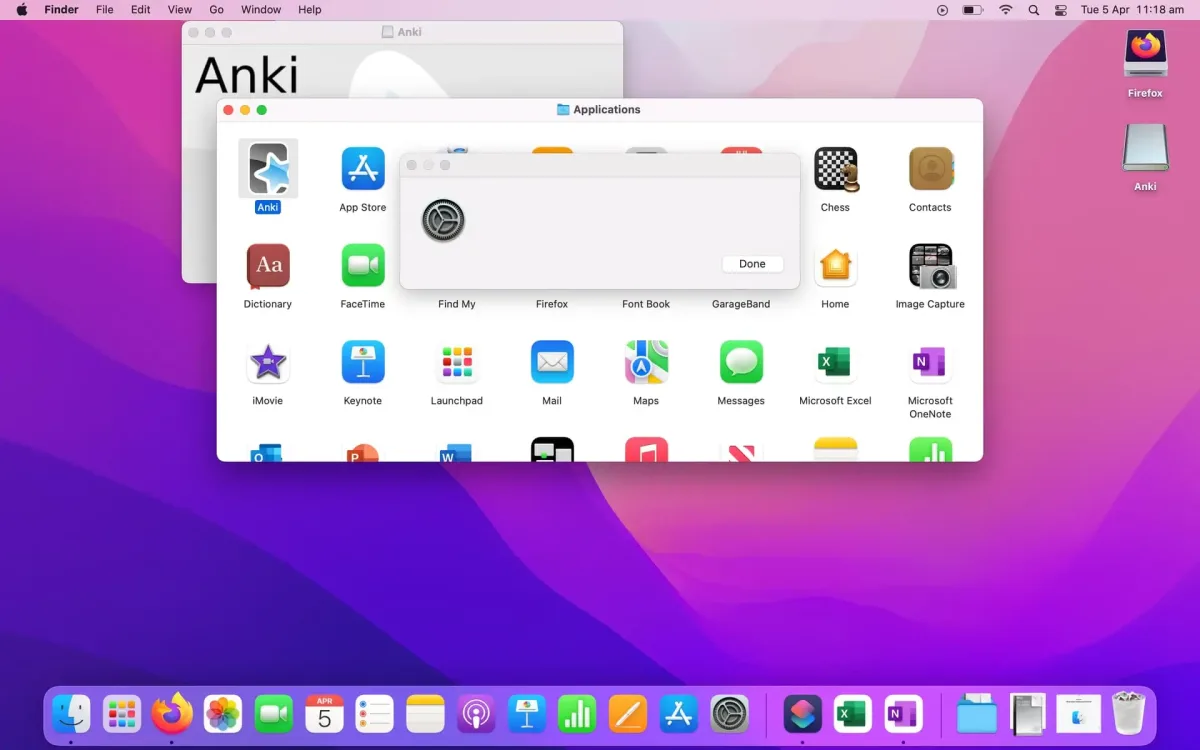
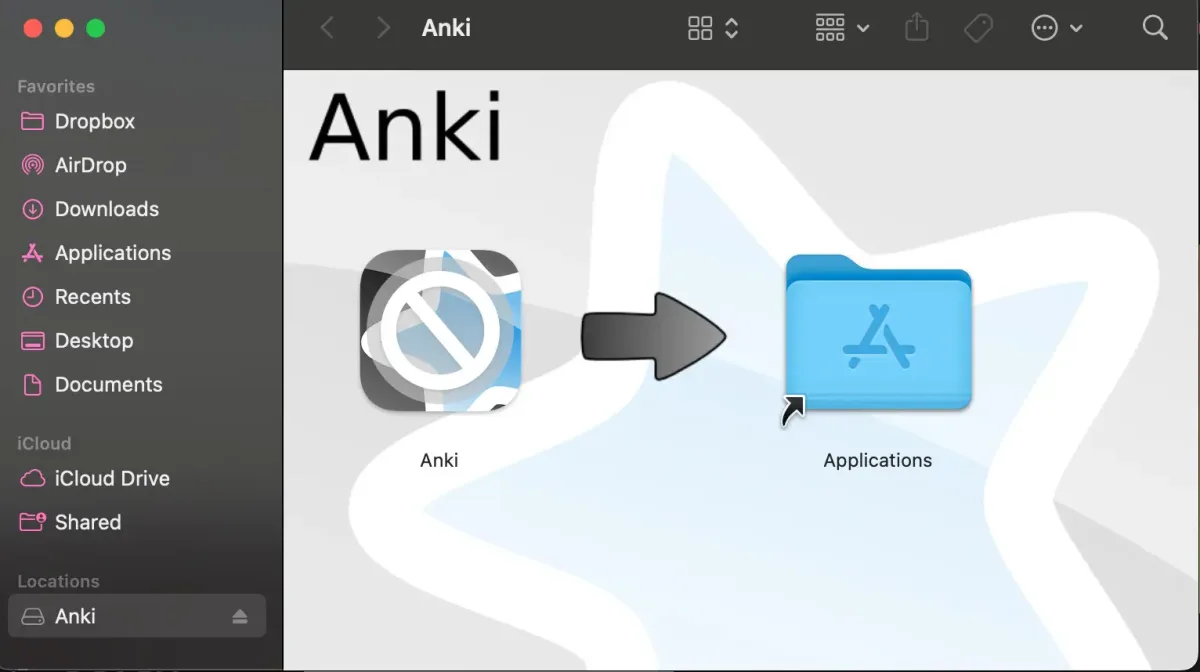
- Click the Download button above, choosing the version matching your Mac's chip if prompted.
- Open the downloaded .dmg file, then drag Anki into your Applications folder.
- Launch Anki from Applications. If macOS shows an "unidentified developer" warning, go to System Settings → Privacy & Security and click Open Anyway.
Create a free AnkiWeb account if syncing decks is needed.
How to Use Anki Mac?
- Create a new deck, or download a shared deck from AnkiWeb to start with existing material.
- Add a note, filling in the front and back of a card, including images, audio, or LaTeX if needed.
- Click Study Now to begin reviewing due cards for a specific deck.
- Rate recall after each card as Again, Hard, Good, or Easy to schedule its next review.
- Adjust deck options if a different scheduling algorithm, like FSRS, is preferred.
- Sync with AnkiWeb to keep the deck backed up and up to date.
Alternatives to Anki
Quizlet: Free-tier flashcard and study platform with a large library of shared study sets, widely used alongside or instead of Anki.