Audacity Overview
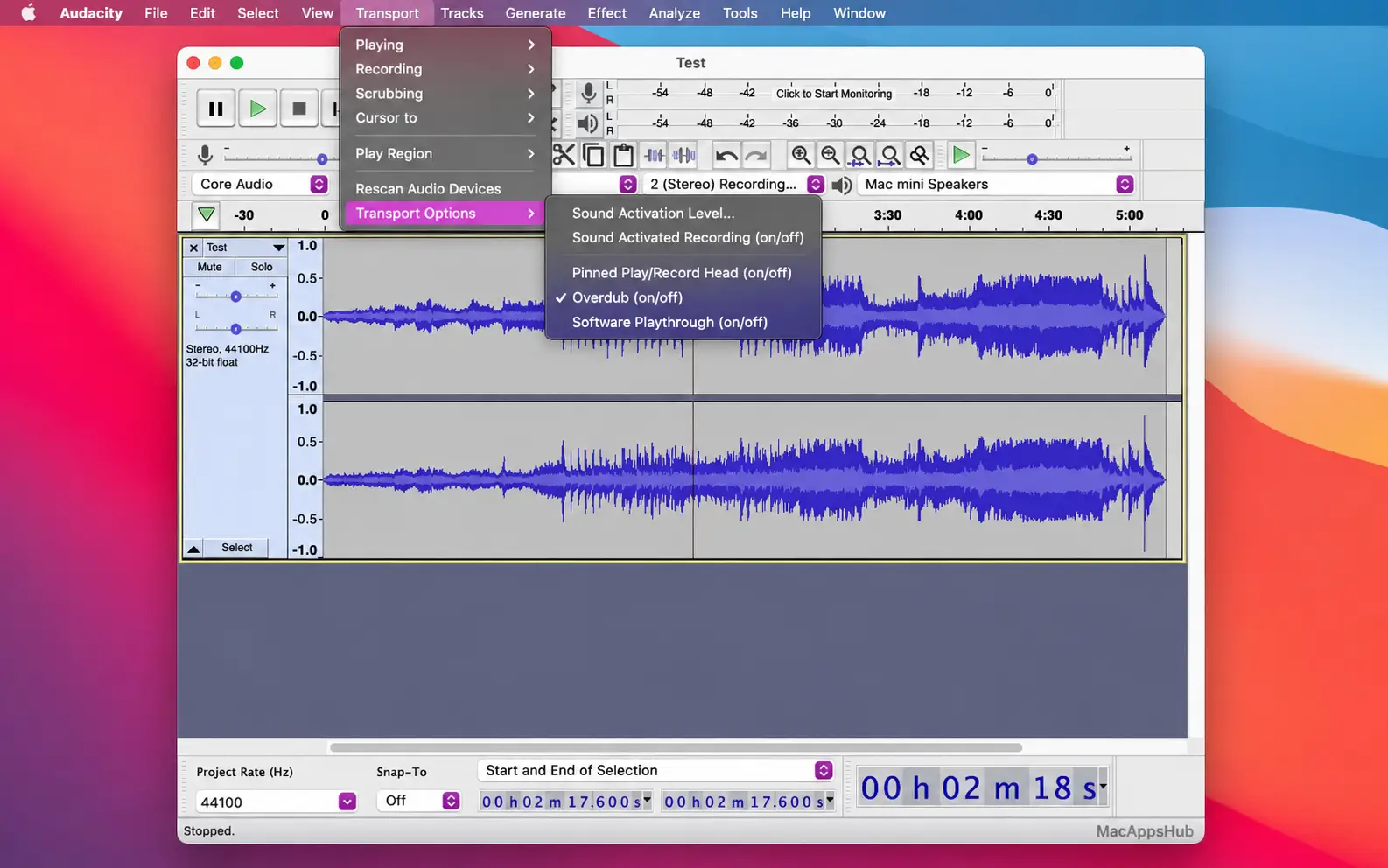
Audacity for Mac records and edits multi-track audio with unlimited undo, built-in effects, and detailed analysis tools, all for free. It covers the full loop from recording through cleanup to export: a compressor and limiter, noise reduction, pitch and speed changers, a spectrogram view, and a frequency-analysis window come built in, so most editing work doesn't need a single paid plugin. Multi-format plugin support extends it when you do need something specific, and cloud saving through Audio.com lets you back up and collaborate on a project without a separate service. Podcasters cleaning up an interview, musicians recording and mixing multi-track demos, and field recordists capturing and analyzing environmental or ambient sound all use it as their go-to audio editor.
Why Choose Audacity Free Audio Editor & Recorder App
The effects and analysis toolkit is where this earns its reputation. A compressor, limiter, noise reduction, and pitch and speed changers cover the editing basics that other free editors often lock behind a purchase, and the spectrogram and frequency-analysis views give you a genuine look at what's actually happening in a recording, useful for tracking down a hum or a clipped section that's hard to hear but easy to see. The built-in toolkit isn't a ceiling either: Audio Unit plugins, the format built into macOS itself, work alongside VST3, LADSPA, LV2, and Nyquist, so effects from GarageBand or Logic Pro's plugin library can often slot straight into a project. All of it, every effect and analysis tool listed, is free and open source under the GPL v3, with the source code open for anyone to inspect or modify.
Two things matter specifically if you're on a Mac right now. OpenVINO AI plugins became available specifically for macOS, adding AI-powered music separation, noise suppression, music generation, and audio super resolution directly into the effects menu, tools that used to require a separate paid service. Transcription runs the same way: speech converts to text using the Whisper model entirely on your Mac, with no file uploads, no minute caps, and no monthly fee attached. And beyond the standard universal DMG covering both chip types, separate Apple Silicon-only and Intel-only downloads are available too, in case you'd rather install the build matched exactly to your Mac's processor. Automatic beat detection and time-stretching round things out for anyone syncing clips to a song's tempo rather than eyeballing the waveform.
Audacity Features
- Multi-track recording and editing — record and edit unlimited tracks with unlimited undo, on Windows, macOS, and Linux.
- Built-in effects and analysis tools — compressor, limiter, noise reduction, pitch and speed changers, plus a spectrogram and frequency-analysis view.
- OpenVINO AI plugins — AI-powered music separation, noise suppression, music generation, and audio super resolution, available specifically for macOS.
- Local AI transcription — generate a text transcript of an interview, lecture, or podcast episode without sending the audio anywhere.
- Multi-format plugin support — extend the built-in toolkit with VST3, Audio Unit (AU), LADSPA, LV2, and Nyquist plugins when you need something beyond the defaults.
- Cloud saving via Audio.com — back up projects and collaborate with others through Audacity's companion service; basic saving is free, with paid plans available for extra storage.
- Automatic beat detection and time-stretching — align clips to a song's tempo without manually adjusting timing by ear.
- Broad format support — import and export WAV, MP3, FLAC, OGG, and more, with additional formats available through the optional FFmpeg library.
- Macro and scripting support — automate repetitive editing tasks using Audacity's built-in scripting and macro tools.
- Vocal Remover — AI-powered stem separation pulls vocals out of any song for karaoke, remixes, or covers, with no limits or subscription.
- Reverb — add natural room, hall, or cathedral ambience to vocals, instruments, or podcast recordings.
What's New in Audacity 4.0.1 Version
Version 4.0.1 shipped October 08, 2026 as a patch release, part of the 3.7.x maintenance series while the team develops Audacity 4.
Features
- Export multiple: export each track, or each labelled region, to its own file (#11136)
- Portable Windows version that runs without installation (#11932)
- Restored missing Audacity 3 keyboard shortcuts (#12062)
- "Open in file manager" on the Cloud projects tab (#11801)
- Clickable carousel dots on the Welcome screen (#11247, by @danielmolinas)
- Liquid Glass app icon on macOS (#11923, by @JoshBashed)
Accessibility
- The timeline and the track vertical rulers are now part of keyboard navigation (#11367, #11368)
- Opening the Effects panel focuses the "Add effect" button (#11416)
- Toast notifications are announced by screen readers and reachable by keyboard (#11645)
Bug fixes
- Fixed project corruption after a failed save (#12296)
- Fixed clips being messed up when converting .aup3 projects (#12209)
- Fixed opening projects and files with non-ASCII characters in their name or folder (#11973, #11976, #12004, #12057, by @jonata)
- Fixed other non-ASCII text issues: presets with Unicode names, starting a new project, and the input device always being the system default on Windows (#8267, #11468, #12107)
- Fixed Audacity failing to launch with Windows Smart App Control enabled (#12167)
- Fixed the AppImage failing to install or start on some Linux distributions (#10135, #12093, by @kfl; #11915)
- Fixed crash when opening the Effect menu in German (#12025)
- Fixed "Audacity quit unexpectedly" dialogs popping up during plugin validation (#11427)
- Fixed VST3 setting changes being reverted on playback start (#11892)
- Fixed typing values into effect controls (#11643, #11668)
- Dragging clips and labels across tracks is faster and no longer crashes, and dragging a duplicated clip onto its original no longer makes it disappear (#12097, #12081 by @jonata)
- Realtime effect windows stay open on edits and undo/redo, and undo/redo is faster with many effects (#12187)
- Fixed clips flickering when selecting after applying an effect (#11145)
- Fixed the playhead drifting from bars and beats above 120 BPM (#11925)
- The view no longer jumps on pause or double-click, and selecting a track by its header no longer moves the playhead (#11148, #12013, #11972 by @jonata)
- Fixed new labels being placed at the wrong position, and the first label's name not being editable right away (#11682 by @RiccardoCampo, #10083)
- No more "-9996 Invalid device" error dialog when input monitoring can't open the device (#12070, by @jonata)
- Fixed exported file names being truncated (#11966)
- Fixed opening files dropped on the macOS Dock icon (#11961)
- Fixed upper-case extensions such as .WAV not being recognized on Linux (#12007)
- Fixed shortcuts not being saved (#11903)
- Fixed tooltips on the gain, volume and graphic EQ sliders (#10410, #11841)
- Fixed the meter dB range not being translated (#11940 by @jonata)
- Cloud: fixed resuming uploads after a lost connection, mono audio imported as stereo, and broken project audio previews (#11609, #12155, #11568)
- Cloud: no more redundant sync dialog on save, error when overwriting a local copy, or half-initialized window after a failed open (#11373, #11460, #11374)
Supported macOS Versions
Audacity 4.0.1 is officially tested on macOS 14 and macOS 15, and the developer states it should also work on any release back to macOS 10.11 El Capitan, though those older versions aren't specifically tested. One detail worth knowing: macOS 10.14 and earlier don't support the universal DMG, so those Macs need the separate Intel-only installer instead. Basic recording and editing run comparably on Apple Silicon and Intel, but the local AI features are a different story: transcription runs a Whisper model directly on your Mac, and that kind of on-device inference genuinely benefits from Apple Silicon's Neural Engine, so expect noticeably faster results on an M-series chip than on older Intel hardware. The developer also notes that Audacity needs fast, uninterrupted access to a hard drive or SSD to record and edit reliably; network storage, consumer-grade external drives, and USB thumb drives may cause dropouts or instability during recording.
How to Download and Install Audacity on macOS?
Installing Audacity on Mac only takes a few steps after downloading, including one quick permission it needs to run properly.
- Click the Download button above that is fully secure and complete the downloading procedure.
- Open the downloaded .dmg file, then drag Audacity into your Applications folder.
- Launch Audacity from Applications. If macOS shows an "unidentified developer" warning, go to System Settings → Privacy & Security and click Open Anyway.
- Grant microphone access when prompted, so Audacity can record audio from your Mac's input devices.
- Install the optional FFmpeg library separately if you need to import or export formats like WMA, M4A, or AC3.
Once the initial setup is done, Audacity won't ask for these permissions again future launches go straight to your project.
How to Use Audacity Mac App
- Launch Audacity and click the red Record button to start recording, or import an existing audio file via File > Import.
- Use the Selection tool to highlight part of a track, then apply an effect from the Effect menu.
- Add multiple tracks to build a multi-track project, adjusting each track's volume and pan individually.
- Switch a track to Spectrogram or frequency-analysis view for a detailed look at its content.
- Export your finished project as WAV, MP3, FLAC, or another format via File > Export.
- Sign in to Audio.com from within Audacity if you want cloud saving or to collaborate with someone else on a project.