Noizio for Mac Overview
Noizio is a Mac menu-bar app that blends 40-plus ambient, nature, and brainwave-style sounds into custom mixes for focus, relaxation, or sleep. It plays entirely offline, runs in the background while other apps are in use, and includes a built-in Pomodoro Timer for structured work sessions. The library covers everything from Rain and Sea Waves to White Noise and Alpha Waves, and any combination can be saved as a personal mix for one-click reuse. It ships as a universal binary, running natively on both Apple Silicon and Intel Macs.
Why Choose Noizio Mac App
Most people cobble together a focus setup from several tools: a white-noise app, a separate Pomodoro timer, and maybe a sleep sounds app for the evening. Noizio folds all three into a single menu-bar utility. Its library of 40-plus curated sounds spans nature recordings, city ambience, and binaural-style brainwave tones, and any of them can be layered and volume-balanced into a mix worth saving. The built-in Pomodoro Timer sits right alongside that mixer, so a focus session and its background soundscape start from the same small window instead of two separate apps.
Being a Mac App Store exclusive means Noizio behaves like a proper macOS citizen rather than a ported cross-platform tool. It sits in the menu bar instead of the Dock, follows System Settings for its Light or Dark appearance, and now tracks whichever output device is active system-wide instead of getting stuck on the wrong speaker or headphones after a reconnect. Since the app's entire job is looping small audio files quietly in the background, it stays light on system resources on any Mac capable of running a current version of macOS.
Key Features
- 40+ ambient sounds: everything from Rain and Sea Waves to Campfire, City Street, Subway, and Deep Space, each recorded and looped for a natural, non-repetitive listen.
- Brainwave-style tones: Alpha, Beta, Gamma, Delta, and Theta Wave tracks for anyone specifically using audio for focus or meditation states.
- Custom mix creation: layer multiple sounds together and balance each one's volume to build a personal soundscape.
- Saved mixes: store a favorite combination and reload it with a single click instead of rebuilding it each time.
- Background playback: keeps playing while other apps are active, since Noizio runs from the menu bar rather than a standalone window.
- Fully offline: every sound plays locally, with no account, login, or internet connection required.
- Built-in Pomodoro Timer: structures work sessions with timed focus intervals and breaks, layered on top of whichever sound mix is playing.
- Autopause timer & Alarm: sets sounds to stop automatically after a chosen duration, or start at a specific time.
- Seamless looping: tracks are engineered to loop without an audible seam, so longer listening sessions don't reveal an obvious repeat point.
- Minimalistic interface: a compact menu-bar design that stays out of the way of whatever else is open on screen.
Screenshots
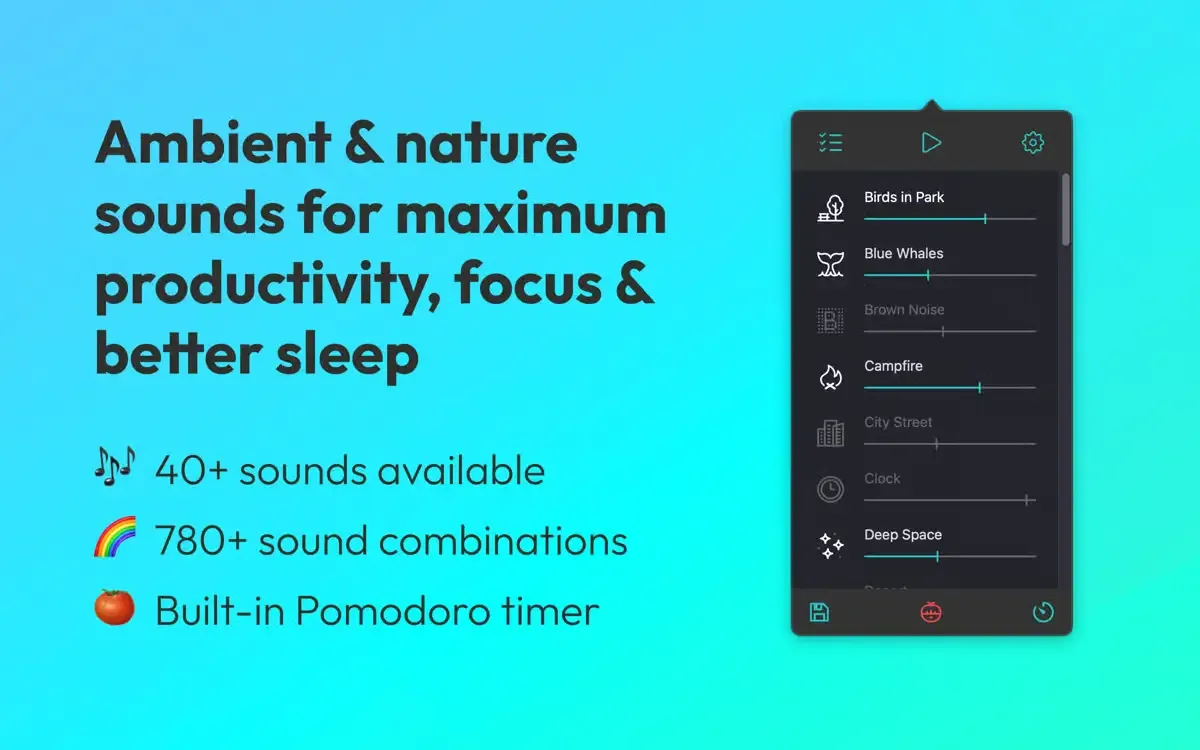
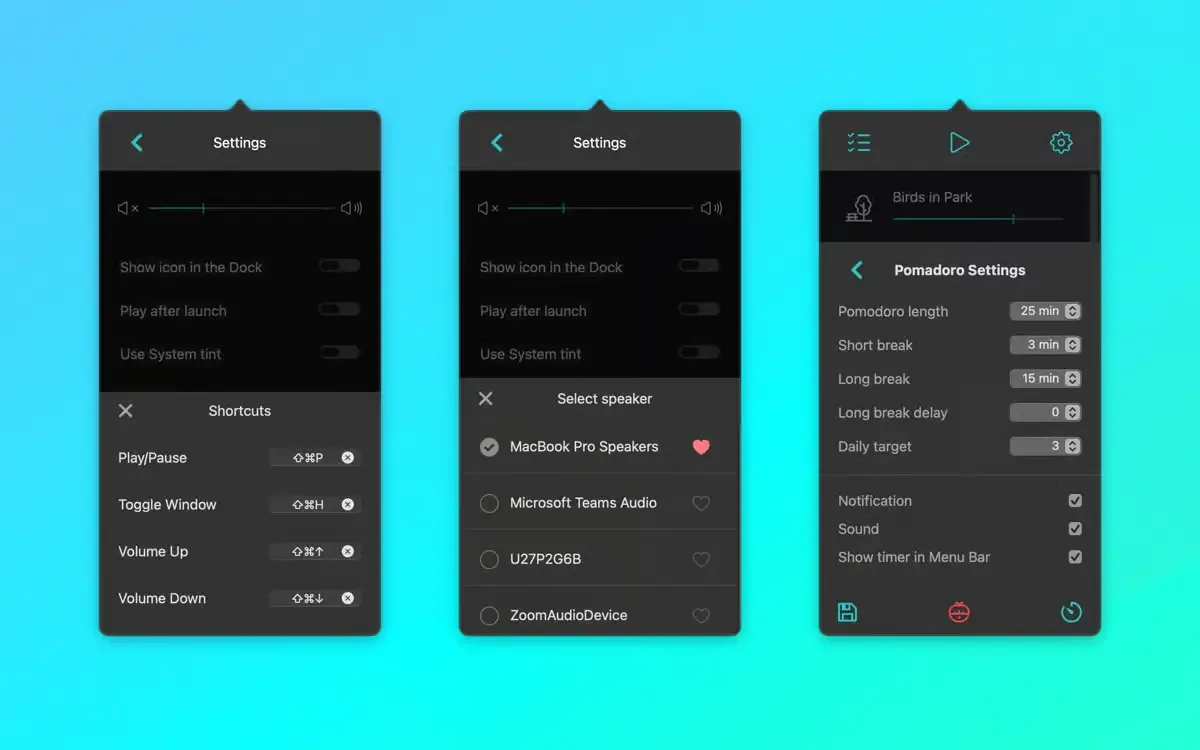
What's New in Noizio 2.3.0 version
Version 2.3.0, released September 1, 2026, centers on a rebuilt audio engine:
- New "System Default" mode, so playback follows whichever output device is picked in Control Center or System Settings
- Sound no longer stops after sleep or when Bluetooth headphones reconnect
- Video call apps and other virtual audio devices no longer interrupt or steal playback
- A heart icon pins a preferred output as the app's default, while a checkmark picks a device just for the current session
- A new Appearance setting lets the app follow the system's Light/Dark mode or override it manually
- Timer fixes correct weekday handling across regions, and Auto Pause presets now count down from the current time instead of a fixed point
- The interface got a visual refinement for macOS Tahoe, including an always-visible scrollbar option and general stability improvements
Together, these changes target the exact kind of audio-output glitches that used to require quitting and reopening the app after switching headphones or waking the Mac from sleep.
Supported macOS Versions
Noizio requires macOS 10.15 (Catalina) or later and ships as a universal binary, so it runs natively on both Apple Silicon and Intel Macs without any translation layer in between. Version 2.3.0 specifically refines the interface for macOS 26 (Tahoe), including an option for an always-visible scrollbar on Macs set to show one, so anyone already running the newest system release gets a build tuned for it rather than one just tolerating it. Because the app's job is just looping audio quietly in the background, hardware demands stay minimal regardless of which macOS version or chip a Mac is running. Even an older Intel MacBook handles Noizio exactly as smoothly as a recent M-series machine.
How to Download and Install Noizio on Mac?
You can download and Install easily Noizio on Mac via 2 ways either directly download setup file OR you may get it from app store official website.
Download and install via direct file download:
- Click the Download button above to securely download the setup file.
- Open the downloaded .dmg file, then drag Noizio into your Applications folder.
- Launch Noizio from Applications. If macOS shows an "unidentified developer" warning, go to System Settings → Privacy & Security and click Open Anyway.
- Noizio opens straight to its menu-bar icon, ready to start playing sounds right away, no permissions or sign-in required.
From here, Noizio stays available from the menu bar every time your Mac starts, unless that's turned off in its own settings.
Download and install via Mac App Store: (Recommended)
Installing Noizio on Mac takes under a minute through the App Store, with no separate download, unzip, or drag-and-drop needed.
- Click the Download button above. It opens Noizio's official listing on the Mac App Store.
- Tap the price button to purchase, since Noizio is a one-time paid download rather than a free app.
- Sign in with your Apple ID if prompted.
- macOS downloads and installs Noizio automatically in the background.
- Once installed, launch it from Launchpad or your Applications folder.
Because the App Store handles future updates automatically, there's no need to manually reinstall Noizio each time a new version ship.
How to Use Noizio Mac App?
- Click the Noizio icon in the menu bar to open the sound mixer.
- Select one or more ambient sounds from the library, such as Rain or White Noise, to start them playing.
- Adjust each sound's individual volume slider to build a custom mix.
- Save the mix so it can be reloaded again later with a single click.
- Set the Autopause timer or Alarm if the sounds should stop or start at a specific time.
- Open the Pomodoro Timer if a structured focus session is needed alongside the sound mix.
Alternatives to Noizio App
Apple Background Sounds: Free and built directly into macOS, offering a handful of steady ambient soundscapes with volume and timer controls, no extra app required.
Elpy: Free, donation-supported ambient sound mixer for Mac that blends up to three sounds at once and saves custom presets.
myNoise: Free browser-based sound generator with adjustable frequency sliders across dozens of soundscapes, actively maintained and usable directly from any Mac browser.