GarageBand Overview
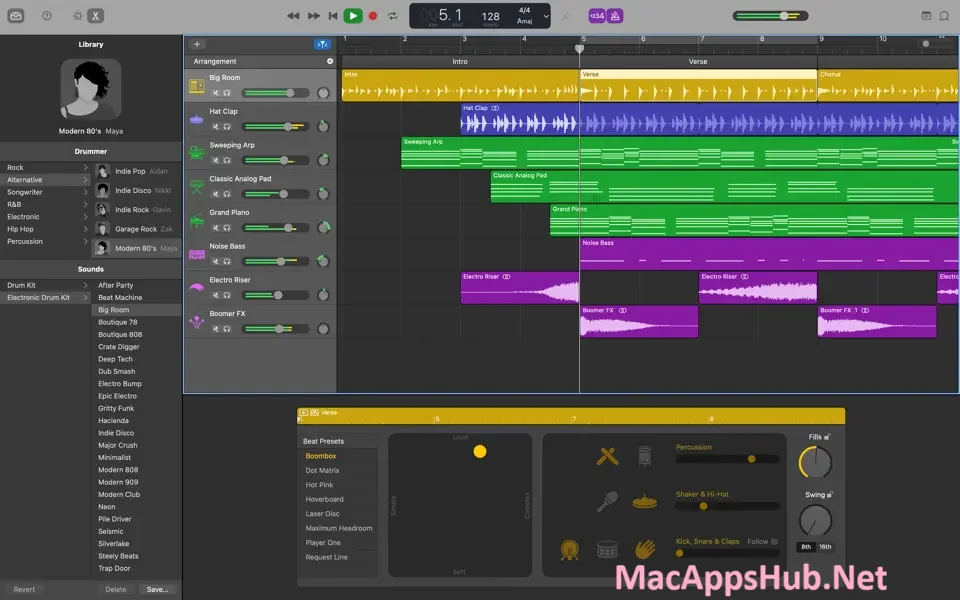
GarageBand for Mac is a complete music creation studio that costs nothing and needs no separate instruments to get started. Drummer, a virtual session player, can lay down realistic beats across genres like EDM, Hip Hop, Rock, and Alternative, choosing from 33 drummers, percussionists, and beat producers. Every instrument in the Sound Library comes with Smart Controls, a custom set of knobs and sliders that adapts to whatever you're playing, and Amp Designer plus Pedalboard bring 25 guitar amps and 35 stompbox effects to anyone plugging in a real guitar. Bedroom producers building a first track, guitarists experimenting with tone without buying a single pedal, and anyone learning piano or guitar from scratch all use it as their entry point into making music on a Mac.
Why Choose GarageBand Mac App
The Sound Library and Drummer combination is what makes this feel like a real studio rather than a stripped-down recording app. Drummer's 33 players cover genres from EDM to Alternative, and each one can perform over a million unique groove and fill combinations, so a song's backing beat sounds like it was played by an actual musician rather than a looped sample. Smart Controls shape every instrument with a purpose-built set of knobs and sliders instead of one generic mixer panel, and Amp Designer, Bass Amp Designer, and Pedalboard together cover guitar and bass tone shaping that would otherwise mean buying real pedals and amps. None of this costs anything beyond the free download.
Building a full song is where the free-app label starts to feel misleading. Nothing caps how big a project can get before you'd need to upgrade, timing mistakes get fixed by nudging a note rather than starting the take over, and picking a final vocal take doesn't mean losing the four you didn't use. The workflow also doesn't stop at your Mac's screen: a verse hummed into an iPhone on the way home is waiting inside GarageBand by the time you sit down to finish it, and an iPad nearby can double as a second set of hands for playing a part or riding a fader while your own hands stay on the keyboard.
Key Features
- Drummer — simple on-screen controls let you enable or disable individual kit pieces, so the beat responds to what your song needs rather than staying fixed once it's generated.
- Sound Library with Smart Controls — the knobs and sliders on screen rearrange themselves for each instrument, so a synth and a guitar amp never share the same generic panel.
- Amp Designer and Pedalboard — mix and match amps, cabinets, and stompboxes to build a guitar or bass rig without owning a single piece of real hardware.
- Up to 255 audio tracks — build a full song with as many tracks as the arrangement needs.
- Flex Time and Groove Track — fix a mistimed note by dragging it into place, or align every track's rhythm to one Groove Track with a click.
- Multi-take recording — record several passes of a section and pick the best one afterward, with every take saved.
- Guided lessons — 40 Basic Lessons for piano and guitar, plus free Artist Lessons taught by the original recording artists, with real-time feedback on your playing.
- iCloud sync — start a song on iPhone or iPad, then pick it up on your Mac to finish it, or add tracks remotely from iOS.
- Logic Remote support — use an iPad to wirelessly play instruments, adjust Smart Controls, and control recording from across the room.
- Direct sharing — export to the Music app library or share straight to SoundCloud, email, or social networks.
What's New in GarageBand 10.4.14 Version
Version 10.4.14 shipped April 23, 2026 as a maintenance release. Apple's own release notes describe it simply as stability improvements and bug fixes, with no detailed public changelog for this specific build.
Supported macOS Versions
The current GarageBand build requires macOS 15.6 Sequoia, a requirement that's climbed noticeably compared to earlier versions, so anyone on an older Mac that can't update that far will need to stick with an earlier GarageBand release. It supports both Apple Silicon and Intel Macs, as long as the machine can run the required macOS version, unlike Logic Pro, which now requires Apple Silicon specifically regardless of macOS version. Since GarageBand shares much of its instrument engine with Logic Pro, Apple Silicon Macs handle Drummer and Smart Controls processing with more headroom, though Intel Macs on a compatible macOS version remain fully functional for typical projects.
How to Download and Install GarageBand on Mac?
Installing GarageBand on Mac takes under a minute through the App Store, no separate download, unzip, or drag-and-drop needed.
- Click the Download button above, it opens GarageBand's official listing on the Mac App Store.
- Tap Get to install the free app.
- Sign in with your Apple ID if prompted.
- macOS downloads and installs GarageBand automatically in the background.
- Once installed, launch it from Launchpad or your Applications folder and let the initial Sound Library content finish downloading before your first session.
Because the App Store handles future updates automatically, you won't need to manually reinstall GarageBand each time a new version ships.
How to Use GarageBand Mac?
- Launch GarageBand and choose a template, an Empty Project, or a guided template like Songwriting or Beat Making.
- Add a software instrument, guitar, or vocal track and start recording.
- Use Smart Controls to shape the sound of any instrument or effect.
- Add a Drummer track and choose a player and genre to generate a realistic beat.
- Use Flex Time and Groove Track to tighten up timing across your project.
- Export your finished song to the Music app, or share it directly to SoundCloud or social media.
Alternatives
Audacity: A free, open-source multi-track recorder and editor with built-in noise reduction and effects, better suited to podcasting and audio cleanup than full instrument-based production.
Waveform Free: A genuinely unlimited free DAW from Tracktion with unrestricted track counts and support for VST, VST3, and AU plugins, aimed at anyone who wants to grow past GarageBand's built-in library.
LMMS: A free, open-source beat-making and pattern-based production tool with a built-in FX mixer, closer in spirit to a loop-driven electronic music workflow.
BandLab: A free, browser-based DAW with no install required, useful for sketching a song idea from any Mac without downloading anything first.