BusyContacts Overview
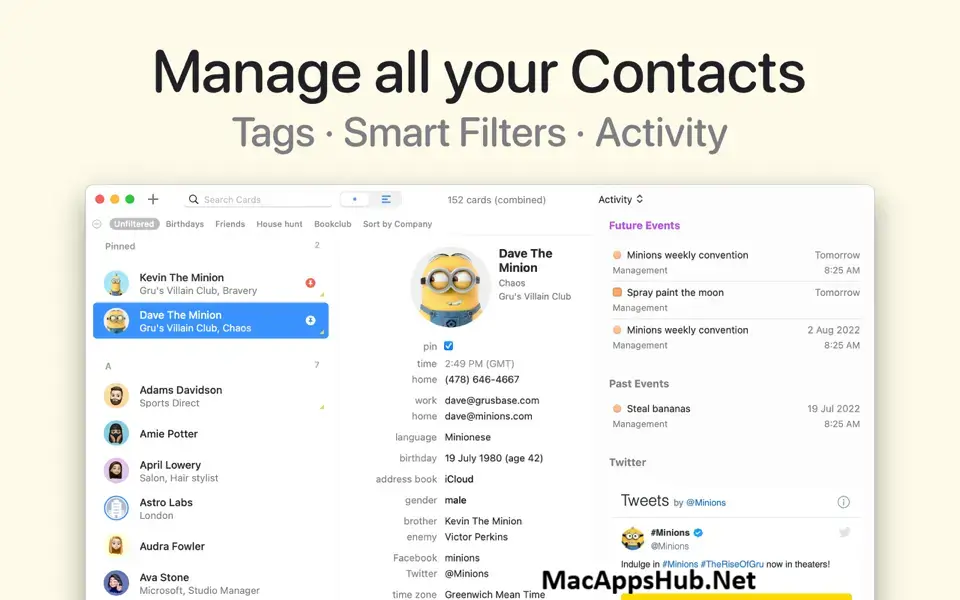
BusyContacts for Mac is a contact manager built for people who need more than what Apple's built-in Contacts app offers. It syncs directly with iCloud, Google, Exchange, Office 365, Fastmail, and other CardDAV servers, no middleman service required, and pairs every contact with an Activity List showing recent emails, meetings, and social posts in one place. Tags, Smart Filters, and a Business Card Reader that turns a photographed card into a saved contact in seconds round out the toolkit. Freelancers tracking client relationships, small business owners who need a lightweight CRM without a monthly enterprise bill, and anyone who's outgrown Apple's basic Contacts app all reach for it.
Why Choose BusyContacts Mac App
Direct CardDAV syncing is the feature that sets this apart from apps that route everything through their own servers. BusyContacts connects straight to iCloud, Google, Exchange, Office 365, and Fastmail, so your contact data stays under your control rather than passing through a third-party sync layer. Pair it with BusyCal and it turns into a genuinely useful lightweight CRM: link a contact to a calendar event or to-do, then pull up their Activity List to see every email, meeting, and social post tied to them without switching apps. The Business Card Reader turns a photo of a paper card, or even an email signature, into a fully formed contact in seconds, and Smart Filters let you save a search by tag, text, or birthdate and reapply it with one click.
A few details matter specifically for how this runs on a Mac. The app already ships with UI support for macOS 26 Tahoe, and its Apple Mail plugin pulls emails directly into a contact's Activity List, a feature that depends on the macOS 12 minimum requirement. Backups happen automatically and locally, so your contact data isn't solely dependent on a cloud service staying online. And unlike a lot of contact managers that have moved to subscription-only pricing, BusyContacts still offers a genuine one-time $49.99 purchase directly from the developer, alongside the subscription options available through the Mac App Store or Setapp.
Key Features
- Direct CardDAV sync: connects straight to iCloud, Google, Exchange, Office 365, Fastmail, and other CardDAV servers.
- Activity List: see emails, meetings, tasks, and social posts tied to a contact in one chronological timeline.
- BusyCal integration: link contacts to calendar events and to-dos for lightweight CRM workflows.
- Business Card Reader: turn a photographed business card or email signature into a saved contact instantly.
- Smart Filters: save searches based on tags, text, or birthdate, and reuse them with a single click.
- Tags: assign multiple tags per contact, with a tag cloud for quick filtering, mapped to Groups in Apple Contacts.
- QR code sharing: generate a QR code from any contact card for instant vCard sharing.
- Social profile linking: pulls in activity from X, LinkedIn, Instagram, GitHub, Reddit, and more per contact.
- Address book sharing: share read-only or read/write address books over Exchange, Fastmail, LAN, or CardDAV.
- Local automatic backups: keeps your contact data backed up on your Mac, independent of any cloud service.
What's New in BusyContacts 2026.4.1 Version
Version 2026.4.1 shipped August 14, 2026 with a handful of reliability fixes.
- Improved CSV export to include all custom fields with their labels and repeated values.
- Improved vCard import compatibility, including international text, contact dates, and large photos.
- Improved field label sizing and removed overlapping animations when entering Edit mode.
- Restored search highlighting when switching between contact cards.
- Restored autocomplete for names, job titles, and organizations.
- Fixed merging contacts that contain shared or private tags.
- Fixed renaming and deleting unused tags, including saving renames with Return.
- Fixed imported contacts missing from search results.
- Fixed hangs when opening menus that suggest contact field values.
- Fixed custom field edits in List View changing the wrong field.
- Fixed birthday display after editing and date calculations with alternative system calendars.
- Fixed floating contact cards closing when minimizing the main window.
- Fixed address books with identical names disappearing from the contact editor.
- Fixed rejected Microsoft contact changes blocking other contacts from syncing.
- Fixed CardDAV sync failures after local address book changes.
- Fixed Column View backgrounds not updating when switching between light and dark appearances.
- Fixed oversized Settings windows when no accounts are configured.
- Fixed crashes during startup and after deleting accounts.
- Ongoing stability and performance enhancements.
Supported macOS Versions
BusyContacts 2026.4.1 requires macOS 12 Monterey as a floor, a requirement tied to the Apple Mail plugin that pulls email activity directly into a contact's timeline. It already ships with interface updates for macOS 26 Tahoe, and runs cleanly on macOS 15 Sequoia as well. As a genuine universal binary, Apple Silicon Macs handle background CardDAV syncing and Activity List updates without any translation overhead, and Intel Macs on a supported macOS version stay fully functional too, since contact management isn't demanding work for either chip.
How to Download and Install BusyContacts on Mac?
Installing BusyContacts on Mac only takes a few steps after downloading, including one quick permission it needs to run properly.
- First click on the Download button given on this page that is fully secure and complete the downloading procedure.
- Open the downloaded .dmg file, then drag BusyContacts into your Applications folder.
- Launch BusyContacts from Applications. If macOS shows an "unidentified developer" warning, go to System Settings → Privacy & Security and click Open Anyway.
- Grant Contacts and Mail access when prompted, so BusyContacts can sync your existing data and pull in email activity.
- Sign in to your accounts (iCloud, Google, Exchange, etc.) to start syncing.
Once the initial setup is done, BusyContacts won't ask for these permissions again, future launches go straight to your contact list.
How to Use BusyContacts Mac?
- Launch BusyContacts and start your 14-day free trial.
- Add your accounts from Settings > Accounts to sync existing contacts from iCloud, Google, or Exchange.
- Use the Business Card Reader to photograph and import a paper business card in seconds.
- Tag contacts to organize them by relationship, client status, or however fits your workflow.
- Open the Activity List on any contact to see recent emails, meetings, and social posts in one place.
- Set up a Smart Filter to save a frequently used search or view configuration.