CDRViewer Overview
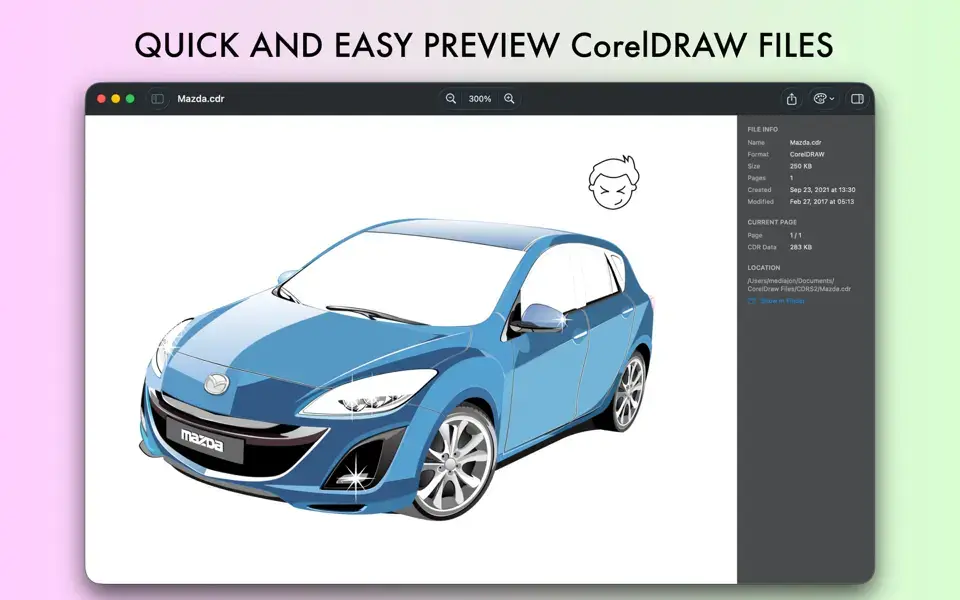
CDRViewer for Mac opens and previews CorelDRAW (.cdr) and Corel Presentation Exchange (.cmx) files without needing CorelDRAW or a Windows machine anywhere near your workflow. It renders drawings through a native vector pipeline, so multi-page files, embedded images, and gradients stay sharp at any zoom level. Built by the Bluetail Team, it runs entirely on your Mac, no uploads, no cloud processing. Graphic designers who receive old CorelDRAW files from clients, print professionals checking specs before a job goes to production, and anyone who just inherited a folder of .cdr files all use it to see what's actually inside those files.
Why Choose CDRViewer for Mac
For years, opening a CorelDRAW file on a Mac meant one of three bad options: install Windows in a VM just to run CorelDRAW, pay for a heavyweight conversion suite, or upload the file to some random online converter and hope it doesn't end up somewhere it shouldn't. CDRViewer skips all three. It's a dedicated, actively updated native app that just opens the file, whether it's a single-page logo or a 40-page catalog with a proper page sidebar to navigate it. At 4.8 MB, it launches instantly, and because it's built with SwiftUI, it feels like a natural extension of Preview rather than a bolted-on utility.
The privacy angle matters more here than in most viewer apps, since CorelDRAW files often carry client work under NDA. CDRViewer's App Store privacy label confirms the developer collects no data at all, and everything renders locally in a sandboxed process. It also covers a gap most competitors ignore entirely: if you buy Pro on one Mac, Family Sharing extends it to every Mac signed into that same Apple ID, and design students get a 50% academic discount with a valid .edu email. Small details, but they're the kind that matter when a whole studio needs the same tool.
Key Features
- Native CDR/CMX rendering — opens CorelDRAW drawings through a vector pipeline that stays sharp at any zoom level.
- Multi-page navigation — a Preview-style sidebar shows thumbnails for every page in a document.
- Zoom from 5% to 2000% — smooth, animated zoom and pan, with a keyboard shortcut to fit the page to your window.
- Detailed inspector — page dimensions, embedded images, and file info, useful before sending a job to print.
- Export to five formats (Pro) — PNG, JPG, PDF, SVG, and TIFF, at resolutions from 72 to 600 DPI.
- Custom canvas backgrounds — set light, dark, or transparent backgrounds per document or as your default.
- Broad version support — opens files from classic CorelDRAW releases through recent ones, including compressed formats.
- 14-language interface — including German, French, Japanese, and Traditional Chinese, following your Mac's system language automatically.
- Fully sandboxed and local — files never leave your Mac, with no uploads or cloud processing involved.
- Built-in accessibility support — dark interface and sufficient-contrast display modes.
What's New in CDRViewer 2.1.1
Version 2.1.1 is latest released with refinements focused on export accuracy.
New tools
- Eyedropper. Hover to read any colour in the drawing, click to lock it. Where the file states a colour you get the exact CMYK or spot ink the designer set; elsewhere you get the colour as it will image. The readout says which, and copies all three notations at once.
- Cropper. Copy an area. Drag a rectangle anywhere on the canvas and it goes to the clipboard as an image — drawn fresh at full resolution, so a crop taken while zoomed out is still sharp.
- Both live in the new Tools menu, alongside Measure and Drawing Scale.
Object inspector
- A new Object tab in the inspector. Select anything and see what the file says about it — size and position, fill with the exact CMYK or spot ink the designer set, outline colour and width, dashes, transparency. For text: the font, size, colour and content.
- Click to select. Click any object on the page to select it — no tool needed. It highlights on the canvas and its row opens in the object list, and vice versa.
- Printing
- Print (⌘P), from the File menu or the toolbar. Vector output, so it stays sharp at any size, with page ranges and scaling from the standard macOS dialog. What you see is what prints — hidden objects stay hidden.
Export
- DXF export. Send a drawing to AutoCAD or any CAD application as editable geometry: paths, layers, colours and live text. Placed images are left out and gradients flattened — DXF has no equivalent for either — and the export tells you what it left behind.
- EPS export. PostScript for print workflows and sign cutting: paths, CMYK, outlined text, embedded images and gradients. Placed photographs travel with the file rather than being referenced.
- Export a single page by right-clicking its thumbnail.
- Exporting no longer blocks the app. The panel closes as soon as it knows what to write, and the drawing's own window shows progress. Large exports leave the app usable throughout.
Settings
- Bleed amount, low-resolution warning threshold, and an option to scroll to the object you select in the object list.
Also
- Page thumbnails scale with the sidebar instead of staying one size
- Icons on the zoom menu items
- More space between the sidebar and inspector tabs
- Page bounds and bleed outlines now sit under the rulers rather than over them
- Text objects show their size and position in the inspector
- Hiding an object no longer resets the zoom
Supported macOS Versions
CDRViewer 2.1.1 requires macOS 14.6 Sonoma as a floor, a jump up from earlier builds that supported much older releases, so anyone still running Ventura or Monterey will need to stick with an older version. It renders cleanest on macOS 15 Sequoia and macOS 26 Tahoe, where the SwiftUI interface and animated zoom feel closest to a first-party Apple app. Since CorelDRAW rendering is disk-and-CPU work rather than GPU-heavy, both Apple Silicon and Intel Macs handle typical CDR files without any noticeable lag, and even an older Intel Mac on a supported macOS version stays just as responsive as an M-series machine for this kind of task.
How to Download and Install CDRViewer on Mac?
Installing CDRViewer on Mac takes under a minute through the App Store, no separate download, unzip, or drag-and-drop needed.
- Click the Download button above or below it opens CDRViewer's official listing on the Mac App Store.
- Tap Get to install the free app.
- Sign in with your Apple ID if prompted.
- macOS downloads and installs CDRViewer automatically in the background.
- Once installed, launch it from Launchpad or your Applications folder.
Because the App Store handles future updates automatically, you won't need to manually reinstall CDRViewer each time a new version ship.
How to Use CDRViewer Mac App?
- Open CDRViewer from Launchpad, or double-click a .cdr or .cmx file to launch it directly.
- Use the sidebar to jump between pages if the document has more than one.
- Zoom in with the (=) key or the toolbar, and press (0) to fit the page to your window.
- Open the inspector to check page dimensions or embedded image details before exporting.
- Pick a background color for the canvas if the default doesn't suit the artwork.
- Tap Export, choose your format and resolution, and save this step needs Pro.