coconutBattery Overview
coconutBattery for Mac reads your battery's actual health data straight from macOS, showing current maximum capacity against the original factory capacity and total charge cycles, all in one window. Connect an iPhone or iPad over USB and it reads the same details for that device too, so you're not switching between three different apps to check every battery in the house. Every reading can be saved, building a history that shows exactly how capacity has changed over months or years rather than just a single snapshot. Anyone deciding whether a MacBook's battery needs replacing, people about to buy a used Mac or iPhone and wanting to check its real condition first, and users just curious how much life is left in their current battery all reach for it as the quick answer.
Why Choose coconutBattery Mac App
The free version already covers what most people actually need: real capacity and cycle data pulled straight from the system, not an estimate. Checking an iPhone or iPad works the same way once it's connected, and saving a reading builds a timeline you can look back on to see whether a battery is degrading normally or dropping off fast. None of this requires digging through System Information or interpreting raw numbers yourself.
The Plus tier exists for people who need more than a single snapshot. Selling a used Mac or iPhone goes smoother when you can hand over real, printable proof of battery condition instead of a verbal promise, and a custom template makes that proof look like a proper report rather than a screenshot. Anyone managing more than one Mac, or a small pile of hand-me-down iPhones in the house, benefits from checking a device wirelessly instead of hunting for the right cable every time. Tracking temperature and voltage over months can also flag a battery heading toward trouble before it actually strands you somewhere inconvenient. It's a one-time purchase either way, not a recurring fee, and a built-in trial lets you run it in Plus mode ten times before deciding if it's worth it.
Key Features
- Battery health at a glance — a single screen answers the question people actually open the app for: is this battery still good, or is it time to start planning a replacement?
- iPhone and iPad diagnostics — plug in an iOS device and its battery stats show up right alongside your Mac's, no separate app required.
- Historical tracking — build a log of past readings so a real drop in capacity stands out clearly instead of blending into normal day-to-day fluctuation.
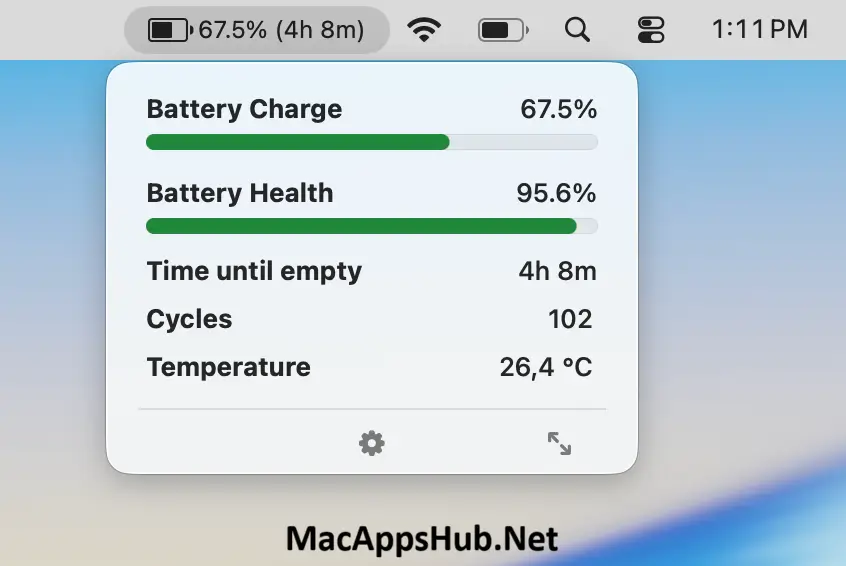
- Menu bar display — keep battery percentage and time remaining visible without opening the main window.
- WiFi Support (Plus) — check a connected iPhone or iPad's battery health without a USB cable.
- Battery Lifetime Analyzer (Plus) — tracks minimum, maximum, and average temperature, voltage, and charge/discharge rates across the battery's life.
- Advanced Viewer (Plus) — adds internal SSD read and write statistics for your Mac alongside deeper battery data.
- Custom notifications (Plus) — get alerted when your Mac, iPhone, or iPad battery drops below a threshold you set.
- Custom printing templates (Plus) — generate battery reports using your own HTML templates.
- Lightweight footprint — the entire app is about 6 MB, with no background processes needed until you open it.
What's New in coconutBattery 4.4.0 Version
- Support for macOS/iOS/iPadOS 27
- Fixed sorting in History Viewer
Supported macOS Versions
coconutBattery 4.x requires macOS 12 Monterey as a floor and runs cleanly through macOS 26 Tahoe, with same-generation support already added for the newest MacBook and iPhone models. It's a universal binary covering both Apple Silicon and Intel Macs, and since reading battery data isn't demanding work for either chip, performance is identical regardless of which Mac you're running it on. Anyone on an older Mac that can't reach Monterey isn't left without an option either: the developer maintains separate legacy builds going all the way back to Mac OS X Tiger for older hardware, available directly from the same download page.
How to Download and Install coconutBattery on Mac?
Installing coconutBattery on Mac only takes a few steps after downloading, including one quick permission it needs to run properly.
- Click the Download button above to download the complete setup file safely or get it from official website.
- Open the downloaded .zip file, then drag coconutBattery into your Applications folder.
- Launch coconutBattery from Applications. If macOS shows an "unidentified developer" warning, go to System Settings → Privacy & Security and click Open Anyway.
- Grant any permissions macOS requests, so coconutBattery can read your Mac's battery data.
Once the initial setup is done, coconutBattery won't ask for these permissions again, future launches go straight to your battery readings.
How to Use coconutBattery Mac App?
- Launch coconutBattery to see your Mac's battery health immediately, no setup required.
- Connect an iPhone or iPad via USB to check its battery health too, approving the "Trust This Computer" prompt on the device the first time.
- Save the current reading to start building a history you can review later.
- Enable the menu bar display if you want battery details visible at a glance.
- Activate the free trial in Settings to explore Plus features like WiFi Support and the Battery Lifetime Analyzer before buying.
- Upgrade to Plus with a one-time purchase if the extra diagnostics are worth it for your use case.
Alternatives
The closest comparisons split into two camps: apps that read battery data like coconutBattery does, and apps that actively manage charging behavior instead.
AlDente: a free, open-source menu bar tool that limits your MacBook's maximum charge percentage to slow down battery wear, a different angle than coconutBattery's read-only diagnostics.
Battery Monitor: Health, Info: a free Mac App Store app that displays live charge, health, and status details in the menu bar, with configurable low and full battery alerts.
Battery Health 2: a free Mac App Store utility covering charge level, capacity, and cycle count, with an in-app purchase unlocking historical charts similar to coconutBattery's own history feature.