diCleaner Overview
diCleaner for Mac scans your storage to show exactly what's taking up space, finds duplicate files and similar photos, and uninstalls apps along with the leftover caches and preferences a simple drag to Trash leaves behind. A separate App Slimming tool trims apps you're keeping down to just the pieces your Mac actually needs. There's also a privacy layer that keeps hidden photo metadata, clipboard contents, and sensitive documents from lingering longer than you'd want them to. Anyone whose Mac is quietly running out of storage, people who want an uninstaller that actually removes everything an app leaves behind, and users who like keeping an eye on system health from the menu bar all use it to keep a Mac running clean.
Why Choose diCleaner Mac App
Most established Mac cleaners charge a subscription or one-time fee once you get past the basic scan, and diCleaner skips that entirely. Space Analyzer, Duplicate Finder, thorough app uninstalling, and junk file cleanup all come in the same free download, with nothing held back for a paid tier. Uninstalling in particular goes further than dragging an icon to the Trash: most of what's actually clogging a Mac's storage isn't the apps themselves but what they quietly left behind, and diCleaner tracks that down and clears it out at the same time.
A few details are worth knowing specifically for how this runs day to day. Trimming an app you already use, rather than deleting one, is a less common approach among Mac cleaners, and it's paired with a way to undo the change if something you needed turns out to be gone. Anyone who posts photos publicly gets a quieter benefit too: a picture shared straight from your camera roll often carries GPS coordinates and device details along with it, and clearing that out before sending is easy to forget until it matters. And instead of opening a full app just to check how much storage is left or what's using your network right now, that information sits one glance away in the menu bar the whole time.
Key Features
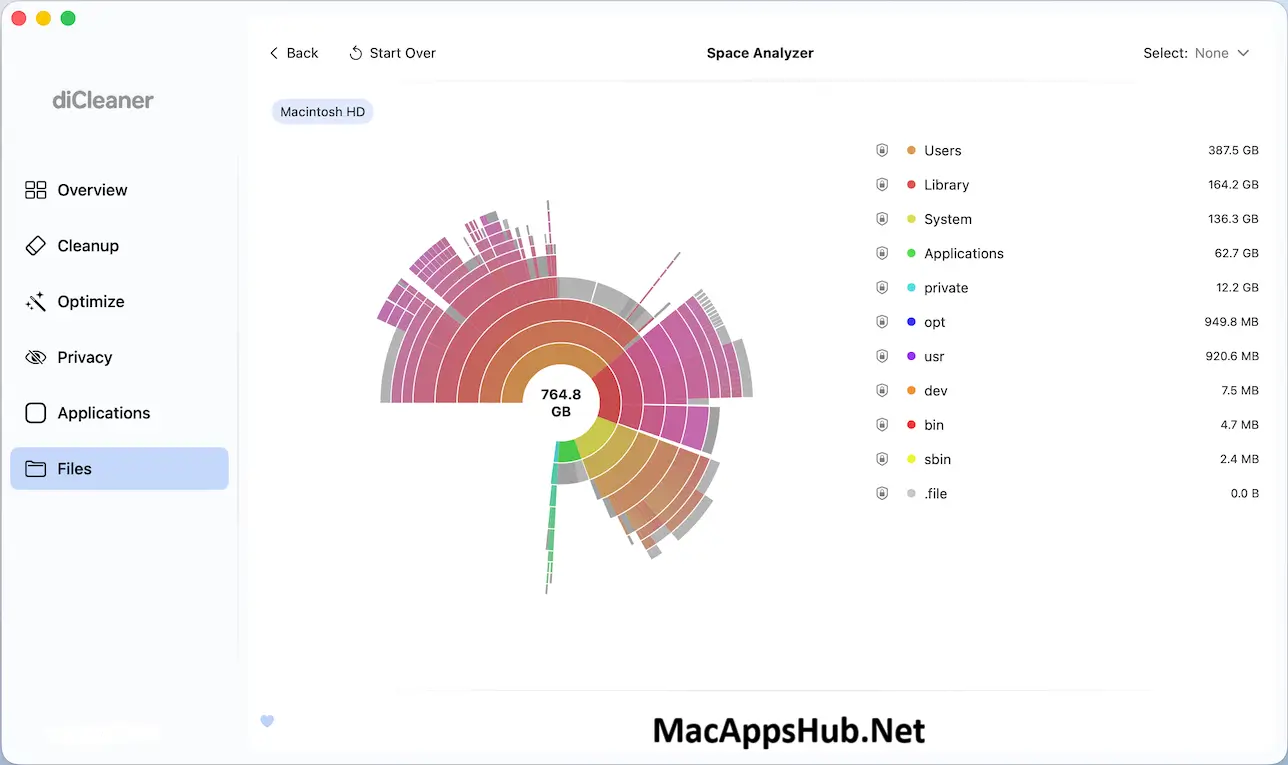
- Space Analyzer — scan your Mac and explore disk usage by folder and file, quickly finding what's actually taking up space.
- Duplicate Finder — locate duplicate files and similar photos or screenshots, with Primary File and Finder Alias actions for handling matches.
- Thorough app uninstalling — removes an app's leftover caches, preferences, and support files, not just the app itself.
- App Slimming — trims the parts of an app you'll never run, like unused processor code or language packs you don't read, without touching anything you actually use.
- Privacy tools — scrub the location and device data hiding inside a photo before you post it, wipe your clipboard history, and lock sensitive files away in an encrypted vault.
- System monitoring — track CPU, GPU, and battery temperatures alongside memory and storage from the Overview tab.
- Startup item management — review and control which apps launch automatically when your Mac starts.
- Menu bar monitoring — keep storage, memory, CPU activity, and network speed visible without opening the main window.
- Secure file shredding — permanently delete sensitive files beyond normal Trash recovery.
- Installer and update tracking — find leftover installer files and check for outdated app versions in one place.
What's New in diCleaner 26.16
Version 26.16 shipped September 24, 2026 with fixes and a handful of new additions.
Fixed
- Fixed path display and localization issues.
Added
- Added support for macOS 27.
Improved
- Updated system information and macOS artwork.
- Improved folder access and permission handling.
- Various stability and compatibility improvements.
Supported macOS Versions
diCleaner 26.16 requires macOS 11.5 Big Sur as a floor and runs cleanly through macOS 26 Tahoe. It's built as a universal binary covering both Apple Silicon and Intel Macs, and since scanning storage and managing files isn't demanding work for either chip, performance stays consistent regardless of which Mac it's running on.
How to Download and Install diCleaner on Mac?
Installing diCleaner on Mac only takes a few steps after downloading, including one quick permission it needs to run properly.
- Click the Download button above to download the complete setup file safely or you may get it from official website.
- Open the downloaded .dmg file, then drag diCleaner into your Applications folder.
- Launch diCleaner from Applications. If macOS shows an "unidentified developer" warning, go to System Settings → Privacy & Security and click Open Anyway.
- Grant Full Disk Access when prompted, so diCleaner can scan and clean files across your system.
Once the initial setup is done, diCleaner won't ask for these permissions again, future launches go straight to the Overview tab.
How to Use diCleaner Mac App?
- Launch diCleaner and check the Overview tab for a quick summary of your Mac's storage, memory, and system status.
- Run Space Analyzer to see which folders and files are using the most disk space.
- Use Duplicate Finder to review and remove duplicate files or similar photos.
- Open the Applications tab to uninstall unused apps along with their leftover files, or run App Slimming to trim unused components from apps you're keeping.
- Check the Cleanup tab for junk files, caches, and Trash contents ready to clear.
- Enable menu bar monitoring if you want ongoing visibility into storage, memory, and network activity.
Alternatives
AppCleaner: A free, long-running utility focused purely on thorough app uninstalls, showing every leftover file before you confirm deletion.
OnyX: A free, deep system maintenance tool for cache clearing and built-in macOS maintenance scripts, released as a separate build for each macOS version.
Pearcleaner: A newer, free, open-source app uninstaller that also detects leftover files from apps removed before it was installed.