SoundSource Overview
SoundSource is a system and per-app audio control app for Mac from Rogue Amoeba, living entirely in the menu bar. It gives every running app its own independent volume, output device, and audio effects, instead of one shared system volume slider. Output Groups play audio to multiple devices at once, in sync, and AirPlay streaming can target a single app rather than the Mac's entire audio output. A built-in 10-band EQ and support for Audio Unit plugins sweeten sound on a per-app or system-wide basis. Quick Configs save a complete audio setup and restore it instantly with one click. Super Volume Keys extends keyboard volume control to devices like HDMI and DisplayPort outputs that don't normally support it.
Why Choose SoundSource Mac App
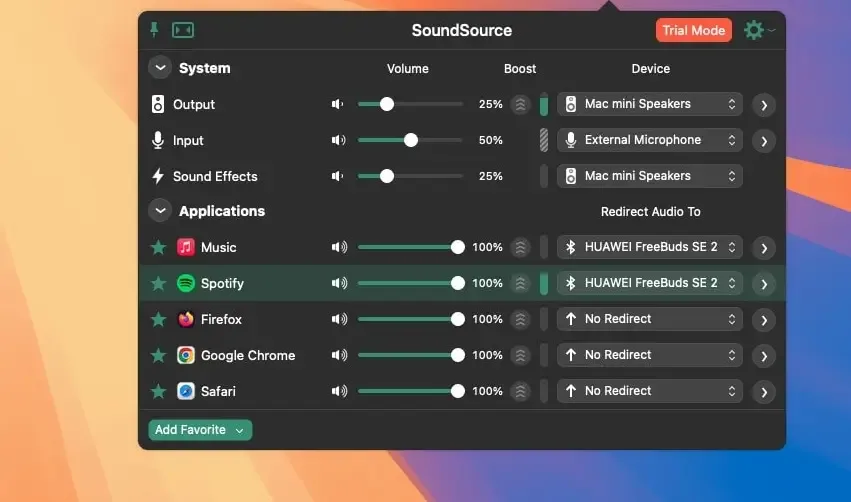
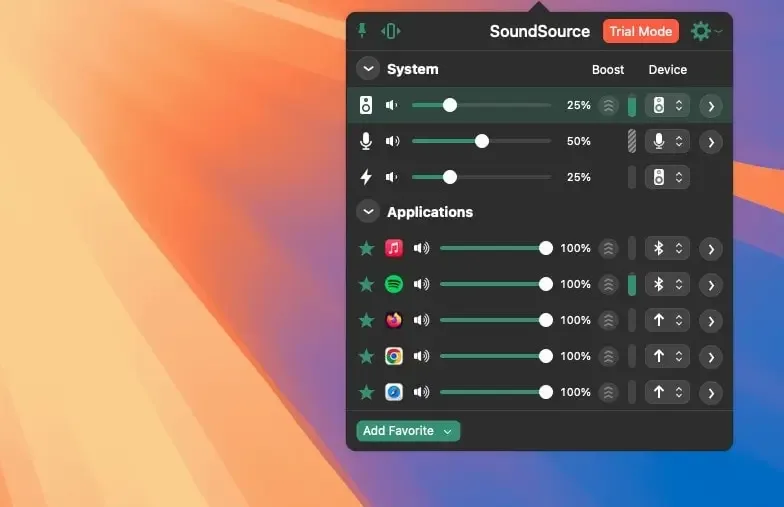
macOS treats volume as one single slider for the whole system. Turn down a podcast and a notification sound drops right along with it. SoundSource breaks that apart, giving every running app its own independent volume, output device, and even its own EQ. One app can play through the built-in speakers while another streams to a HomePod in a different room, all adjusted from the same menu bar dropdown.
Recent versions have leaned heavily into fixing genuine Mac quirks Apple hasn't addressed on its own: keyboard volume keys that stop working on HDMI or DisplayPort outputs, AirPods that quietly override a carefully chosen device order, and macOS's own habit of streaming everything or nothing over AirPlay instead of allowing per-app control. Version 6 requires macOS 15 or later, though SoundSource 5 continues to be maintained separately for anyone still on an older system.
Key Features
- Per-app volume control: adjusts the volume of any running app independently of every other app and the system as a whole.
- Per-app output routing: sends one app's audio to a specific device while everything else uses a different output.
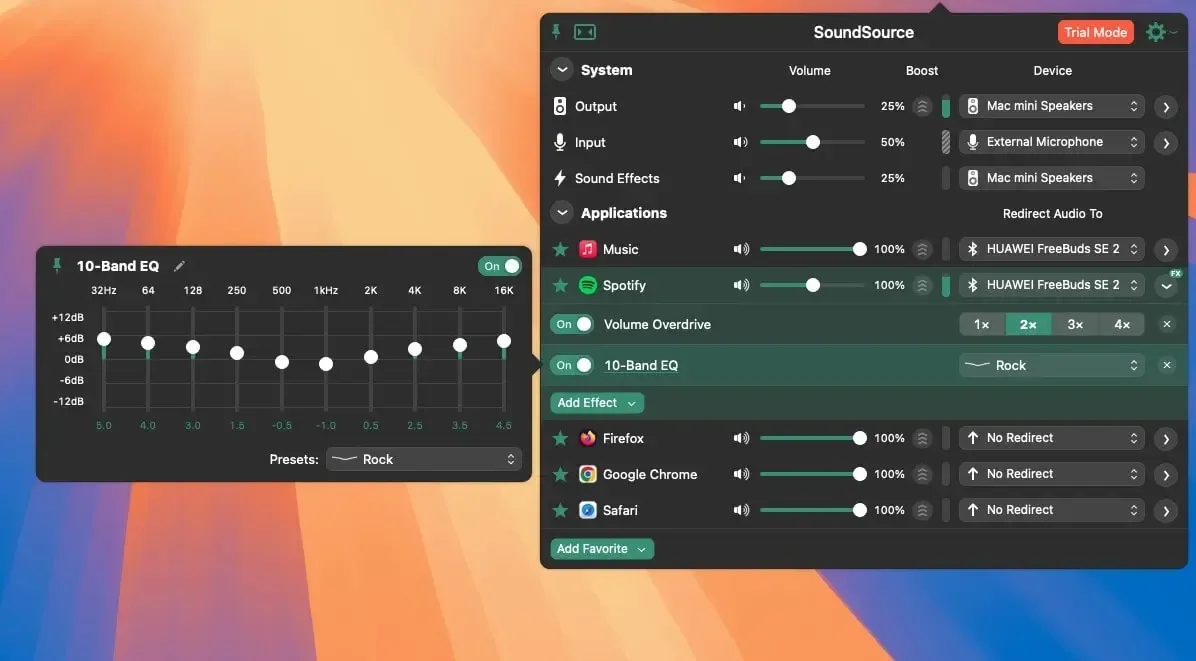
- Per-app and system-wide effects: applies a built-in 10-band EQ or third-party Audio Unit plugins to an individual app or the whole system.
- Output Groups: plays audio to multiple devices simultaneously, kept in sync.
- Per-app AirPlay streaming: sends a single app's audio to an AirPlay device instead of the Mac's entire audio output.
- Quick Configs: saves a complete audio setup, devices, volumes, and effects, and restores it instantly with one click.
- Super Volume Keys: makes a Mac keyboard's volume keys work with HDMI, DisplayPort, and other outputs that don't natively support them.
- Sweetening effects: improves thin or quiet audio with Volume Overdrive, Magic Boost, and Headphone EQ.
- Shortcuts automation: triggers volume changes, device switches, and effect adjustments through the macOS Shortcuts app.
- System device settings: adjusts volume, balance, and sample rate for the Mac's Output, Input, and Sound Effects devices.
- Preferred Device Order: automatically selects the right replacement device whenever one disconnects.
- Timed Mute: silences audio for a set duration, then fades it back in automatically.
Screenshots
What's New in SoundSource 6.1.2 Version
Version 6.1.2, released August 26, 2026, centers on macOS 27 support and AirPlay reliability:
- Confirmed support for macOS 27 (Golden Gate), with the launch warning removed and no known issues reported
- Several AirPlay improvements, including more reliable auto-connection, correct recovery after a coreaudiod restart, tighter sync across multiple streamed devices, and restored volume levels on reconnect
- Average CPU usage significantly reduced through optimized processing of silence
- Fixed a regression that could hide Shortcuts actions from the Shortcuts app without a restart
- Fixed a rare background crash and several interface glitches
- Test release notifications moved from the hidden Debugging window into the main Settings interface
Supported macOS Versions
SoundSource 6.1.2 requires macOS 15 or later. Anyone on an older Mac isn't left without an option, though. SoundSource 5 continues to be actively maintained as a separate release for macOS 11 through 14.4.1, so a system still on an earlier OS gets its own compatible, up-to-date version rather than being stuck on an outdated build. The current version confirms full support for macOS 27, the newest release. SoundSource's job is adjusting and routing audio rather than heavy processing, so even a modest Mac runs it without any noticeable load. The exception is CPU-intensive third-party Audio Unit effects, which do benefit from a faster processor.
How to Download and Install SoundSource Mac?
Installing SoundSource on Mac only takes a few steps after downloading.
- Click the Download button above to securely download the setup file.
- Open the downloaded file, then drag SoundSource into your Applications folder.
- Launch SoundSource from Applications. If macOS shows an "unidentified developer" warning, go to System Settings → Privacy & Security and click Open Anyway.
Grant the permissions SoundSource requests, such as System Audio Access, so it can control volume for the apps you choose.
SoundSource opens as a full trial with every feature available. Purchasing a license later unlocks it permanently through the License window.
How to Use SoundSource Mac App?
- Click the SoundSource icon in the menu bar to see every app currently playing audio.
- Adjust an app's volume slider, or click its output icon to send its audio to a different device.
- Click the FX button next to an app or system device to add the built-in EQ or an Audio Unit effect.
- Open the Audio Devices window to adjust system-level settings like sample rate, balance, or preferred device order.
- Build an Output Group if audio needs to play to multiple devices at once, in sync.
- Save a Quick Config once a setup feels right, so the whole configuration can be restored with one click later.
Alternatives to SoundSource
FineTune: Free, open source menu bar app built specifically as a SoundSource alternative, with per-app volume, multi-device output, and a 10-band EQ.
Background Music: Free, open source utility that adds a per-app volume slider for every running application.