Spotify Overview
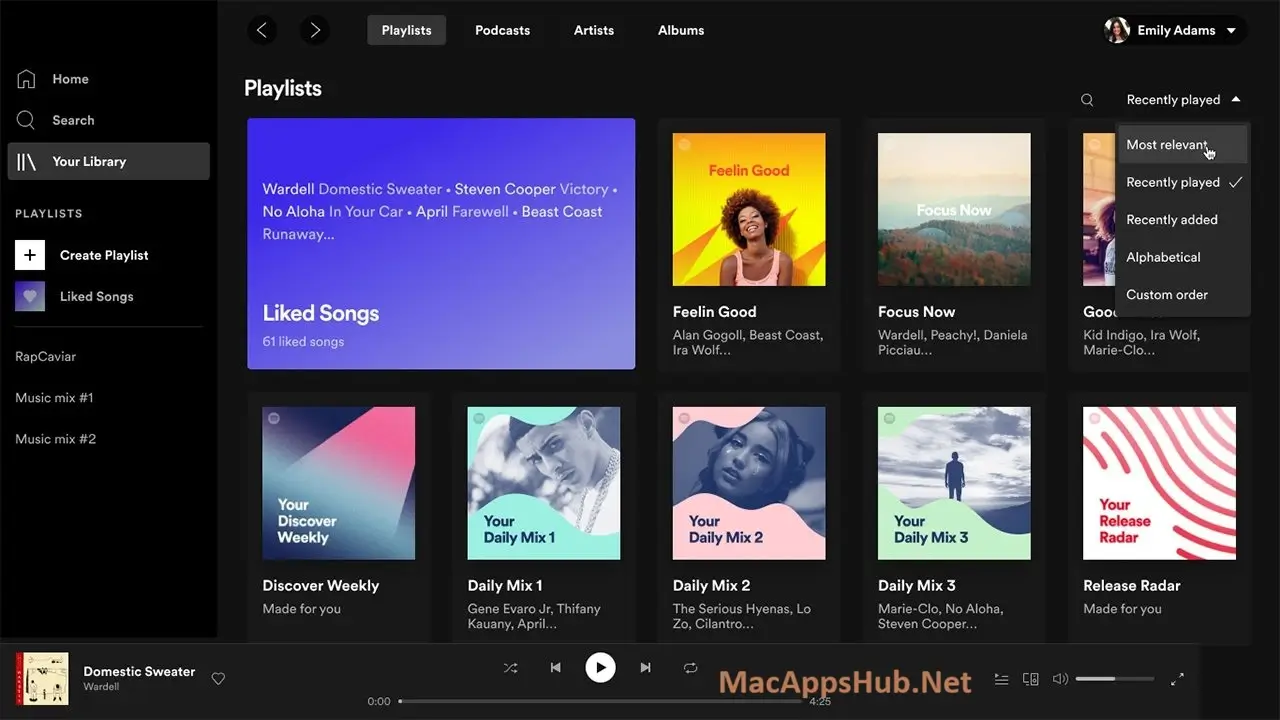
Spotify for Mac streams a massive catalog of songs, podcasts, and audiobooks, all synced across every device you own. If you're wondering whether you can get Spotify on a Mac at all: yes, it's a full native desktop app, not just a browser tab, and it's free to start. Free accounts can now search for a specific song and play it directly instead of settling for shuffle-only radio, a real change from how the app used to work. Premium subscribers get lossless audio, ad-free listening, offline downloads, and unlimited skips on top. Commuters building a playlist for the drive home, anyone who wants their music library synced identically across a Mac, phone, and speaker, and listeners who just discovered they can finally get studio-quality streams without a separate app all keep it running in the background.
Why Choose Spotify Mac App
The catalog size is genuinely hard to match, spanning tens of millions of tracks plus deep podcast and audiobook libraries, all searchable from one bar. What changed the free tier the most was a September 2025 update: the old restriction that limited free accounts to shuffle-only playback is gone, closing a real gap that used to push free users toward competitors with more flexible free tiers. Discover Weekly, Release Radar, and Daily Mixes build a personalized rotation the longer you use the app, and AI DJ narrates a mixed listening session that adapts to your mood rather than shuffling a static playlist.
Lossless audio is the feature that matters most for anyone listening seriously on a Mac, and it finally arrived for Premium subscribers in September 2025 after years of requests. Quality jumps well past the old 320kbps ceiling, with separate controls for how much of that quality you want streaming over Wi-Fi versus cellular versus saved downloads. Cross-device sync means a queue built on your Mac picks up exactly where you left it on your phone, a connected speaker, or in the car, and the menu bar controls let you skip tracks or adjust volume without switching away from whatever else you're working on.
Key Features
- Massive catalog: over 100 million tracks, 7 million podcasts, and 350,000 audiobooks
- Free on-demand playback: search and play any specific song directly, not just shuffle-only radio mode
- Lossless audio (Premium): stream up to 24-bit/44.1kHz FLAC, toggleable separately for Wi-Fi, cellular, and downloads
- AI DJ: an AI-hosted mix that talks between tracks and adapts to your mood and listening history
- Personalized discovery: Discover Weekly, Release Radar, and Daily Mixes built from your listening habits
- Cross-device sync: start a song on your Mac and pick it up seamlessly on your phone, speaker, or car
- Offline downloads (Premium): save playlists and albums for listening without an internet connection
- Collaborative playlists: build and edit a shared playlist with friends in real time
- Podcast and audiobook library: access millions of podcast episodes and audiobooks in the same app as your music
- Menu bar controls: control playback, skip tracks, and adjust volume without switching to the app window
What's New in Spotify 1.3.4.258 Version
Detailed release notes for this specific build weren't published by Spotify, which ships frequent incremental updates without a public per-version changelog. For context, the most significant recent changes shaping the current app:
- Lossless audio launched for Premium subscribers in September 2025.
- Free-tier playback restrictions loosened the same month, removing the old shuffle-only limitation.
- Premium pricing increased again in February 2026, with Individual moving to $12.99/month.
Supported macOS Versions
Spotify 1.3.3.264 requires macOS 12 Monterey as a floor and runs cleanly through macOS 26 Tahoe. As a universal binary, it performs identically on Apple Silicon and Intel Macs, since audio streaming and decoding aren't demanding tasks for either chip. If you're troubleshooting why you can't play Spotify on your Mac, the most common causes are an outdated macOS version below this floor, a corrupted local cache, or a background update stuck mid-install, quitting the app fully and relaunching resolves most of these. One genuine limitation worth knowing about lossless playback specifically: the benefit depends more on your output hardware and connection type than on your Mac's processor, since many Bluetooth headphones recompress audio regardless of what quality Spotify sends.
How to Download and Install Spotify on Mac?
Installing Spotify on Mac only takes a few steps after downloading, including one quick permission it needs to run properly.
- First click on the Download button given on this page that is fully secure and complete the downloading procedure.
- Open the downloaded installer file and follow the on-screen prompts.
- Launch Spotify from Applications once installation finishes.
- Log in with an existing account, or create a free account to get started.
- Grant media control permissions if macOS asks, so keyboard media keys work with playback.
Once the initial setup is done, Spotify won't ask for these steps again, future launches go straight to your library.
How to Use Spotify Mac?
- Launch Spotify and log in or create a free account.
- Search for an artist, album, or playlist, or browse Discover Weekly for personalized picks.
- Click play on any track, free accounts can now search for and play specific songs directly, not just shuffle.
- Open AI DJ from the Home tab for a narrated, mixed listening session based on your taste.
- Right-click any playlist or album to download it for offline playback, which requires Premium.
- Control playback from the menu bar icon without switching away from what you're working on.
Alternatives
YouTube Music: A free, ad-supported streaming service backed by YouTube's video catalog, strong for live performances and remixes Spotify doesn't carry.
SoundCloud: A free-tier platform built around independent and emerging artists, useful for music that hasn't reached mainstream streaming catalogs yet.
Deezer: A free, ad-supported streaming service with a strong international and world music catalog alongside the mainstream one.