
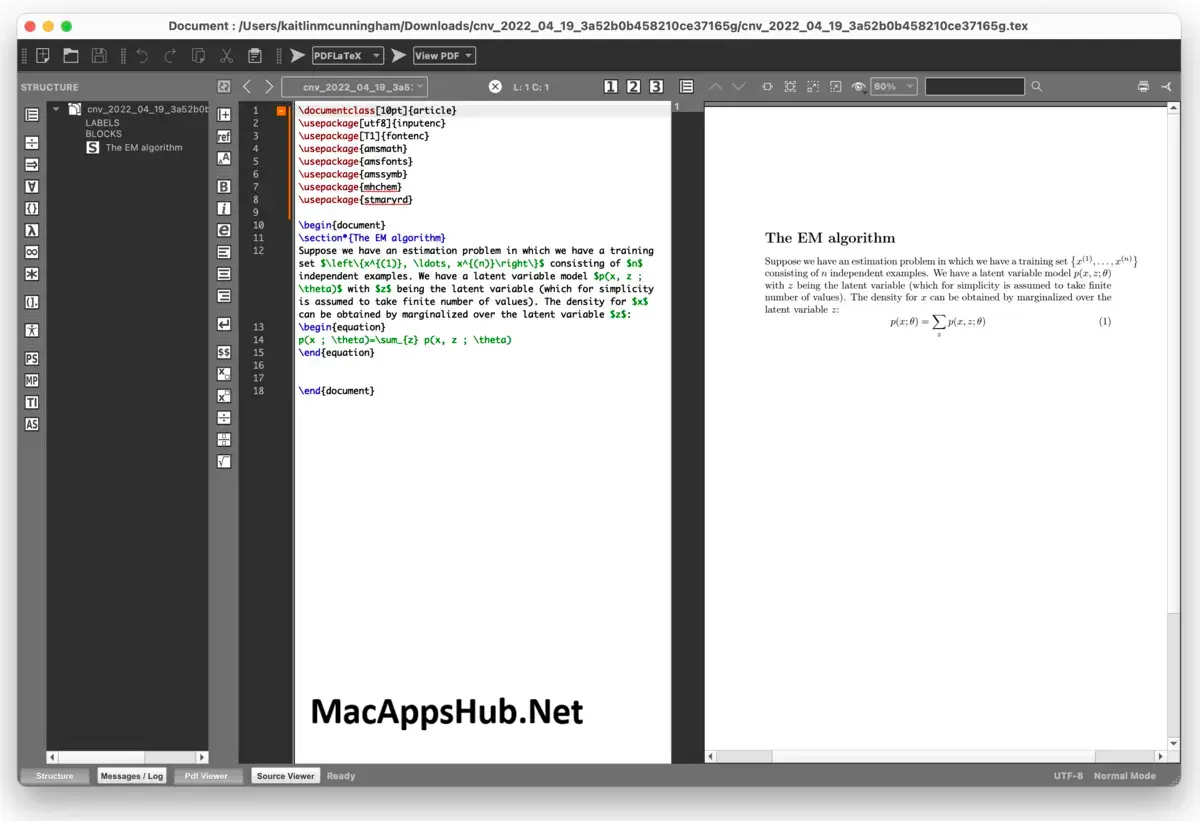
TeXMaker Overview
TeXMaker for Mac is a complete LaTeX editing environment that combines a unicode source editor with an integrated PDF viewer, so you write and preview a document in the same window. SyncTeX links the two together: click anywhere in the PDF and the editor jumps to the matching line in your source, and clicking a line in the editor does the reverse. A structure view lets you navigate straight to any chapter or section, 370 clickable math symbols cover LaTeX notation you'd otherwise have to memorize, and Quick Build compiles and previews a document in one click. Academics writing papers, students working through a thesis, and anyone typesetting math-heavy documents all use it as their day-to-day LaTeX editor.
Why Choose TeXMaker Mac App
The core workflow is what makes this worth setting up over a plain text editor pointed at pdflatex in Terminal. SyncTeX turns proofreading into something closer to a normal word processor: click a paragraph in the PDF preview and the cursor jumps straight to that line in your source, saving the constant scroll-and-search that comes with editing LaTeX blind. The structure view mirrors your document's chapters and sections, so navigating a 40-page thesis works the same way as navigating a short letter. And the 370 built-in math symbols mean you can click your way to a fraction, an integral, or a Greek letter instead of recalling the exact command syntax every time.
Beyond the editor basics, the Tools menu is genuinely configurable rather than locked to one compiler: pdfLaTeX, LuaLaTeX, XeLaTeX, BibTeX, Biber, and Asymptote all run through it, so switching engines for a specific project doesn't mean switching editors. Document wizards generate starting templates for standard documents, letters, tabular layouts, and Beamer presentations, and inline spell checking is joined by grammar checking on text extracted directly from the compiled PDF. All of it, every feature listed here, is free and open source under the GPL v2, with nothing held back behind a paid tier.
Key Features
- Unicode source editor: syntax highlighting, code folding, auto-completion, and bracket matching built for LaTeX syntax specifically.
- Integrated PDF viewer with SyncTeX: click any line in the PDF to jump to the matching source line, and vice versa.
- 370 clickable math symbols: insert LaTeX math notation without memorizing commands.
- Structure view: navigate a document by jumping directly to any chapter, section, or label.
- Quick Build: compile and preview a document in one click, without touching Terminal.
- Multi-engine support: a configurable Tools menu covers pdfLaTeX, LuaLaTeX, XeLaTeX, BibTeX, Biber, and Asymptote.
- Document wizards: generate starting templates for standard documents, letters, tabular environments, and Beamer presentations.
- Spell and grammar checking: check spelling inline in the editor, or grammar-check text extracted directly from the PDF.
- Master document mode: manage multi-file projects by linking child documents to one master file.
- Drag-and-drop image insertion: drop an image into the editor and Texmaker writes the \includegraphics command automatically.
What's New in TeXMaker 6.0.2 Version
Version 6.0.2 is a maintenance release following the larger version 6.0 rebuild.
- Removed a dependency on Qt Core private, simplifying the build.
- Fixed an issue with the color of selected text.
- Updated the CMakeLists.txt build configuration.
- Updated French and Hungarian translations.
- Added mouse wheel support for moving between pages in the PDF presentation mode.
Supported macOS Versions
This is the detail to check before downloading: Texmaker 6.0.2 is built specifically for Apple Silicon and requires macOS 11 Big Sur or later. There's no universal binary covering both architectures for the current version. If you're still on an Intel Mac, the developer maintains a separate Texmaker 5.1.4 release built for Intel 64-bit hardware, available directly from the same download page. On Apple Silicon, the app runs natively without any Rosetta translation, and since editing and previewing LaTeX documents isn't graphics-intensive work, performance stays smooth even on entry-level M-series hardware.
How to Download and Install TeXMaker on Mac?
Installing TeXMaker on Mac involves a couple of extra steps beyond a typical drag-and-drop app, since it isn't notarized by Apple.
- Click on the download button given on this page that is fully secure and complete the downloading procedure.
- Open the downloaded .dmg or .zip file, then drag TeXMaker into your Applications folder.
- Launch TeXMaker. If macOS reports that "texmaker.app is damaged and can't be opened," open Terminal and run `xattr -dr com.apple.quarantine /Applications/texmaker.app` to clear the quarantine flag, then try launching it again.
- Install a LaTeX distribution such as MacTeX separately if you haven't already. TeXMaker is only the editor; it needs a LaTeX distribution installed to actually compile documents.
- Open TeXMaker's Configure dialog and confirm it has detected your LaTeX distribution's commands correctly.
Once this setup is done, you won't need to repeat it, future launches open straight to your last session.
How to Use TeXMaker Mac?
- Launch TeXMaker and open or create a .tex document.
- Use the LaTeX, Math, or Greek menus to insert tags and symbols, or click any of the 370 built-in math symbols directly.
- Press the Quick Build button to compile and preview the PDF in the same window.
- Click inside the PDF to jump to the matching line in your source, or click a source line to jump to that spot in the PDF, using SyncTeX.
- Open the Structure view to navigate quickly between chapters and sections in longer documents.