
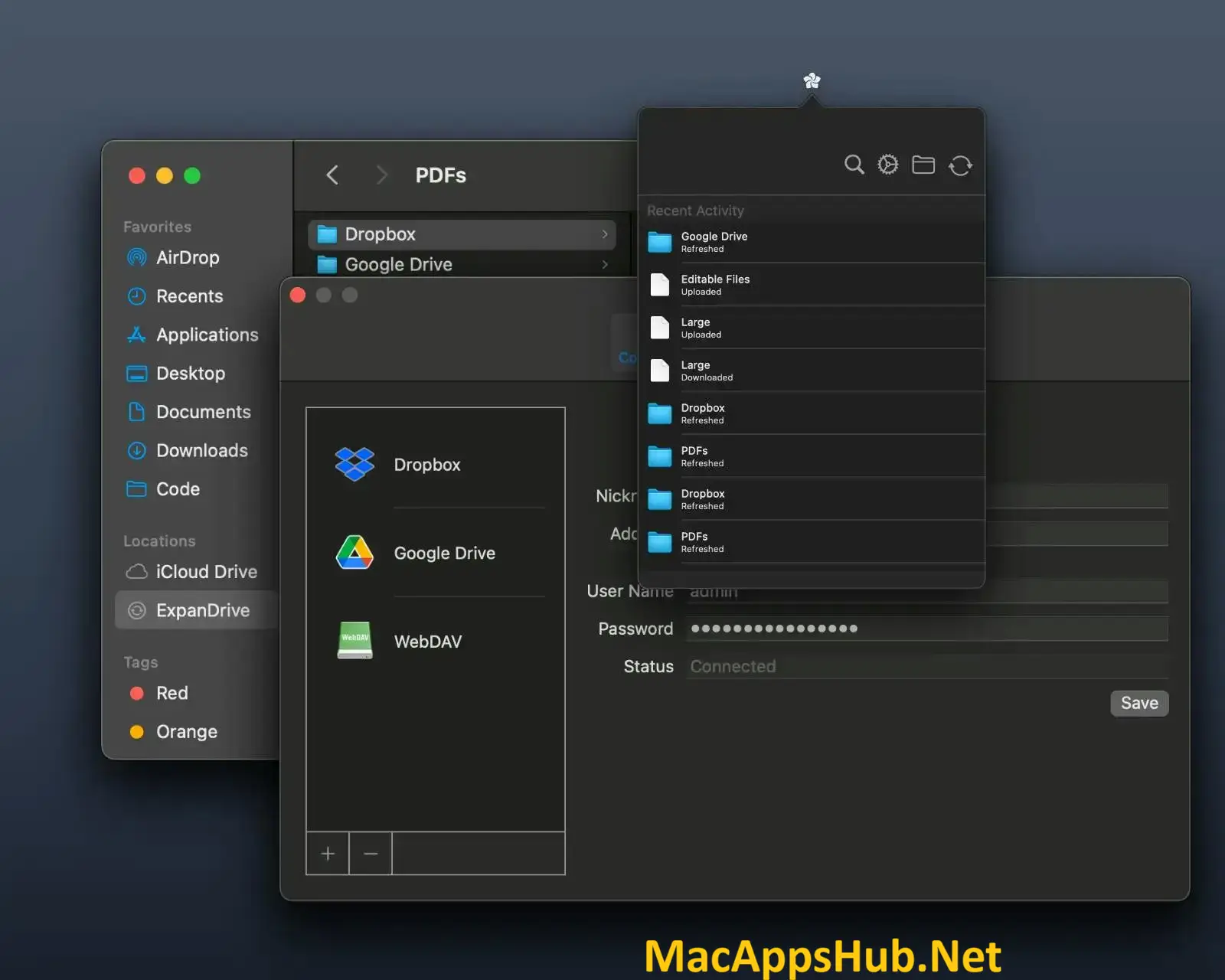
ExpanDrive Overview
ExpanDrive for Mac mounts Dropbox, Google Drive, OneDrive, SharePoint, Amazon S3, and a dozen other cloud services as native drives right in Finder, no sync folder, no multi-gigabyte local mirror eating your disk. Files stream on demand and cache locally once opened, so every app on your Mac, Adobe Creative Cloud, Office, Xcode, Terminal, reads and writes them exactly like local files. It's built on Apple's modern File Provider extension, the same system-level API Apple uses for iCloud, so there's no kernel extension to approve and no reboot needed. Developers juggling S3 buckets alongside local project files, agencies bouncing between client SharePoint sites, and anyone tired of a Dropbox folder eating half their SSD all mount their clouds through it instead.
Why Choose ExpanDrive Mac App
Most cloud storage apps solve the "access my files" problem by syncing everything to a local folder first, which works fine until that folder is eating 200GB you don't have to spare. ExpanDrive mounts the cloud as a drive instead: files stream in only when you actually open them, and every app on your Mac treats the mount like local storage without knowing the difference. Drag a file out of an S3 bucket, through SharePoint, and into Photoshop in one motion, and the friction of "which app can even read this cloud service" disappears entirely. Mounted files also participate fully in Spotlight search, macOS tags, and Quick Look previews, something a lot of cloud-mounting tools only half-support.
What matters most for a Mac specifically is how it's built. ExpanDrive runs on Apple's File Provider extension, the same sandboxed, Apple-blessed API that powers iCloud and Dropbox's own native integration, rather than an older kernel extension that needs separate security approval and tends to break with every macOS upgrade. It ships as a genuine universal binary, native on Apple Silicon from M1 through M4 as well as Intel, with no Rosetta translation involved. And as of a recent pricing change, it's now completely free for personal use, every one of the 15 supported cloud integrations included, with no trial period to run out on.
Key Features
- Native Finder mounting: cloud storage appears in Finder and ~/Library/CloudStorage right alongside local folders.
- Apple File Provider extension: uses the same sandboxed system API Apple built for iCloud, no kernel extension or reboot required.
- Stream-on-demand: files download only when opened, so there's no multi-gigabyte local mirror eating disk space.
- 15+ cloud integrations: Dropbox, Google Drive, OneDrive, SharePoint, Box, Amazon S3, Backblaze B2, and more.
- Universal protocol support: connects to any SFTP, FTP, or WebDAV server, not just named cloud providers.
- Multiple simultaneous connections: mount every cloud you use at once, each with its own nickname in Finder.
- Spotlight, tags, and Quick Look: mounted files participate in macOS search and previews like local files.
- Cross-app compatibility: Adobe Creative Cloud, Office, Xcode, Terminal, and any file-based app works with the mount directly.
- Smart offline cache: pin specific files for offline access and sync changes back once you're reconnected.
- Cross-platform licensing: the same license and connections work across macOS, Windows, and Linux.
What's New in ExpanDrive 2026.10.02 Version
Detailed release notes for this specific build weren't published by the developer, but it lands as part of a broader, more significant shift: ExpanDrive recently moved to being completely free for personal use, a change from its previous trial-then-purchase model. The underlying architecture has also moved fully onto Apple's File Provider extension in recent releases, replacing the older kernel-extension approach and making the app considerably more resilient across macOS version upgrades.
Supported macOS Versions
ExpanDrive 2026.10.02 requires macOS 11 Big Sur as a floor and runs cleanly through macOS 26 Tahoe. Because it's built on Apple's File Provider API rather than a kernel extension, it's designed to keep working across macOS upgrades without the re-approval dance older cloud-mounting tools often require. As a genuine universal binary, it runs identically on a 2018 Intel iMac and a current Apple Silicon MacBook, with the developer specifically noting no architecture-specific bugs or battery penalty on M-series hardware.
How to Download and Install ExpanDrive on Mac?
Installing ExpanDrive on Mac only takes a few steps after downloading, including one quick permission it needs to run properly.
- First click on the Download button given on this page that is fully secure and complete the downloading procedure.
- Open the downloaded .dmg file, then drag ExpanDrive into your Applications folder.
- Launch ExpanDrive from Applications. If macOS shows an "unidentified developer" warning, go to System Settings → Privacy & Security and click Open Anyway.
- Approve the File Provider extension when macOS prompts you, so ExpanDrive can mount cloud drives in Finder.
- Sign in to your first cloud provider or server to create your first mounted drive.
Once the initial setup is done, ExpanDrive won't ask for these permissions again, future launches go straight to your mounted drives.
How to Use ExpanDrive Mac App?
- Launch ExpanDrive and choose a cloud provider or protocol to connect, such as Google Drive, Dropbox, S3, or SFTP.
- Sign in through the provider's own login screen; ExpanDrive never handles your password directly.
- Give your connection a nickname, and it mounts as a drive in Finder and ~/Library/CloudStorage.
- Open, save, and drag files from Finder or any app exactly like a local folder.
- Pin specific files or folders for offline access if you'll need them without a connection.
- Repeat for any additional clouds or servers you want mounted side by side.