iStat Menus Overview
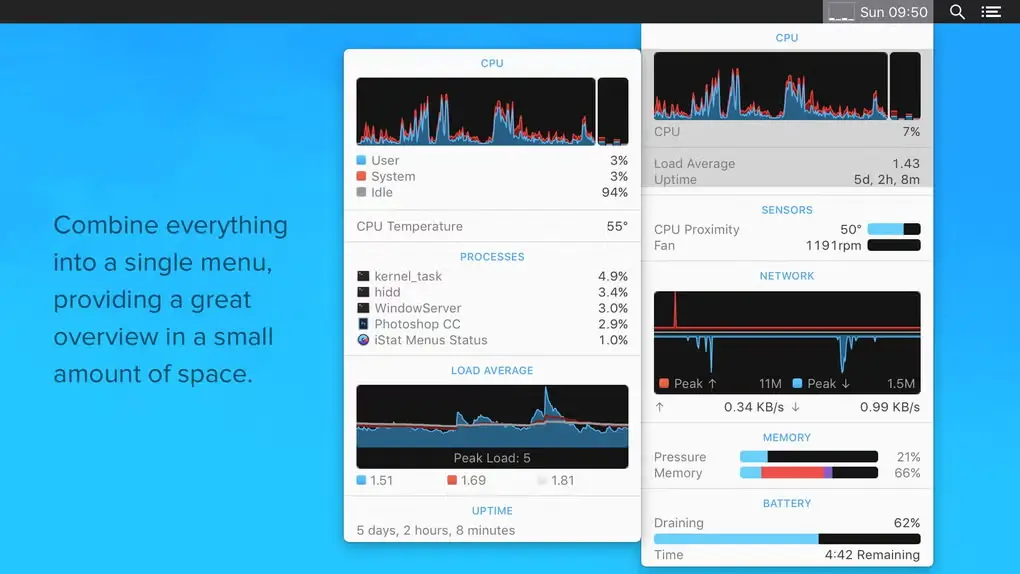
iStat Menus for Mac is a powerful system monitoring utility that displays real-time information about your Mac directly from the menu bar. It lets you track CPU usage, memory consumption, disk activity, network performance, temperatures, battery health, sensors, and other essential system statistics. Whether you're troubleshooting performance issues, monitoring hardware resources, or simply keeping an eye on your Mac's health, iStat Menus provides accurate insights through a lightweight and highly customizable interface for both Apple Silicon and Intel-based Macs.
Key Features:
- CPU - Monitor cpu usage. 7 display modes, multiple core support
- Memory - Monitor memory usage. 4 display modes, page ins/outs and swap usage display
- Disks - Monitor disk usage and activity. 6 display modes, ability to hide disks you dont want to see
- Network - Monitor current and total bandwidth, peak bandwidth, IP addresses, and the ability to hide network connections you don't want to see
- Temps - Monitor the temperature of your Mac. 2 display modes, ability to hide sensors you don't want to see
- Fans - Monitor the fan speeds in your Mac. 2 display modes, ability to hide sensors you don't want to see
- Bluetooth - Control bluetooth status plus monitor the battery level of your Apple wireless keyboard or mouse
- Date & Time - Date and time in your menubar. World clock display lets you see the time in multiple locations around the world
- Weather - with current temperature, hourly forecast, weekly overview and so much more
What's new in version 7.20
- Added a new Liquid Glass icon with mono support.
- Improved localisations.
- Improved city searching in settings for world clocks and weather. You can now search by city, airport, ZIP code, and search an expanded city list for each country.
- Improved calendar display in Time menu when week numbers are shown.
- Fixed a critical security issue with communication with the iStat Menus daemon.
- Fixed an issue where menu bar item vertical position could be offset in macOS Tahoe.
- Fixed an issue where S.M.A.R.T. based temperature sensors may not update properly after disconnecting and reconnecting a drive.
- Fixed an issue where frequencies and some other sensors may be missing in macOS Tahoe.
- Fixed the display of the moon icon in the menu bar where it's rotation angle wasn’t correct.
- Fixed an issue with label/bar menu bar mode in Disks where some disks were showing an incorrect name.
- Fixed an issue where moon calendar in Time menu could sometimes show the same moon icon twice.
- Fixed an issue where the fan control page in settings always showed temperature in celsius.
How to Install iStat Menus on MacOS?
Installing iStat Menus is quick and easy.
- Download the latest version of iStat Menus for Mac.
- Open the downloaded installer.
- Follow the installation instructions.
- Grant the required macOS permissions.
- Launch iStat Menus and choose the menu bar modules you want to display.
- Customize the monitoring panels to suit your workflow.
How to Use iStat Menus Mac App?
Getting started with iStat Menus is simple.
- Open iStat Menus after installation.
- Select the hardware statistics you want to monitor.
- Add CPU, memory, battery, network, or temperature modules to the menu bar.
- Click any menu bar item to view detailed real-time information.
- Adjust alerts and display settings based on your preferences.
With just a few clicks, you can keep track of your Mac's performance without opening additional system utilities.