SpaceLauncher Overview
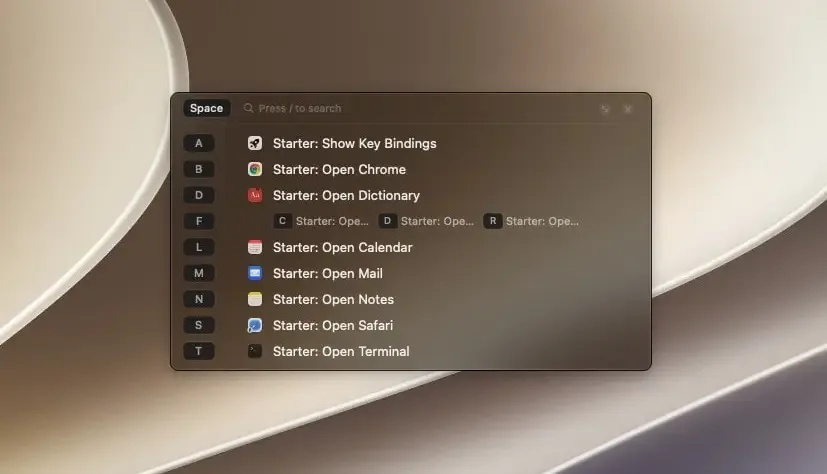
SpaceLauncher turns the Space key into a shortcut launcher for Mac. Hold Space, press a key, and an action runs. Space then S opens Safari, and Space then F then D opens Downloads. Actions cover apps, folders, URLs, menu commands, keystrokes, AppleScript, and shell commands. Tapping Space still types a normal space. A hint window lists what you can press next, and any key can serve as the leader instead. Shortcuts can differ from app to app, and the whole setup exports as plain-text JSON. It needs Accessibility access, keeps typing on the Mac, and runs on macOS 12 or later.
Why Choose SpaceLauncher Mac App
Spotlight, Raycast, and Alfred are built for finding things. SpaceLauncher is built for actions you already repeat every day. There's no query to type. You hold Space and press a letter. The developer's own advice is to give an action a key only after you catch yourself repeating it, and to keep using a search launcher for everything else.
Borrowing the Space key is a tricky job. When you type fast, the next key often goes down before Space comes back up. SpaceLauncher is built around that overlap and decides if you meant a space or a shortcut. The developer notes that general remapping tools can approximate pieces of this behavior. Apps that use a hold-Space drag, like Photoshop's canvas pan, keep working as usual too.
Key Features
- Hold-to-run shortcuts: runs an action when you hold Space and press one key or a short sequence.
- Typing protection: tells a tap from a hold automatically, so ordinary typing stays untouched.
- Nested shortcuts: chains several keys in order, such as Space then F then D for a Downloads folder.
- Hint window: shows what to press next, and pressing / lets you search every shortcut.
- App-specific shortcuts: limits a shortcut to chosen apps, or switches SpaceLauncher off in apps where it gets in the way.
- Custom leader keys: lets Caps Lock, F12, a key combination, or a tapped modifier take the place of Space.
- Open actions: launches apps with arguments, opens URLs, files, and folders, or brings Finder forward.
- Menu commands and keystrokes: runs any menu item of the frontmost app or simulates any key combination.
- Script actions: runs AppleScript, shell commands, or executable files with arguments.
- Text and system actions: inserts reusable text snippets, sends notifications, switches input methods, or puts the Mac to sleep.
- Tab Slot: reuses an existing browser tab through an extension for Chrome, Firefox, and Safari.
- Portable setup: moves bindings between Macs, keeps rolling backups, and warns about conflicts before saving.
Screenshots
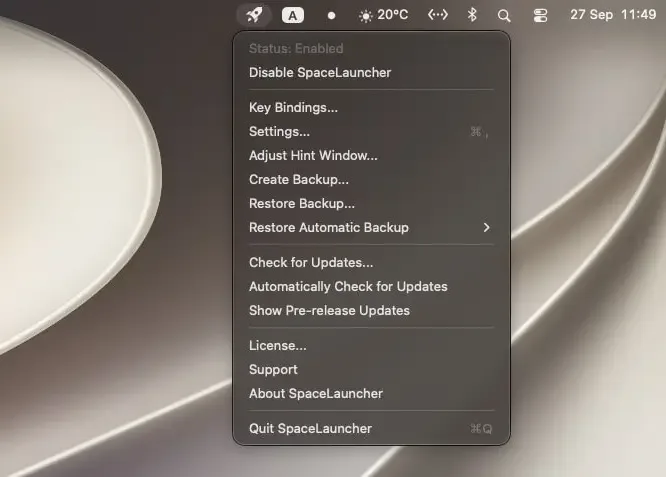
What's New in SpaceLauncher 3.5.4 Version
Version 3.5.4, released September 24, 2026, includes two changes:
- Fixed leader keys stopping altogether when a tiling window manager holds keyboard focus. The Dock-stack workaround now applies only to the Dock, Spotlight, and Control Center, so Space still opens Quick Look in a Dock stack
- Improved hint window placement and sizing, with an Adjust Hint Window option in the menu bar, Settings, and the hint window itself
- The 3.5 series also added Quick Add, which turns a recent or running app into a shortcut without opening the full editor. It brought a clearer indicator too, for moments when macOS pauses shortcuts through Secure Input.
Supported macOS Versions
SpaceLauncher requires macOS 12.0 or later and runs as a universal binary on Apple Silicon and Intel Macs. Accessibility permission is part of setup. Secure Input, which macOS turns on in password fields, temporarily pauses shortcuts, and a menu bar indicator shows when that happens. Watching for a leader key is light work, so hardware speed rarely matters.
How to Download and Install SpaceLauncher Mac?
SpaceLauncher is also available through Homebrew. Installing the direct download takes a few steps.
- Click the Download button above to safely download the setup file.
- Open the downloaded file, then drag SpaceLauncher into your Applications folder.
- Launch SpaceLauncher from Applications. If macOS shows a security prompt, go to System Settings → Privacy & Security and click Open Anyway.
- Grant Accessibility access when asked, since SpaceLauncher can't see keystrokes without it.
SpaceLauncher is free to evaluate with no time limit. A one-time license is needed for continued use.
How to Use SpaceLauncher Mac?
- Open the SpaceLauncher menu bar icon and choose Quick Add to create your first shortcut.
- Pick a recent or running app, then record the key you want to press after Space.
- Hold Space and press that key to launch the app.
- Hold Space without pressing anything to open the hint window and see your available shortcuts.
- Follow the branches in the hint window to reach nested shortcuts, or press / to search them.
- Set an app scope on a shortcut so the same key can do something different in another app.
Alternatives to SpaceLauncher
Raycast: Launcher with a free plan. Lets you assign hotkeys and aliases to apps and commands, and adds file search and extensions.
Alfred: Launcher with a free core app for opening apps, finding files, and searching the web. Its paid Powerpack adds workflows.
Karabiner-Elements: Free, open source key remapper. Complex modifications can turn a key like Caps Lock into a shortcut layer, and it supports macOS 27.