
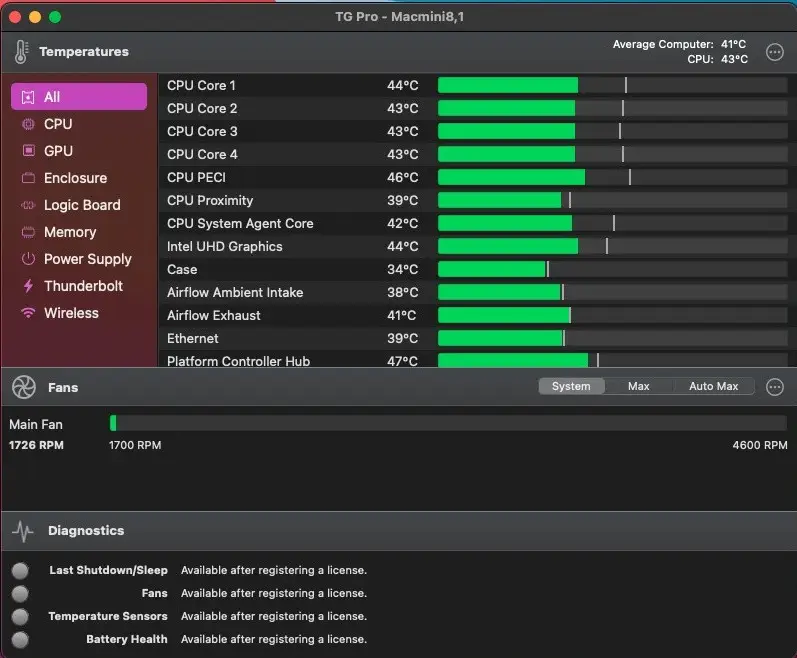
TG Pro Overview
TG Pro for Mac monitors temperatures across your CPU, GPU, drives, and battery, and gives you direct control over fan speeds through both automatic rules and manual override. A busy core running hot doesn't get averaged away into a single misleading number here, drives get the same overheating warnings a dedicated storage utility would give you, and a battery diagnostic tracks voltage, charge cycles, and health status with alerts for conditions like over-voltage. Anyone running a Mac hot with sustained CPU or GPU loads, people troubleshooting unexplained fan noise or shutdowns, and users running local AI models who want to keep an eye on sustained thermal load all rely on it to catch a hardware problem while it's still cheap to fix.
Why Choose TG Pro Mac App
Sensor coverage is where this pulls ahead of a typical menu bar temperature widget. Beyond the usual CPU and GPU readings, it tracks internal and external drives via SMART data, extends GPU monitoring to external graphics cards connected over Thunderbolt, and reads out logic board, trackpad, WiFi chip, or case temperature depending on what your specific Mac model actually exposes. Fan control works the same way from both directions: Auto Boost rules raise fan speed automatically once a chosen sensor crosses a threshold you set, while Manual or Max mode takes over instantly if you need airflow right now instead of waiting on a rule to trigger.
The engineering underneath the fan control matters more than it might seem. A dedicated, code-signed helper service handles the actual fan commands and only accepts instructions from TG Pro itself, a design decision that specifically addresses the class of vulnerability documented in CVE-2019-13013 affecting fan-control utilities more broadly. The app is Apple notarized, built with the macOS Hardened Runtime, and ships with no tracking or analytics code at all. For anyone managing more than one Mac, a single Homebrew command replaces a manual per-machine install, and IT departments can push preferences and license keys out unattended instead of walking to each desk individually.
Key Features
- Auto Boost Rules: build custom fan curves triggered by CPU, GPU, or drive temperature thresholds, so cooling adjusts itself without manual intervention.
- Manual and Max fan control: override automatic behavior instantly when you need maximum airflow right now.
- Per-core CPU temperature: Apple Silicon Macs show individual core readings instead of a single averaged figure.
- GPU and eGPU monitoring: tracks built-in graphics temperature and extends to external GPUs connected via Thunderbolt.
- Drive health via SMART: internal and external SSDs and HDDs report temperature using the same SMART data the drives already expose.
- Battery diagnostics: catches the kind of electrical problem that quietly shortens a battery's life long before a normal charge-percentage view would ever show it.
- Local and email alerts: get notified on your Mac or via email when a sensor crosses a threshold or a shutdown looks abnormal.
- CSV logging : export a historical record of temperatures and fan speeds for later analysis in a spreadsheet.
- Hardware diagnostics : a dedicated report flags failing fans, dead sensors, or battery problems before they become a bigger issue.
- Homebrew and remote install support : `brew install --cask tg-pro`, plus command-line options for silent, unattended deployment across multiple Macs.
What's New in TG Pro 2.103 Version
Version 2.103 shipped March 19, 2026, rounding out chip support that TG Pro had already started rolling out two releases earlier.
- New: full support for M5, M5 Pro, and M5 Max Macs, including MacBook Pro, MacBook Air, and MacBook Neo models.
- Fixed: Auto Boost rules could fail to activate correctly when switching between power sources, such as moving from AC power to battery and back to AC.
- Improved: the first-run setup experience now shows prompts in the correct order, opens with a larger initial window, and centers the settings window on screen.
- The two releases just before it filled in the groundwork: version 2.102 (March 18) fixed a launch failure specific to macOS 10.13 and 10.14, and version 2.101 (March 17) added initial support for the MacBook Neo and six new M5-based MacBook Pro and MacBook Air configurations, increased the maximum Auto Boost gradual-ramp time from 60 to 120 seconds, and added support for email alerts on servers that don't require a username or password, such as local relay servers.
Supported macOS Versions
TG Pro 2.103 covers an unusually wide range for current Mac software, running on anything from macOS 10.13 High Sierra through the newest macOS 26 Tahoe. It natively supports Apple Silicon chips from the original M1 through the current M5 generation, as well as Intel Macs both with and without the T2 security chip. Hackintosh systems are supported too, through a simple preference toggle rather than a separate build. Apple Silicon Macs benefit from native per-core temperature reporting that Intel Macs don't expose in the same way, though core monitoring and diagnostic scans run smoothly on either architecture.
How to Download and Install TG Pro on Mac?
Installing TG Pro on Mac only takes a few steps after downloading, including one quick permission it needs to run properly.
- Click the Download button above to securely download the setup file or you may get it from official website.
- Open the downloaded .dmg file, then drag TG Pro into your Applications folder.
- Launch TG Pro from Applications. If macOS shows an "unidentified developer" warning, go to System Settings → Privacy & Security and click Open Anyway.
- Approve the fan-control helper service when prompted, so TG Pro can actually adjust fan speeds rather than just display readings.
Prefer Homebrew instead? Run `brew install --cask tg-pro` from Terminal, and it handles the download and installation automatically. Once the initial setup is done, TG Pro won't ask for these permissions again, future launches open straight to your temperature readings.
How to Use TG Pro Mac App?
- Launch TG Pro and check the main window or menu bar dropdown for an overview of current temperatures and fan speeds.
- Open Fan settings to configure Auto Boost rules, or switch to Manual or Max for immediate control.
- Enable local notifications or email alerts under Preferences to get warned about unusual readings.
- Turn on logging to start building a CSV record of temperature and fan data over time.
- Run a hardware diagnostic scan to check for failing sensors, fans, or battery issues.
- Check for updates through the app directly, or via `brew upgrade --cask tg-pro` if you installed through Homebrew.
Alternatives
smcFanControl: A free, long-standing utility for basic fan speed control on Intel Macs.
Macs Fan Control: A free for personal use, with fan control and temperature monitoring across a wide range of Mac models.