
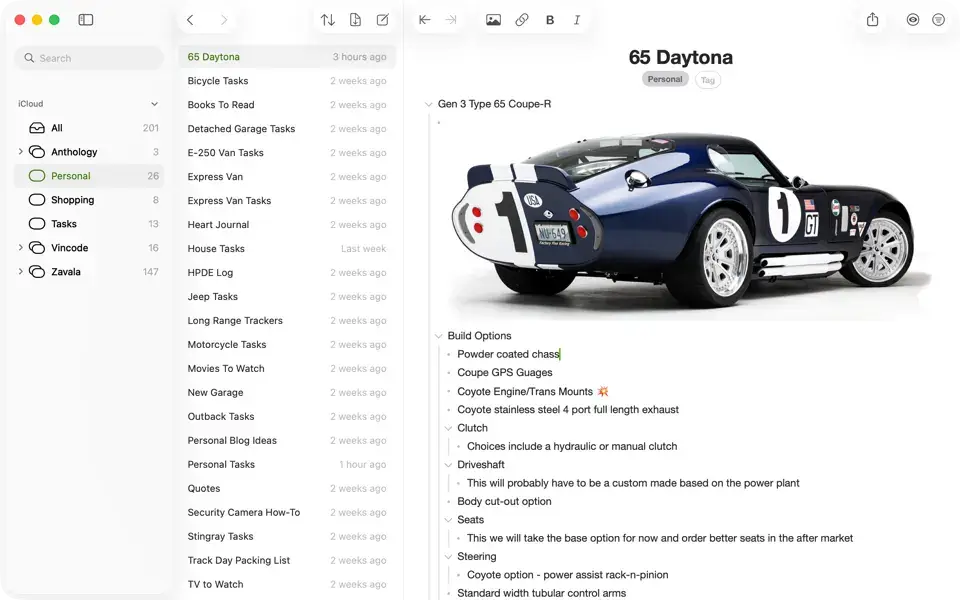
Zavala Overview
Zavala for Mac is a free, native outliner built for organizing ideas, notes, and structured documents entirely offline or synced through iCloud. It behaves like a real Mac app should: multiple windows, a full menu bar, a customizable toolbar, and a keyboard shortcut for nearly everything you'd want to do. Outlines can be locked and encrypted, shared in real time with other Zavala users, and exported as OPML or Markdown whenever you need them somewhere else. Writers organizing long-form drafts, anyone planning a project without wanting a bloated task manager, and outlining fans who've bounced between apps for years all find their way to it for exactly that reason.
Why Choose Zavala Mac App
Zavala doesn't feel like a stripped-down port of an iPhone app, which is where a lot of outliners on Mac fall short. It supports real multiple windows, a full menu bar, and a customizable toolbar, and just about every action has a keyboard shortcut behind it. Outlines sync through iCloud with full offline editing, so changes made on a plane land the moment you're back online, and iCloud sharing lets you collaborate on the same outline with other Zavala users in real time rather than just handing off a file. All of this is free, permanently, across Mac, iPhone, iPad, and Apple Vision, with no subscription tier hiding features behind a paywall.
The details that matter for a Mac-specific workflow go beyond the basics. Individual outlines can be locked and encrypted, which also switches on encrypted iCloud syncing for anything sensitive. Extensive Shortcuts app integration means you can build custom automations using Zavala's own Shortcut actions and launch them directly from the app. Import and export cover both OPML and Markdown, including a dedicated Markdown blog post format for anyone publishing straight from an outline, and Backlinks let you see every place one outline links back to another, something most simple outliners skip entirely.
Key Features
- Real Mac app design — multiple windows, a full menu bar, a customizable toolbar, and keyboard shortcuts for nearly every action.
- iCloud sync and sharing — edit fully offline, and collaborate on an outline in real time with other Zavala users.
- Encrypted outlines — lock and encrypt individual outlines, which also enables encrypted iCloud sync.
- OPML and Markdown import/export — including a dedicated Markdown blog post export format.
- Nested tags — organize outlines with tags instead of folders, with an automatic tag search in the sidebar.
- Backlinks — see every place an outline is linked to from another one.
- Shortcuts app integration — build custom automations using Zavala's Shortcut actions, launchable right from the app.
- Customizable typography — set fonts and sizes per outline level, instead of one style for the whole document.
- Automatic row numbering — choose from None, Simple, Decimal, or Legal numbering styles.
- Typewriter scrolling — keeps your current line centered on screen during long outlining sessions.
What's New in Zavala 4.4 Version
Version 4.4 shipped August 12, 2026 as a small fix release: it resolved a bug that prevented Zavala from retrying to send changes to iCloud after a syncing failure. It follows a run of more substantial updates earlier in the year:
- Added a new web clipper function. You can select Zavala from the Share menu now Zavala will attempt to turn it into an editable Outline. Due to how poorly most web pages are structured, results may vary.
- Added the Import HTML function. This works like the web clipper function except you enter the select the local HTML page you want to import.
- Added the Export HTML Doc and Export HTML List functions.
- Added the Parent Entity ID as an optional query parameter for the Find Rows Shortcut action. This allows you to get all the child rows of either an Outline or Row.
- Added Japanese translation.
- Added a bunch of missing German and Simplified Chinese translations.
- Finally worked around the the trailing padding bug for toggles in the Settings and Get Info dialogs.
Supported macOS Versions
Zavala 4.3.1 requires macOS 26 Tahoe as a floor, a jump that came with February 2026's version 4.0 rebuild of the interface for Apple's Liquid Glass design. That means Macs still running macOS 15 Sequoia or earlier can't install the current version at all, so this is worth checking before you download if you haven't updated recently. On a Mac running Tahoe, the app runs natively across Apple Silicon and Intel hardware, and since outlining is lightweight, text-based work rather than anything graphics-intensive, performance stays smooth even on older Intel Macs that have made the jump to the latest macOS.
How to Download and Install Zavala on Mac?
Installing Zavala on Mac takes under a minute through the App Store, no separate download, unzip, or drag-and-drop needed.
- Click the Download button above, it opens Zavala's official listing on the Mac App Store.
- Tap Get to install the free app.
- Sign in with your Apple ID if prompted.
- macOS downloads and installs Zavala automatically in the background.
- Once installed, launch it from Launchpad or your Applications folder.
Because the App Store handles future updates automatically, you won't need to manually reinstall Zavala each time a new version ship.
How to Use Zavala Mac App?
- Open Zavala from Launchpad after installing it from the App Store.
- Sign in with your Apple ID and enable iCloud if you want outlines to sync across devices.
- Create a new outline and start typing, press Tab to indent a row, Shift-Tab to outdent it.
- Tag outlines from the sidebar to organize them without relying on folders.
- Use the Link dialog to connect related outlines, and check Backlinks to see what points back to any outline.
- Export finished outlines as OPML or Markdown whenever you need them somewhere else.