VSCodium Overview
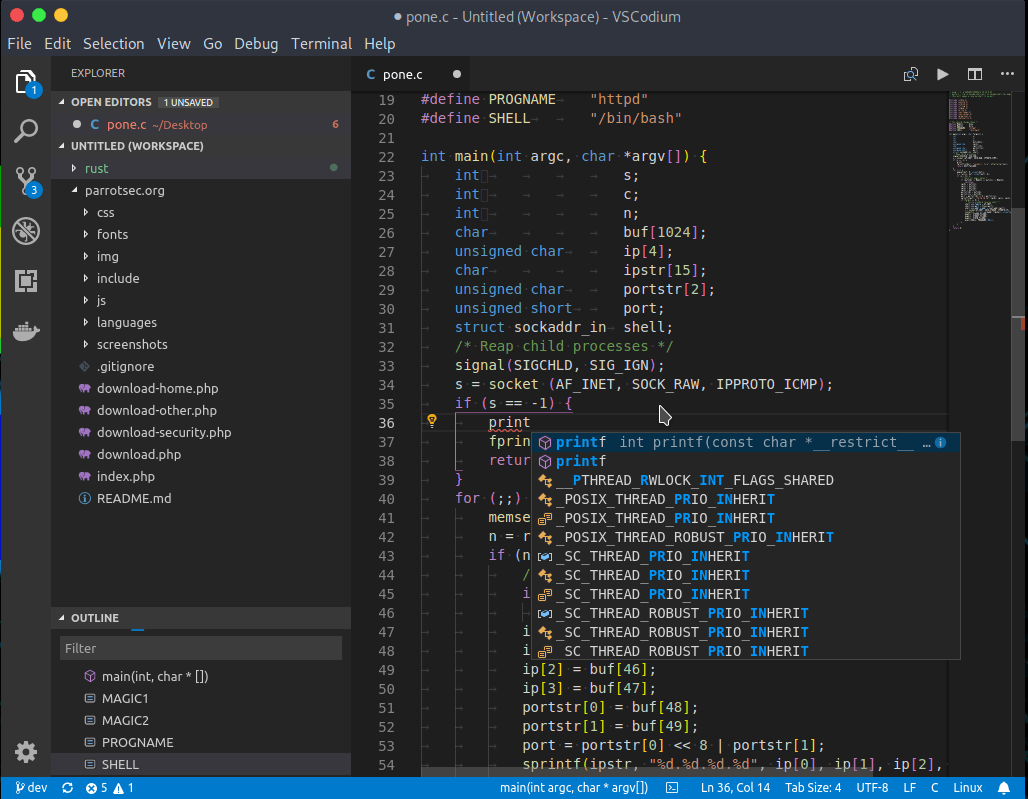
VSCodium for Mac is a community-built binary of Microsoft's Visual Studio Code, compiled directly from Microsoft's own open-source repository but without the telemetry, tracking, and proprietary branding Microsoft adds to its official release. The underlying vscode source code has always been MIT-licensed, but the Visual Studio Code app you'd normally download ships under a separate, more restrictive license with data collection built in; VSCodium skips that layer entirely and ships under the genuine MIT license instead. It supports the same extensions, keyboard shortcuts, and editor core developers already know, just without Microsoft's additions layered on top. Developers who want VS Code's editing experience without sending usage data anywhere, privacy-focused teams standardizing on open-source tooling, and anyone curious what "vanilla" VS Code actually looks like all run it as their daily editor.
Why Choose VSCodium for Mac App
The editing experience itself doesn't change from what VS Code users already know, the same interface, the same keyboard shortcuts, the same core editor. What changes is everything running quietly underneath it. Every VSCodium release is built using scripts anyone can inspect on GitHub, pulling straight from Microsoft's public vscode repository without the customized configuration file Microsoft uses to enable its own telemetry and branding. Recent releases have gone further than just leaving these features unconfigured: specific Microsoft additions like AI co-author prompts have been explicitly disabled by the maintainers rather than simply left out.
Trust matters more for a tool handling your actual work, and VSCodium backs that up with process rather than promises. Releases are cryptographically signed, commits carry verified GPG signatures from the maintainers, and the entire build pipeline sits in the open rather than behind closed doors. Development also moves fast: when Microsoft ships a new VS Code version, a matching VSCodium build typically follows within days, so you're rarely stuck several releases behind. For anyone managing multiple Macs, installing through Homebrew turns updates into a single terminal command instead of a manual download each time.
Key Features
- Full VS Code feature parity: the same editor core, keyboard shortcuts, and extension architecture developers already know.
- No telemetry by default: ships without the usage tracking and data collection built into Microsoft's own release.
- Genuinely MIT-licensed: a real open-source license, distinct from the more restrictive terms Visual Studio Code itself ships under.
- No hidden fork: VSCodium isn't a separately maintained clone; it's Microsoft's actual code, rebuilt fresh from source with each release rather than patched after the fact.
- Architecture-specific builds: dedicated Apple Silicon and Intel downloads, each running fully native on its target chip.
- Verifiable release history: anyone can trace a given build back to the exact signed commit it came from, rather than taking a download on faith.
- Short lag behind Microsoft: a new VS Code release rarely sits unmatched for more than a week or two before VSCodium catches up.
- Homebrew support: install and update with `brew install --cask vscodium` instead of manual downloads.
- CLI and remote development builds: dedicated command-line tooling and Remote Host binaries ship alongside the desktop app.
- Cross-platform consistency: the same editor and settings sync work identically across macOS, Windows, and Linux.
What's New in VSCodium 1.135.06055 Version
- build(deps): bump actions-rust-lang/setup-rust-toolchain from 1.16.1 to 1.17.0 by @dependabot[bot] in #2920
- fix(riscv64): fix REH builds by @kxxt in #2921
- build(deps): bump actions/setup-node from 6.4.0 to 7.0.0 by @dependabot[bot] in #2936
- build(deps): bump actions/stale from 10.3.0 to 10.4.0 by @dependabot[bot] in #2937
- build(deps): bump zizmorcore/zizmor-action from 0.5.7 to 0.6.0 by @dependabot[bot] in #2935
- build(deps-dev): bump fast-uri from 3.1.2 to 3.1.4 in /font-size by @dependabot[bot] in #2938
- build(deps): bump postcss from 8.5.14 to 8.5.18 in /font-size by @dependabot[bot] in #2939
- build(deps-dev): bump brace-expansion from 1.1.14 to 1.1.16 in /font-size by @dependabot[bot] in #2940
- build(deps): bump actions/checkout from 7.0.0 to 7.0.1 by @dependabot[bot] in #2941
- build(deps): bump actions/setup-python from 6.3.0 to 7.0.0 by @dependabot[bot] in #2942
- build(deps): bump zizmorcore/zizmor-action from 0.6.0 to 0.6.1 by @dependabot[bot] in #2953
- build(deps): bump actions/stale from 10.4.0 to 11.0.0 by @dependabot[bot] in #2954
- build(deps-dev): bump fast-uri from 3.1.4 to 3.1.5 in /font-size by @dependabot[bot] in #2955
- build(deps): bump postcss from 8.5.18 to 8.5.23 in /font-size by @dependabot[bot] in #2956
- build(deps): bump signpath/github-action-submit-signing-request from 2.2 to 2.3 by @dependabot[bot] in #2971
- build(deps): bump zizmorcore/zizmor-action from 0.6.1 to 0.6.2 by @dependabot[bot] in #2964
- build(font-size): replace xo with eslint by @daiyam in #2972
- feat(1.135): update patches by @daiyam in #2973
- build: use nodejs-v24.20 by @daiyam in #2974
- Fix inverted enableASARSupport() guard by @0zitro in #2978
- wip: fixing oom and slow build by @daiyam in #2977
- fix: replace max-old-space-size with our own limit by @daiyam in #2979
- Honor custom product branding by @ThadHouse in #2981
- Honor disabled CLI builds by @ThadHouse in #2982
- Preserve the update-disable patch by @ThadHouse in #2983
- fix(windows): update by @daiyam in #2986
- Add anylinux-appimage by @Shikakiben in #2950
- build(linux): update location of electron version by @daiyam in #2985
- Address EditorConfig violations by @BaumiCoder in #2905
- enhance: use binary by @daiyam in #2993
- ci: update actions by @daiyam in #2994
- feat: add arm32 back by @daiyam in #2992
- fix(ci): install nodejs to publish appimage by @daiyam in #2996
- feat: update dependencies by @daiyam in #2998
- fix(appimage): fixes unprivileged restrictions by @daiyam in #2999
Supported macOS Versions
VSCodium 1.135.06055 requires macOS 12 or later. Unlike many modern Mac apps, it doesn't ship as a single universal binary, Apple Silicon and Intel each get their own dedicated .dmg, so picking the correct download for your Mac's chip matters here more than usual. Once installed, both versions run fully native, and since code editing itself isn't a demanding task for either chip, day-to-day performance differences come down more to project size and installed extensions than raw processor power.
How to Download and Install VSCodium on Mac?
Installing VSCodium on Mac only takes a few steps after downloading, including one quick permission it needs to run properly.
- Click the Download button above, making sure to select the build matching your Mac's chip, Apple Silicon or Intel.
- Open the downloaded .dmg file, then drag VSCodium into your Applications folder.
- Launch VSCodium from Applications. If macOS shows an "unidentified developer" warning, go to System Settings → Privacy & Security and click Open Anyway.
- Grant any folder access macOS requests, so VSCodium can open and save your project files.
Once the initial setup is done, VSCodium won't ask for these permissions again — future launches open straight to your last project.
How to Use VSCodium Mac App?
- Launch VSCodium and open a folder to start working on a project.
- Install extensions from the Open VSX Registry to add language support and additional tools.
- Open the integrated terminal with View > Terminal to run commands without leaving the editor.
- Use the Command Palette (Cmd+Shift+P) to find and run any command by name.
- Turn on Settings Sync if you want your preferences and extensions to follow you across machines.
- Update later by running `brew upgrade --cask vscodium`, or by downloading a newer release directly.
Alternatives
CodeEdit: A free, open-source code editor built specifically for macOS from the ground up, rather than adapted from a cross-platform base.
Zed: A free, high-performance code editor built around real-time collaboration, with a from-scratch native architecture rather than an Electron foundation.